
You're staring at the cart drawer again. The dress is in, the matching belt is being offered, and the store dashboard shows a tiny bump in average order value, but the checkout rate has slipped in a way that's hard to ignore. That's the trap with a Shopify upsell funnel, it can look healthy on the revenue side while making the path to payment harder.
The problem starts earlier than the typical operator admits. Baymard Institute's checkout research shows an average global cart-abandonment rate of about 70.19%, so roughly 7 in 10 carts never become orders, and the biggest friction points are the ones upsells can easily aggravate, like unexpected costs, account creation, and slow delivery Baymard checkout usability research. That's why a strong reduce cart abandonment and convert resource is useful context, but the core lesson is simpler: protect the order first, then pursue the add-on.
Table of Contents
- Why Most Shopify Upsell Funnels Hurt Conversion
- How to Build a Constrained Shopify Upsell Funnel
- Where to Place Upsell Offers Across the Buyer Journey
- Discount Logic and Offer Rules That Protect Margin
- Analytics and Experimentation for Continuous Optimization
- Shopify-Native Implementation and Operational Safeguards
Why Most Shopify Upsell Funnels Hurt Conversion
A store can create its own problems with a well-meant offer. A shopper adds a dress, sees a pushy belt popup, hesitates, and closes the tab. The app reports an upsell win because one visitor accepted the offer, but the merchant never sees the higher-order cost of the shoppers who walked before payment.
The hidden trade-off
The funnel breaks when the offer behaves like a second checkout decision. Baymard's checkout research ties abandonment to avoidable friction, including 39% of surveyed shoppers who left because of unexpected costs, 19% who were required to create an account, and 21% who abandoned because delivery was too slow Baymard checkout usability research. If the upsell adds surprise pricing, extra fields, or anything that obscures the total, it runs into the same objections that already stop people from paying.
Practical rule: if an offer makes the cart harder to understand, it is probably too expensive operationally even when it looks cheap on paper.
The mistake is treating the upsell as a merchandising sidebar instead of part of the purchase path. The same checkout research also points to large ecommerce sites gaining as much as 35% in conversion rate from checkout-design improvements alone Baymard checkout usability research. That makes the order of operations clear. Improve the path to checkout before you pressure people to add more.
What a healthy funnel protects
A good Shopify upsell funnel does not compete with checkout clarity. It keeps the total visible, makes dismissal easy, and leaves shipping and payment information in view. A belt or warranty may sell, but the important question is whether selling it here hurts the order already in motion.
That is why operators should audit the funnel from the customer's side and from the support queue. If the upsell appears before payment, it needs to be obvious, relevant, and easy to refuse. If it cannot do that, it should move later in the journey or disappear entirely. For a useful starting point, reduce cart abandonment and convert is worth reviewing alongside your own checkout flow.
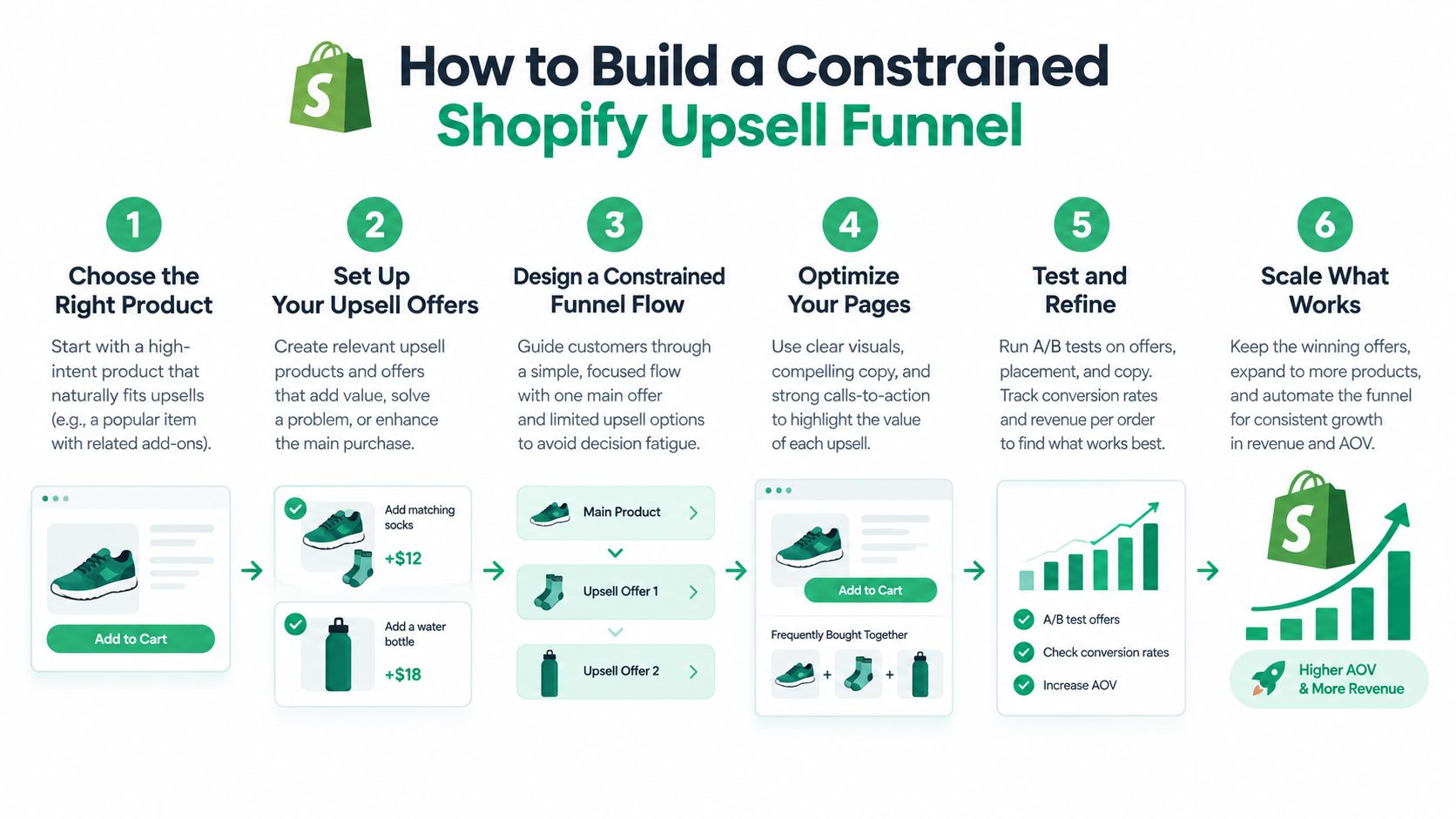
How to Build a Constrained Shopify Upsell Funnel
Start with a baseline ops can defend
Before adding any offer, measure whether the funnel is helping the order or making it harder to finish. Product-view-to-add-to-cart, cart-to-checkout, checkout completion, average order value, and gross profit per order should sit on the same dashboard. An upsell that lifts AOV but drags down completed orders still hurts the business. McKinsey's personalization research is useful here because it frames relevance as an incremental lift, not a guaranteed outcome, with results that depend on execution quality McKinsey personalization research.
Show one offer at one moment
A constrained funnel gives the shopper one clear next step, usually after add-to-cart or inside the cart drawer. One contextually relevant item, bundle, or threshold reward is easier to process than three tiles, a carousel, or a chain of interruptions.
The decline path has to stay light. The shopper should be able to say no without losing cart state, re-entering details, or hunting through clutter. If refusing the offer slows checkout, the funnel is too aggressive.
Measure the right events
Track offer impressions, acceptances, incremental revenue, cancellation or refund rate, and downstream checkout conversion. Acceptance rate is useful, but it is only a diagnostic. A discount can convert well and still cut contribution margin or pull in orders that would have happened anyway.
Segment before you scale
Break results out by device, market, product, traffic source, and new versus returning customer. McKinsey's reported range for personalization outcomes makes this especially important, because the same offer can behave very differently across segments. If you skip segmentation, you can end up pushing a weak offer into a group where it does not fit.
Build it like a controlled system, not a campaign stack. Duplicate offers, conflicting discounts, and double-fired analytics create false wins fast.
A practical setup uses one decision engine, one eligibility rule set, and one recorded impression per shopper path. That keeps repeated prompts out of the journey, avoids subscription conflicts, reduces analytics noise, and keeps the funnel understandable for both customers and operators.
Where to Place Upsell Offers Across the Buyer Journey
Placement changes the meaning of the offer. A product-page recommendation feels like browsing help, an in-cart suggestion feels like last-minute convenience, and a post-purchase prompt feels like a follow-on order. The wrong placement can make the same product feel pushy, while the right one makes it feel natural.
The guide to lifting AOV on Shopify is useful background if you want the mechanics of post-purchase offers, but placement choice should start with intent. A shopper looking at running shoes is more open to socks than to a random candle, and the cart drawer is the right place to reflect that context.
Pre-purchase, in-cart, and post-purchase
Independent ecommerce benchmark material reports approximate acceptance ranges of 8–15% for pre-purchase offers, 5–12% for in-cart offers, and 3–8% for post-purchase offers, while also noting that targeted upsell programs can raise AOV by roughly 10–20% ecomhint benchmark material. Those numbers are directional, not guarantees, but they explain why placement strategy matters so much.
Pre-purchase works best for obvious add-ons. In-cart works well when the shopper has already committed but hasn't paid yet. Post-purchase is where the bigger follow-on offer usually fits, because the original order is already secured.
A post-purchase offer can look stronger on AOV while hiding a drop in total orders if you don't validate against a holdout group.
How to choose the surface
Map each offer to SKU, cart value, customer segment, currency, and inventory state. That matters more than brand preference. A replenishment item might belong in-cart for one catalog and post-purchase for another, depending on support load, shipping rules, and whether the add-on creates a second shipment.
For cart-drawer work, the Shopify cart drawer guide is a practical reference point because the drawer is where the order is still editable and the shopper can still see totals clearly. That visibility is what keeps the offer from feeling like a trap.
The best placement is the one that matches operational reality. If the add-on complicates fulfillment or support, it probably belongs later, or not at all. If it is a clean complementary item with low risk, earlier placement can work without making checkout feel heavier.
Discount Logic and Offer Rules That Protect Margin
Gross AOV can flatter a weak offer. A merchant sees a discount-driven upsell accepting well, but fulfillment cost, payment fees, extra support, and refund risk eat the gain before month-end. The cleaner metric is incremental contribution margin per completed order.
Rank by net profit, not just acceptance
List eligible offers by expected margin and keep the top candidates only when they survive the operational test. A bundle that adds a second shipment might look fine in the dashboard and still be the wrong choice once shipping and handling are included. The same goes for items that cause partial refunds, inventory mismatches, or manual address edits.
The product bundling pricing examples resource is relevant because bundle logic only works when pricing and operations stay aligned. A discount that forces a support ticket is not a clean discount, it's deferred labor.
Use rejection criteria
Reject an upsell when it does any of these things:
- Creates a second shipment: Shipping complexity can wipe out the margin you thought you earned.
- Breaks bundle inventory: If the system can't reserve the right quantities, the offer is too brittle.
- Triggers manual refunds or address changes: Support workload isn't free, even if the popup converted.
- Conflicts with subscriptions: Cadence and replenishment logic should stay predictable for the customer.
- Rewrites the shipping promise: Anything that obscures delivery timing risks abandonment.
You can still discount, but the rule should be narrow. The discount exists to make a sensible add-on easy, not to rescue an unrelated product. When the offer only works because the markdown is deep, it's usually pulling demand forward rather than adding real value.
Preserve the customer's original intent
An upsell should feel like a helpful continuation of the basket, not a new commercial negotiation. That's why the best operators rank offers by expected profit, then apply the simplest rule that keeps support volume stable. If a promotion raises revenue but also creates fragile order states, it belongs lower in the stack or out of the funnel entirely.
Analytics and Experimentation for Continuous Optimization
A Shopify upsell funnel gets dangerous when teams start believing the popup dashboard instead of the full order path. The offer can report healthy clicks while hiding rising refunds, reducing checkout completion, or adding support tickets that never show up in the app summary.
Measure the whole journey
Track impressions, conversions, revenue per offer, refund rate, and downstream checkout completion. Then compare exposed shoppers with a control group so you can isolate incremental value instead of guessing. If the treatment group buys more but completes fewer checkouts, the funnel is leaking somewhere upstream.
Segment results by device, market, product category, traffic source, and customer type. A mobile-heavy audience can behave differently from desktop, and new shoppers often respond differently than repeat buyers. The point is not to find a universal winner, it's to identify which combinations justify the operational cost.
Use holdouts before rollout
Randomize eligible sessions into control and treatment, then judge incremental profit instead of raw acceptance. That protects you from the false comfort of a high-converting discount that would have happened anyway. It also exposes offers that increase AOV while lowering total orders, which is exactly the kind of loss that's easy to miss in a merchandising-only review.
If the upsell can't survive a holdout test, it probably shouldn't survive production.
When to pull an offer is usually obvious in ops meetings. Support starts seeing the same complaint pattern, refunds rise, or inventory exceptions become common. Those are not side effects, they're part of the funnel's cost.
Shopify-Native Implementation and Operational Safeguards
Upsells work better when they behave like part of Shopify instead of a bolt-on script. Shopify-native surfaces reduce the chance of layout shift and make the offer easier to reconcile with the order state, especially when edits, payment updates, and fulfillment all need to stay in sync.
Treat order edits as state changes
Shopify's 2025 developer release notes discuss committed order edits and partial payment recording, which is a reminder that post-purchase changes are not just merchandising events, they're payment and order-state events too Shopify developer release notes. Once an upsell changes the order, the system has to reconcile inventory, payment, and notifications without creating duplicate charges or phantom items.
For analytics plumbing, the guide to Shopify analytics integration is a useful companion because the funnel only stays trustworthy when event tracking and order data line up. That applies to every app in the stack, not just the upsell layer.
Build in safeguards that reduce support
The safest setup includes reversible edits, clear notification rules, and merchant-controlled windows for when changes are allowed. If a customer can edit an order, the platform should respect shipping state, stock availability, and subscription constraints without forcing the support team to clean up exceptions later.
One practical option in this category is ServeApps, which offers Shopify-native cart and upsell tools plus self-service order editing, so merchants can connect merchandising and post-purchase operations in the same system. That matters when the offer affects the order after payment, because fulfillment and support need the same source of truth.
Evaluate tools by operational fit
The right tool is not the one with the loudest popup builder. It's the one that handles inventory updates, payment reconciliation, consent-based changes, and market-aware behavior without creating a second admin workload. The ecommerce merchandising tools overview is a useful way to compare how different merchandising surfaces fit together when you care about support load as much as conversion.
A good upsell stack should feel invisible to the customer and boring to operations. That's the standard.
If you want to build a Shopify upsell funnel that raises order value without adding support drag, review the full stack at ServeApps. It's the kind of setup that makes the cart drawer, the offer logic, and the post-purchase flow work together instead of against each other.
Best Up Sell App Picks for Shopify in 2026
Compare 10 Shopify up sell app options for 2026, with features, pricing, placements, and honest limitations to help you choose the right fit.
Read more →
Best Checkout Page: 7 Examples That Convert in 2026
Discover 7 best checkout page tools and examples for Shopify with pros, cons, and conversion tips to boost AOV without rebuilding checkout.
Read more →
Shopify Checkout Customization: Options Compared
Compare Shopify checkout customization options: Checkout Extensibility, checkout.liquid, and apps. Learn plan limits and which approach fits your store.
Read more →