
You've paid to bring a shopper to your Shopify store, they've finally checked out, and you're wondering whether a matching accessory could make that order more valuable. An offer after payment seems straightforward. The harder question is whether it creates profit you wouldn't otherwise have earned.
A post purchase upsell deserves the same scrutiny as an acquisition campaign. You need to know what customers accepted, what fulfilling those additions cost, and whether the offer changed refunds, support demand, or future purchases. Start with a useful product pairing, then judge it against customers who saw no offer.
Table of Contents
- What a Post-Purchase Upsell Is and Why It Works
- Where Post-Purchase Offers Appear on Shopify
- Timing and Offer Patterns That Get Accepted
- Benchmarks and ROI You Can Realistically Expect
- Personalization Without Feeling Watched
- How to Launch Your First Post-Purchase Offer
- Fixing Low Acceptance, Refunds and Complaints
- Launch One Offer and Judge It by Margin
What a Post-Purchase Upsell Is and Why It Works
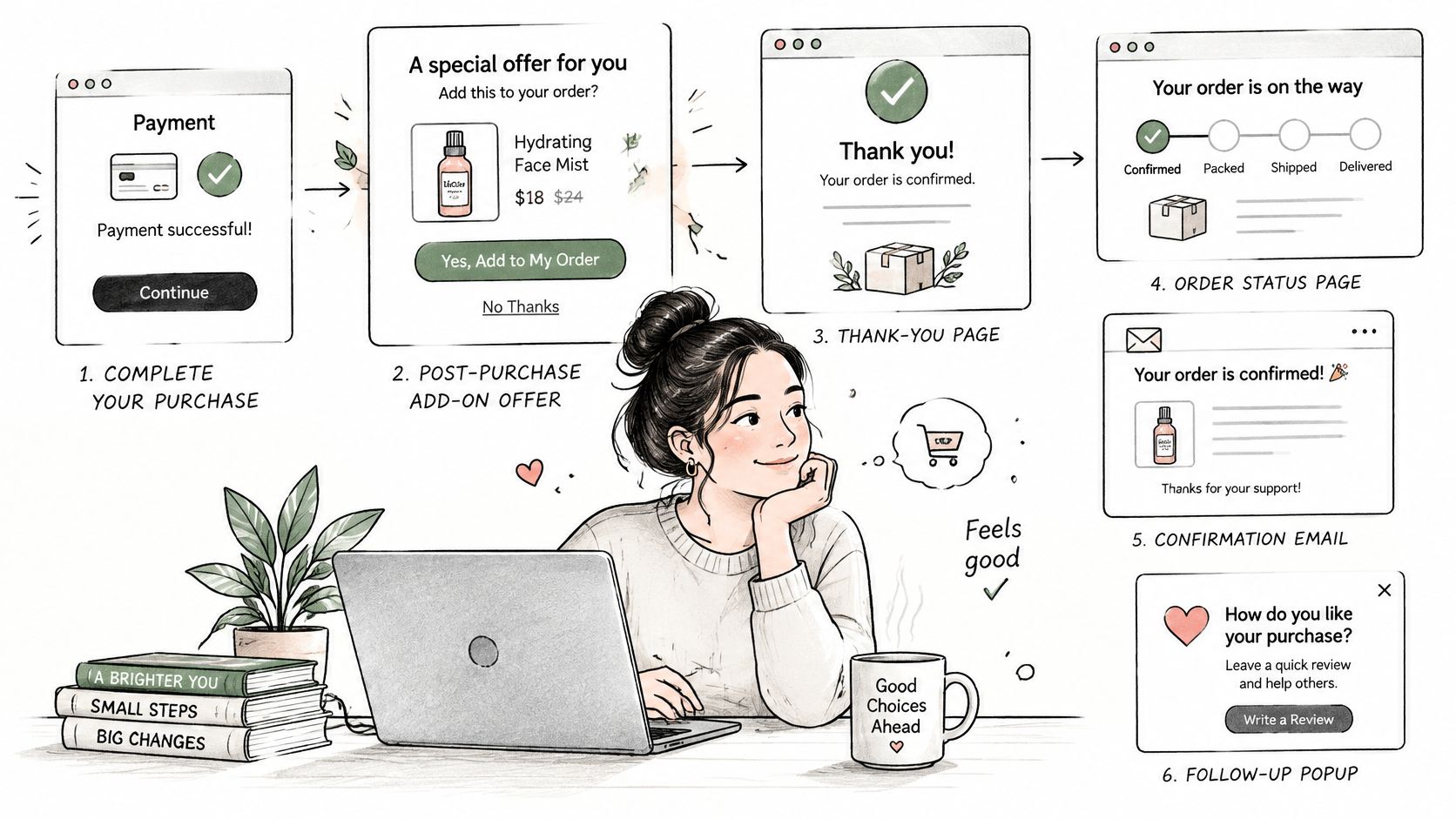
A post-purchase upsell is an offer shown after a customer has completed payment, on a thank-you page, order-status page, confirmation email, or follow-up popup, for an item that complements or extends the order just placed. Unlike a cart or checkout offer, it doesn't interrupt a buying decision that's still open.
Say a customer buys a suit. After payment, the tailor offers to hem the trousers so they're ready to wear. The offer makes sense because it improves the purchase rather than asking the customer to reconsider it. A compatible case offered after someone buys a camera follows the same logic.
Protect the original buying decision
The Baymard Institute's checkout usability research places the global average cart-abandonment rate at 70.19%. That makes the distinction between an offer before payment and an offer after payment important: most carts never become completed purchases.
Once payment is complete, a relevant suggestion doesn't have to compete with that initial decision. You're merchandising within an existing customer relationship rather than paying to acquire another shopper. For practical pairing ideas, Quikly's guide explains how to offer relevant add-ons after purchase.
However, funnel size isn't evidence that your particular accessory will sell. Nor does a completed checkout mean the customer welcomes an unlimited sequence of promotions.
Practical rule: Improve the purchase the customer already made. Don't make them feel they've entered another checkout funnel.
An offer should pass these tests:
- Relevant: It complements the order rather than merely clearing unwanted stock.
- Easy: Acceptance requires minimal interaction, with any additional payment clearly explained.
- Optional: Declining leaves the original purchase intact and confirmation easy to access.
Where Post-Purchase Offers Appear on Shopify
The main Shopify offer placements are the post-purchase page, order-status page, add-to-cart popup, cart drawer, and checkout. Only the first two occur after payment; the others belong to pre-purchase merchandising.
Shopify offer placements compared
| Placement | When the shopper sees it | Best offer type | Setup note |
|---|---|---|---|
| Post-purchase page | Immediately after payment is confirmed | One complementary item for the order just placed | Confirm app, payment, theme, and plan eligibility before setup |
| Order-status page | When the customer returns to track or edit an order | Add-on items, matching accessories, shipping upgrades | Editing permissions must follow merchant rules |
| Add-to-cart popup | When an item is added to the cart, before checkout | Bundles and frequently bought together items | Check popup triggers and frequency caps |
| Cart drawer offer | While the shopper reviews the cart | Spend-tier rewards and free-shipping goals | Confirm the cart drawer theme block is installed |
| Checkout upsell | Inside checkout, before payment | Low-friction add-ons at the buying step | Confirm plan eligibility; the offer adds a decision before payment |
Match the offer to the customer's task
The post-purchase page suits a direct complement that needs little explanation. A customer who has just bought an electric toothbrush can understand a compatible replacement-head offer without browsing another collection. Don't assume that every thank-you-page block can charge the existing payment method or modify the paid order; verify the actual acceptance flow.
The order-status page serves a different task. Customers return to check delivery or change an order, so an accessory must remain secondary to those actions. Our guide to the order confirmation screen helps distinguish confirmation content from the controls customers need after checkout.
An add-to-cart popup appears earlier. It's useful for a bundle whose value is clearest when the shopper selects the original item, such as a compatible charger beside a device. Because payment hasn't happened, evaluate any added revenue alongside checkout completion.
Keep cart and checkout offers distinct
A cart drawer gives shoppers room to review quantities and totals. Spend-tier rewards and free-shipping goals fit that context, provided the qualifying amount and exclusions are easy to understand. Avoid encouraging an extra purchase that costs the shopper more than the benefit they receive.
A checkout upsell sits inside the payment journey. Keep it simple enough that customers don't need to leave checkout to investigate compatibility, sizing, or delivery terms.
Our apps map to different placements: UpServe handles branded add-to-cart popup upsells, SelfServe places upsell blocks within the order-editing page, and CartServe provides a no-code cart drawer. Checkout upsells are also available on Shopify Plus.
Choose the placement where the suggestion helps the customer complete their current task. An accessory shown during a useful order edit may be better suited to that moment than a bundle popup shown before payment.
Timing and Offer Patterns That Get Accepted
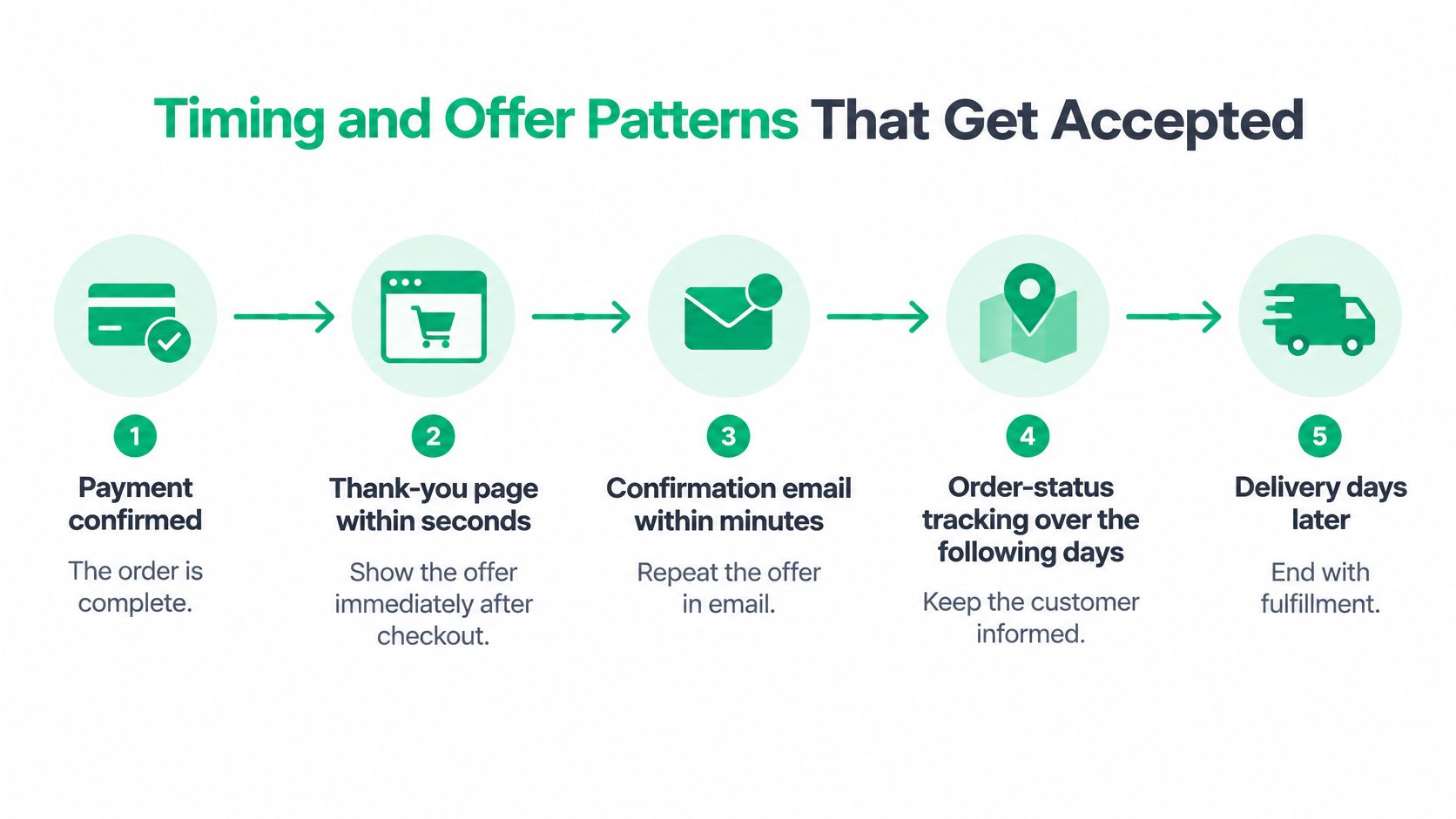
Follow a typical order: payment is confirmed, the thank-you page appears within seconds, a confirmation email follows within minutes, the customer checks order status over the following days, and delivery arrives later. This is an illustrative journey, not a delivery or email-service promise.
Attention changes along that journey. Immediately after payment, the customer is checking that the purchase succeeded. Later, they may care only about tracking, so an offer that obscures delivery information can feel intrusive.
Use timing as a hypothesis
An independent July 2025 study covering 1,847 businesses, discussed by EZCommerce, reported 14.6% conversion for post-purchase upsells on physical-goods stores, compared with 11.3% for email upsells. These are directional benchmarks, not promised results or proof that changing placement alone causes a lift.
A plausible reason for immediate acceptance is reduced effort: the original purchase is complete, and an eligible add-on may not require another checkout. Email can reach customers later, but it asks them to reopen the shopping task. Product compatibility, price, and payment eligibility still affect the result.
Make the choice easy to understand
Use a focused offer rather than a carousel that asks customers to browse again. A running-shoe buyer might appreciate moisture-wicking socks; a coffee-grinder buyer might need compatible filters, but only if those filters suit their brewing equipment. Category similarity isn't enough.
Apply these presentation rules:
- Show the actual price: If you discount the item, display the original and discounted prices clearly, including any added shipping charge.
- Make refusal straightforward: Give the decline option comparable visual weight, without guilt-based wording.
- Reduce acceptance effort: Enable one-click acceptance where the payment and app setup support it.
- Cap repeated exposure: Don't keep presenting the same declined product when customers revisit their order.
The distinction between a higher-value upgrade and a complementary item also affects wording. Our explanation of cross-sells and upsells can help you name the benefit accurately rather than describing every recommendation as an upgrade.
Don't automatically repeat an immediate offer in the confirmation email. Suppress it if the customer already accepted, and consider whether repeating a declined offer adds anything useful. An unresolved order problem takes priority over merchandising, regardless of how attractive the timing benchmark looks.
Benchmarks and ROI You Can Realistically Expect
Read these benchmarks as test inputs, not targets your store must achieve. The Shopify placement figures come from a vendor-derived dataset and aren't independently audited.
Average post-purchase and upsell benchmarks
| Placement or channel | Average rate | Context |
|---|---|---|
| Post-purchase offers, all placements | 6% acceptance | Shopify placement dataset |
| Cart-drawer offers | 12% acceptance | Same Shopify dataset |
| Checkout offers | 9% acceptance | Same Shopify dataset |
| Product-page offers | 7% acceptance | Same Shopify dataset |
| Email upsells | Channel-specific conversion benchmark | Separate business study discussed under timing |
| Post-purchase upsells, physical goods | Channel-specific conversion benchmark | Same separate business study |
The Shopify rates above come from Oxify's benchmark compilation of 250 Shopify stores and 66 million offer impressions, which also reports individual stores ranging from below 2% to above 20% at the same placement. That spread is a reason to test product relevance and economics, not declare a universally winning location.
Calculate contribution before claiming incrementality
First calculate the contribution generated by accepted offers:
Net accepted-offer revenue − product cost − payment fees − additional fulfillment cost − refunds − support and cancellation costs.
If revenue already reflects the discount, don't subtract the discount again. Then calculate contribution per eligible order for both the offer and holdout groups, using the same observation window:
Incremental contribution per eligible order = offer-group contribution per eligible order − holdout-group contribution per eligible order.
A hypothetical example shows the difference between sales and profit:
| Illustrative input | Assumption or calculation |
|---|---|
| Eligible orders | 1,000 |
| Acceptance | 8%, producing 80 accepted items |
| Discounted selling price | $34 |
| Product cost | 50% of selling price, or $17 |
| Payment fee | 3%, or $1.02 |
| Additional fulfillment | $5 per accepted item |
| Contribution before refunds | $10.98 per item, $878.40 total |
| Contribution per eligible order | About $0.88 before refunds |
Those are example assumptions, not benchmarks. The result still isn't incremental profit until you subtract the comparable holdout outcome and account for downstream costs.
Don't confuse acceptance with value
In another hypothetical comparison, 20% acceptance on a $3 add-on produces $0.60 revenue per offer shown, while 5% acceptance on a $40 accessory produces $2.00. Neither calculation tells you margin without costs.
Our guide to Shopify average order value explains the revenue metric, but your decision should go beyond it. A Shopify App Store reviewer said our post-purchase upsell feature increased AOV without affecting checkout. That's useful anecdotal feedback, not controlled evidence of incremental lift.
Personalization Without Feeling Watched
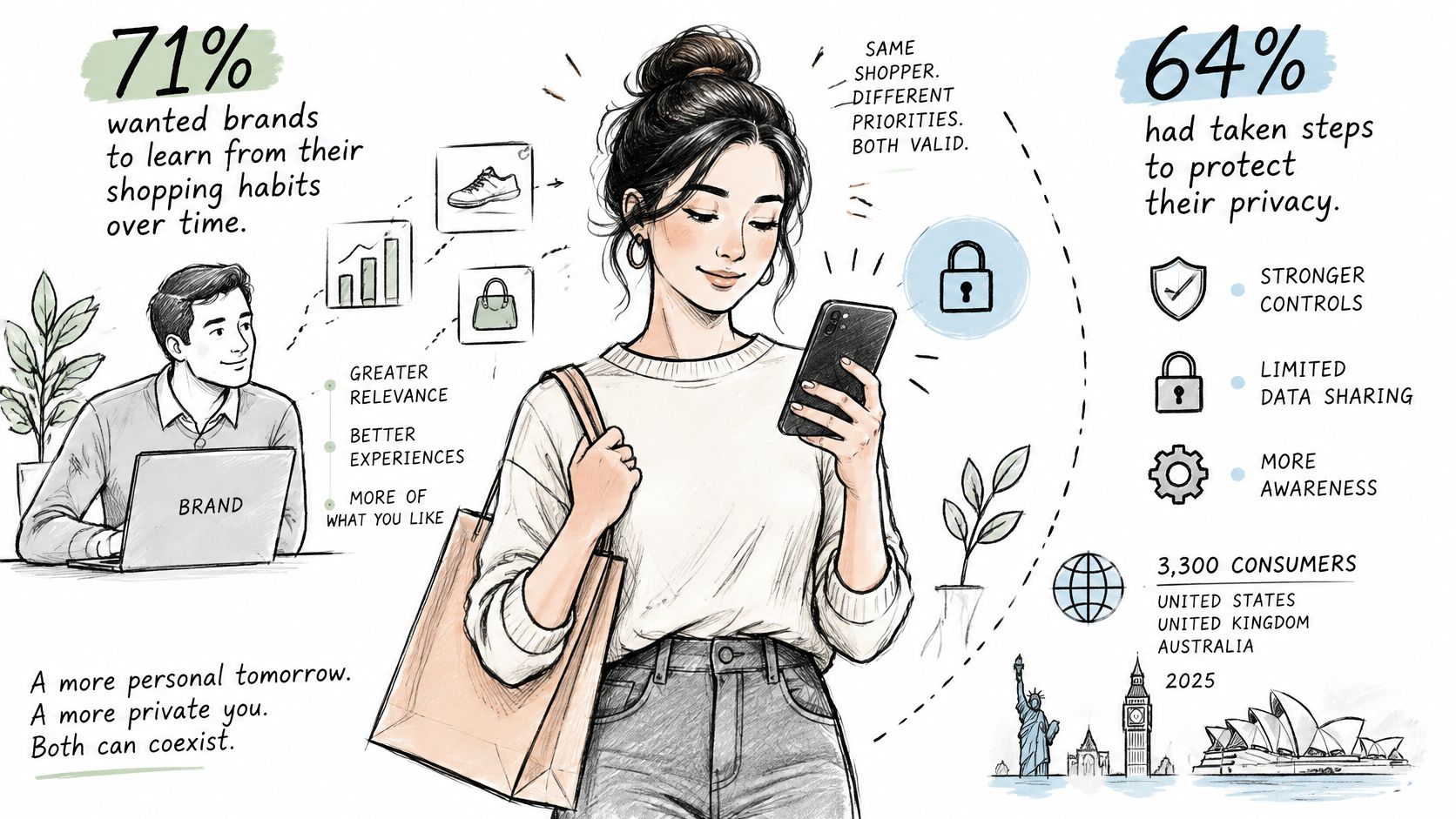
A 2025 Attentive survey of 3,300 consumers in the United States, United Kingdom, and Australia found that 71% wanted brands to learn from their shopping habits over time, while 64% had taken steps to protect their privacy, including limiting app data access. Customers can want useful recommendations and still reject intrusive tracking.
The practical consequence is that the most individually targeted offer isn't automatically the best. Start with information customers would reasonably expect you to use for the transaction they just completed.
Use the least intrusive useful signal
Build your recommendation rules in this order:
- Current order contents: Suggest an accessory compatible with the purchased product and variant.
- Broad product category: Use a clear relationship, such as footwear and shoe-care products.
- Market and inventory: Remove unavailable items and products that can't be fulfilled appropriately.
- Stated preferences: Respect the shopper's chosen sizes, interests, or communication settings.
- Cross-session behavior: Use only where appropriate, permitted, and necessary, rather than treating browsing history as the default input.
A running-kit suggestion after a running-shoe purchase is understandable. An unrelated suggestion that appears to expose private browsing may make the shopper question what else you know about them.
If you can't explain why the recommendation belongs beside this order in plain language, reconsider the targeting rule.
Measure the cost of discomfort
Don't infer sensitive attributes such as health conditions, pregnancy, or financial distress to select an offer. Explain relevance through the product relationship, honor opt-outs, and keep reporting aggregated wherever practical. Restrict access to customer-level records rather than exporting them broadly for merchandising analysis.
To test whether deeper targeting helps, randomly assign eligible customers to highly personalized, contextual, generic, and no-offer groups. Keep the offer economics and placement comparable so you aren't confusing targeting with a bigger discount.
Track conversion alongside consent changes, unsubscribes, complaints, repeat purchases, and contribution over a consistent follow-up window. Define that window before launch. A targeting approach that generates immediate orders but prompts customers to withdraw permission or stop buying may be the weaker commercial choice.
How to Launch Your First Post-Purchase Offer
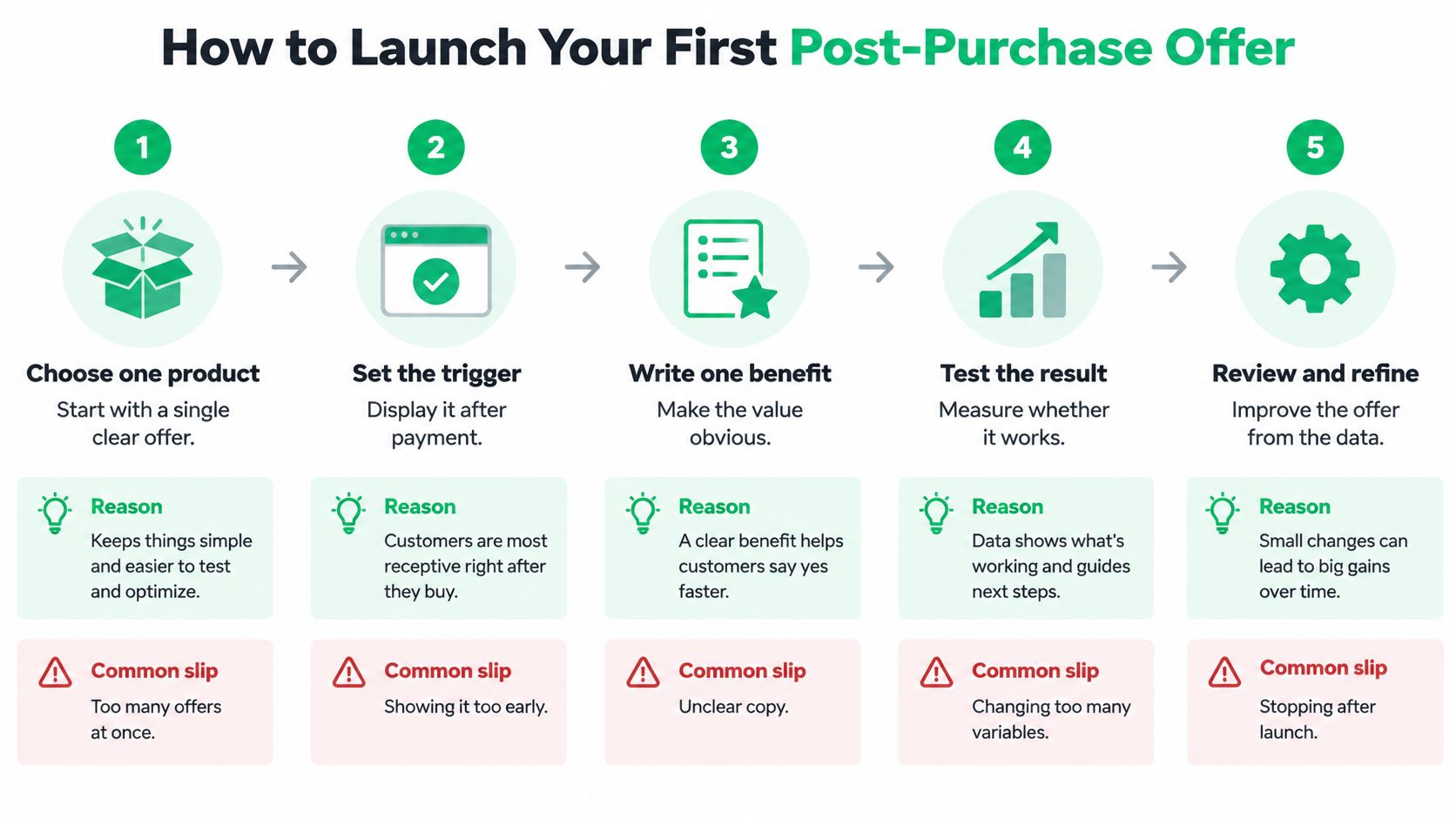
Configuration can be quick; proving a profitable result takes longer. Our post-purchase workflow setup takes under 10 minutes, but that's setup time, not a promise about how soon a test becomes reliable.
Prepare the experiment before turning the offer on. You'll need a product pairing, eligibility rules, a cost model, and an assignment method that keeps customers in their original test group.
Configure a test you can interpret
Choose a clear product pairing. Select a purchased product and a useful complement, such as a leather bag and compatible care product. Starting with the whole catalog makes it harder to identify why customers accept or decline.
Define eligibility exclusions. For an initial test, exclude final-sale, custom-made, and pre-order items, plus orders with unresolved delivery problems. Treat these as merchandising rules you deliberately configure, not as automatic consequences of a product tag.
Set the price and comparison. Choose a discount you can afford after product and fulfillment costs, and retain a no-discount variant if traffic supports it. Don't change the price repeatedly during the test or you'll blur the result.
Select the trigger and placement. Match the offer to the customer's action and verify the complete mobile acceptance flow. Label it as a separate optional add-on, not a correction or required change to the paid order.
Apply an exposure limit. Choose a repeat-exposure period appropriate to your buying cycle and suppress accepted offers. Check that returning customers don't receive the same suggestion through several surfaces at once.
Randomly assign a holdout. Reserve eligible customers who receive no offer, and keep assignment consistent across repeat visits. Don't compare exposed buyers with an unrelated group from a quieter trading period.
Wait for an interpretable outcome. Compare acceptance, revenue, and contribution per eligible order after allowing time for refunds and fulfillment costs to appear. Use an experiment calculator or analyst to assess uncertainty rather than stopping as soon as a favorable result appears.
Record what changed
Maintain a simple test log containing the product pair, eligibility conditions, price, start date, assignment method, and outcome definitions. Record operational changes such as a stock shortage or carrier disruption, because they can affect the comparison.
Measurement check: Accepted-offer revenue is an observed sale. Incremental contribution is the difference your experiment can reasonably attribute to showing the offer.
If results remain uncertain, keep the experiment stable or stop it as inconclusive. Adding more products, stronger discounts, and another placement simultaneously won't tell you which change helped.
Fixing Low Acceptance, Refunds and Complaints
The DHL E-Commerce Trends Report 2025 reports that 81% of shoppers abandon carts when their preferred delivery option is unavailable, while 79% do so when their preferred returns option is unavailable. These are pre-purchase findings, not measurements of post-purchase upsell harm, but they show why delivery and returns deserve attention when designing the experience.
After payment, customers are checking whether you'll keep your promises. An accessory offer shouldn't compete with a missing tracking update, a cancellation request, or a confusing return policy.
Offer symptoms, likely causes and fixes
| Symptom | Likely cause | Fix |
|---|---|---|
| Acceptance stays unusually low across repeated reviews | Weak relevance, incompatible products, or poor timing | Test a closer complement before increasing the discount |
| Acceptance looks strong but revenue is flat | Low-priced items, heavy discounts, or displaced purchases | Judge contribution per eligible order |
| Refunds or cancellations rise after exposure | Delivery friction, unsuitable products, or misunderstood terms | Pause affected offers and inspect order-level reasons |
| Customers complain about pushy popups | Repetition, unclear decline controls, or excessive offers | Simplify the display and enforce exposure limits |
| Holdout earns the same revenue as the offer group | Possible substitution for purchases customers would make anyway | Check uncertainty, then change the product or stop |
| Support tickets increase about order changes | Wording sounds like a required modification to the paid order | Label the separate add-on and check confirmation messages |
Diagnose before discounting
Suppose an order-status accessory offer attracts little interest, and the offer and holdout groups generate comparable revenue. You haven't established that the accessory creates additional demand. Check test size, assignment, and tracking before assuming customers need a larger discount.
If the comparison is reliable, try a different complement or stop the offer. Increasing the discount could pay customers to make a purchase they would have made anyway.
Distinguish a fast operational repair from a new experiment. Correcting misleading wording or a broken decline button should happen promptly; changing the product pairing or placement needs a fresh observation period. Don't treat the combined results as though customers all saw the same experience.
Suppress offers when service takes priority
Use order status, support flags, and product-category rules to pause offers when fulfillment is late or a customer has an unresolved problem. For high-return categories, examine whether compatibility or fit information is missing before offering more items.
Treat complaints as measurable operating costs, but don't force every trust concern into an invented monetary estimate. Track complaint rates, support time, refunds, and repeat buying separately alongside margin. A positive short-term contribution result isn't permission to ignore a worsening customer experience.
Launch One Offer and Judge It by Margin
Launch a focused offer this week rather than redesigning the whole store. Pick a product pairing you can explain plainly, confirm its costs, and reserve a randomized holdout before customers see it.
Keep the offer only when the comparison supports positive incremental contribution per eligible order, with refunds and repeat purchases included over the same follow-up window. A favorable early result is a reason to continue measuring, not immediately expand across the catalog.
Set the decision before seeing the result
- Keep: The offer produces a credible contribution advantage without unacceptable customer-service effects.
- Expand: The original pairing wins reliably, and you can test another pairing without obscuring its result.
- Narrow: A specific product, market, or customer segment causes disproportionate refunds or complaints.
- Stop: The holdout performs just as well, or the operational and trust costs outweigh the benefit.
The right outcome may be a small, useful offer shown to fewer customers. That's preferable to a high acceptance rate supported by discounts, extra shipping expense, and avoidable support work.
Write down the pairing, placement, cost assumptions, and stop conditions before configuring anything. Your first useful deliverable isn't an upsell dashboard. It's a decision you can defend with customer outcomes and contribution margin.
ServeApps offers SelfServe for order editing and post-purchase offers, CartServe for cart drawers, and UpServe for popup upsells; the apps install independently and can work together under one account. Visit ServeApps to choose the app for your first placement, with SelfServe's free tier covering up to 25 orders per month, and launch a focused offer you can evaluate against a holdout.
What Is Upsell? Examples and How Shopify Stores Use It
What is upsell? Learn the definition, how it differs from cross-selling, and how Shopify stores use upsells to raise order value.
Read more →
Increase Conversion Rate on Website: 9 Proven Cart Tactics
Increase conversion rate on website with cart, upsell, and testing tactics. See what lifts AOV, cuts abandonment, and how to apply each one today.
Read more →
8 Self Service Store Examples: Benefits and Tactics
Explore 8 self service store examples, from cashierless checkout to post-purchase portals, with benefits, trade-offs, and tactics you can copy.
Read more →