
The standard advice on how to upsell a product is to show more of it. Bundle two items, bolt a countdown onto the cart, discount 15% at checkout, add an exit popup. Stores that follow that advice usually end up with more offers and roughly the same revenue, plus a checkout that feels like a market stall.
The advice fails because it treats the offer as the unit of work. The unit of work is the decision the shopper is already making: what they picked, how it ships, what happens if they send it back, and whether the extra item arrives in the same box.
Three things decide whether an upsell makes money: where it appears, whether it survives a post-purchase risk check, and whether you can prove it created profit that would not otherwise exist. Wording comes fourth, and it can't rescue a bad placement.
Table of Contents
- Choose the Placement Before You Write the Offer
- Build Your First Upsell in Six Steps
- Match Offers to Post-Purchase Risk
- Write Offer Copy and Discount Rules That Convert
- Prove Incremental Profit Against a No-Offer Holdout
- Diagnose a Weak Upsell Before You Change the Offer
- Launch One Safe Upsell This Week
Choose the Placement Before You Write the Offer
Placement decides more of the outcome than copy does. The same accessory offered in four different places produces four different take rates and four different effects on margin.
Upsell placements compared
| Placement | Where the shopper sees it | Best for | Main risk |
|---|---|---|---|
| Cart drawer | Inside the cart before checkout | Cart-level bundles and spend goals | Crowding the cart and slowing checkout |
| Add-to-cart popup | Right after an item is added to the cart | Accessories and complementary items | Interrupting browsing when triggered too often |
| Post-purchase upsell | On the order status page after payment | Add-ons that can ship with the same order | Delivery confusion if the add-on ships separately |
| Checkout upsell | Inside checkout on Shopify Plus | Low-price add-ons with one clear decision | Checkout friction and abandonment |
The cart drawer keeps the offer inside the same frame as the decision the shopper is already making. CartServe's drawer blocks sit below the line items, optional and dismissible, with the checkout button still the loudest element on screen. That hierarchy is the whole point: an offer that competes visually with checkout costs more orders than it adds.
An add-to-cart popup fires in the second after commitment, when the shopper has stopped browsing and started buying. UpServe triggers on add to cart by default and can be limited to specific products, so the accessory appears only where it fits. The downside is interruption, and a frequency cap controls that better than better copy does.
Post-purchase offers catch the shopper on the order status page, after payment, when nothing can be undone. A relevant recommendation made during order editing converts at 3 to 5 times the rate of a static thank you page offer, which makes this the cheapest placement to test. SelfServe places those blocks on the order editing page. Checkout upsells exist only on Shopify Plus and work best for one low-price add-on with a single decision attached.
Baymard's benchmark of 344 ecommerce sites warns that injected cross-sells requiring an explicit accept-or-reject decision can read as aggressive. In its large-scale checkout testing, 66% of users who encountered a separate cross-sell step showed extreme frustration. One or two related offers is the ceiling, not the starting point.
- Pick the placement closest to the current decision. A shopper adding a phone wants the case in that same moment, not three pages later.
- Launch one placement, not four. Four placements at once give you four unreadable results and no way to attribute the change.
- Keep high-trust offers before the payment step. Once a shopper is entering card details, every addition is a chance to lose them.
Look at where your funnel already leaks before you pick anything. If sessions die in the cart, a drawer offer has room to work. If they die inside checkout, leave checkout alone and put the offer on the order status page instead. Placement is a merchandising decision as much as a technical one, and this merchandising guide for ecommerce covers how offer position fits a wider catalog plan.
Build Your First Upsell in Six Steps
Adding more offers doesn't fix a weak offer. McKinsey's 2021 research found personalization most often produces a 10% to 15% revenue lift, with company-specific results ranging from 5% to 25% (McKinsey's personalization research). That lift comes from relevance to the shopper's current intent, not from the number of prompts on the page.
The six steps below are the sequence I'd use for a first offer, in order.
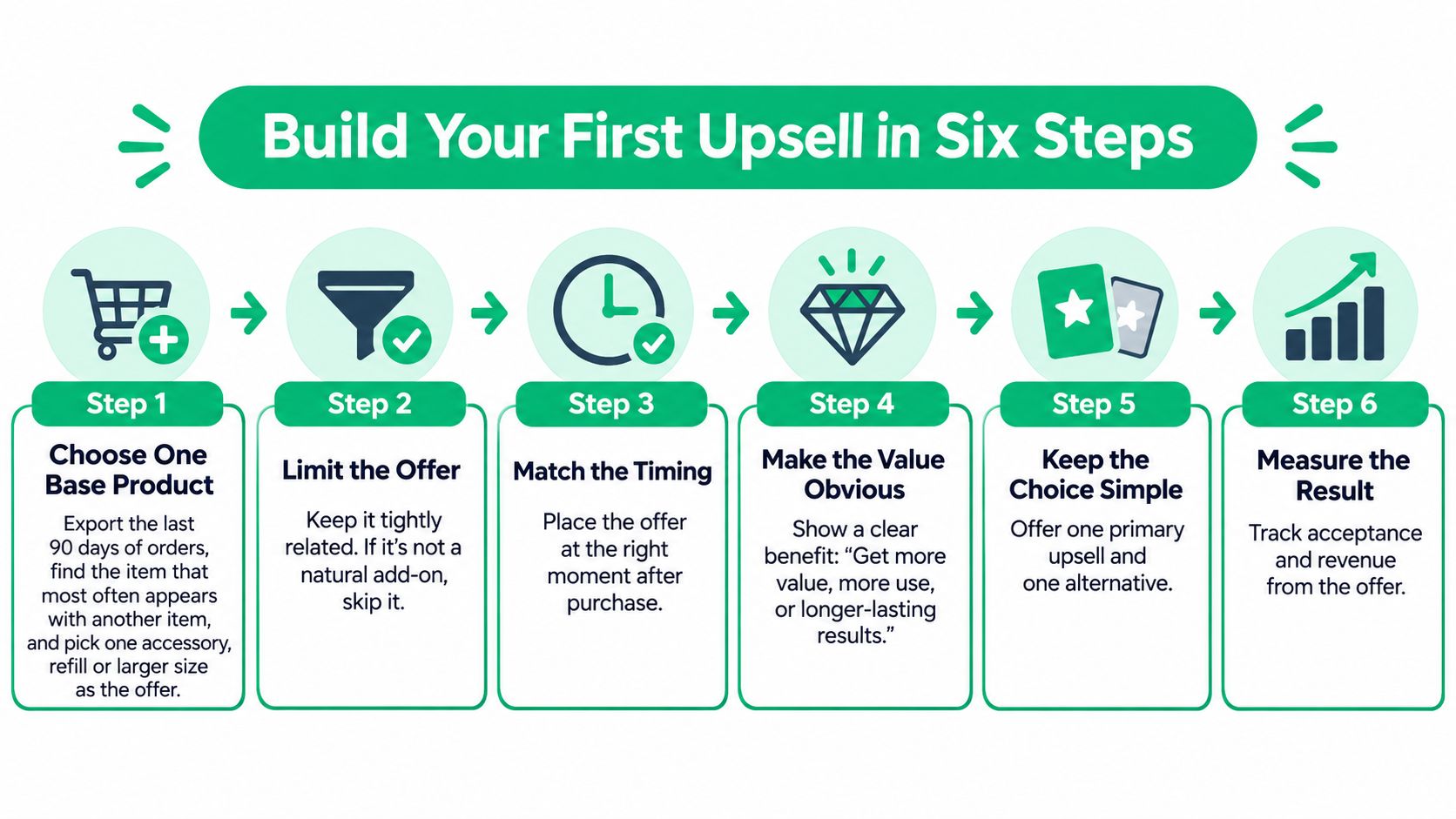
Step 1. Choose one base product. Export the last 90 days of orders and find the item that most often shares an order with another item. Pick one accessory, refill or larger size for that product and ignore everything else for now, because a single base product gives you a clean read on whether the offer works at all.
Step 2. Cap the offer set at two items. A shopper choosing between three add-ons stops choosing and leaves. Show a primary offer and, at most, one alternative, so the click stays a yes-or-no rather than a comparison exercise.
Step 3. Set the trigger and eligibility. Fire on add to cart, limit the popup to the base product, and suppress the offer when stock on the offered item drops below what you can still ship. Rules written before launch are easier to defend than a rule invented after a bad week.
The walkthrough below shows the flow end to end, from the popup design to the first results.
- Set the discount per upsold item. Start modest so the shopper judges the fit rather than the price. Use a fixed amount on low-price add-ons where a percentage looks trivial, and a percentage on higher-priced items where a fixed amount barely moves the number.
- Add a frequency cap. A returning shopper who sees the same offer in every session learns to dismiss the popup without reading it, and that habit carries to every future offer.
- Publish and check the first 50 impressions. The popup should appear once per session, the discount should apply in the cart, and the added item should appear in the order total and ship with the order rather than as a separate parcel.
A flow that works has a shape you can see in the data. The offer appears at the moment of intent, accepted items land in the order total, and a tag such as customer_item_added flags the order for a revised pick list so the warehouse packs everything together.
Match Offers to Post-Purchase Risk
Trust in delivery gates every conversion. DHL's 2025 survey of 24,000 online shoppers across 24 markets found that three out of four shoppers will not buy from a retailer they do not trust to provide delivery and returns (DHL E-Commerce Trends Report 2025). An upsell that muddies when the parcel arrives trades a small basket increase for a large trust loss.
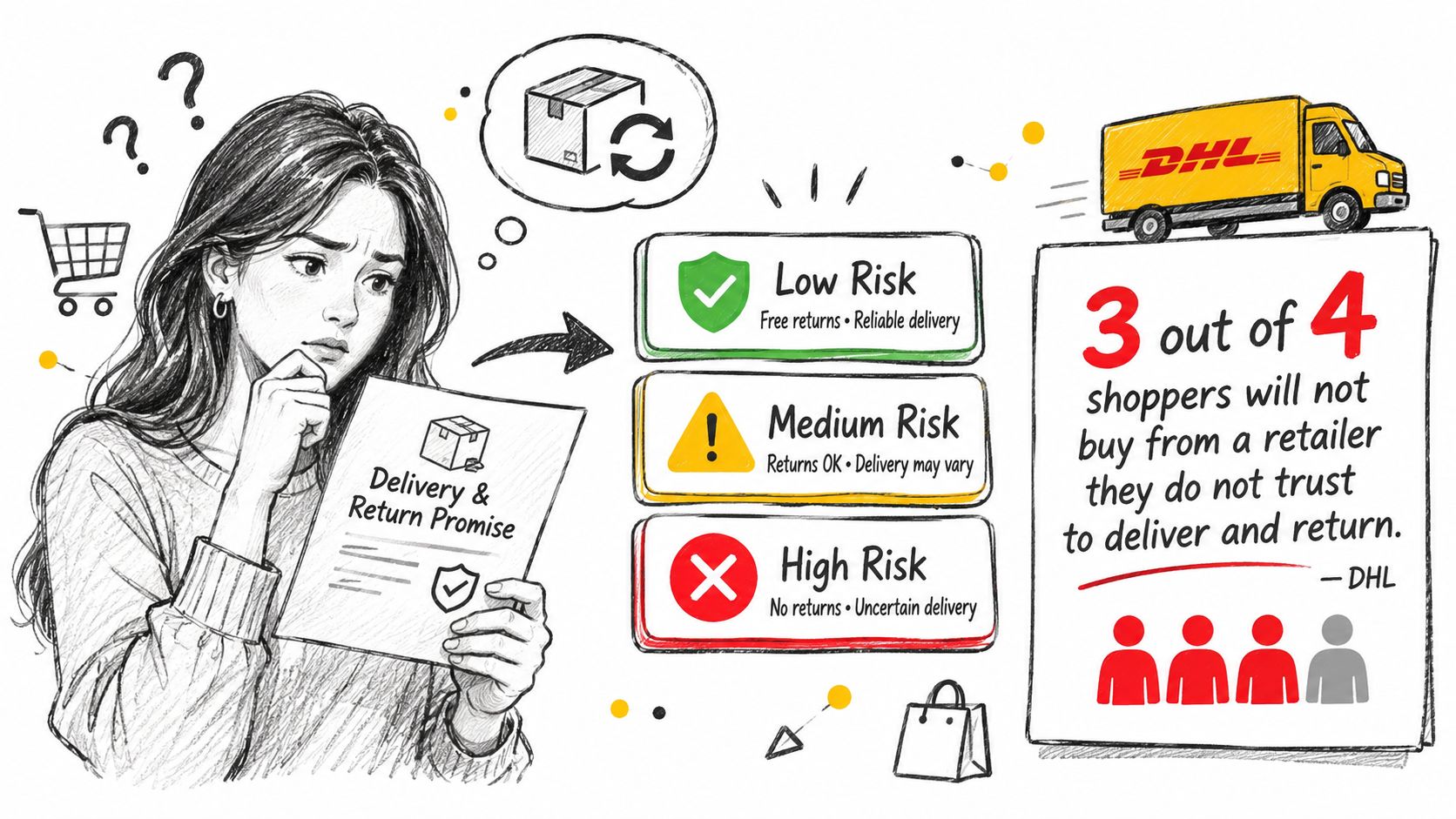
Sort every candidate offer into a tier before you write a line of copy. The tier sets the treatment, and the treatment is not negotiable.
Offer risk tiers
| Risk tier | Example | Required treatment |
|---|---|---|
| Low | Phone case or matching accessory shipped with the order | Standard add-to-cart popup |
| Medium | Larger quantity or subscription variant tied to live stock | Stock check and estimated delivery date |
| High | Item from another supplier with its own warranty or return window | Hide at purchase or state shipping and return terms first |
Treat each tier differently
A phone case, a screen protector or a second pair of laces ships in the same box, under the same return policy, at the same speed. Low-risk offers can take the standard add-to-cart popup with no extra explanation, because nothing about the order changes for the shopper.
A larger quantity or a subscription variant looks low-risk and isn't. It touches live stock and can change the delivery date, so the shopper needs a stock check and an estimated date before the click rather than a promise afterward.
An item from another supplier carries its own warranty and return window, which means two sets of rules on one order. Keep high-risk offers out of the purchase moment, or state the shipping and return terms before the shopper commits. How you write those return terms matters as much as where you show them, and this guide to improving returns in ecommerce covers the wording that prevents disputes.
- Suppress the offer when inventory is low. Selling an add-on you can't ship turns one order into two support tickets.
- Suppress it when the delivery date is uncertain. A shipping promise you can't keep outweighs any discount.
- Suppress it when the shopper has an open support ticket. An unresolved problem plus a new offer reads as indifference.
- Suppress it when the add-on's return policy conflicts with the original order. Mixed rules create refunds you'll absorb, not the supplier.
Selling to people who already bought is the cheaper direction. Bain & Company's cross-selling analysis describes the lower incremental selling cost of expanding an existing relationship, and its U.S. telecommunications work shows the scale: as many as 60% of customers split mobile, landline, television or internet services across multiple providers. For one provider, persuading just 10% of those customers to move one service from a competitor was worth up to $480 million in extra annual revenue, while persuading 10% to consolidate everything was worth up to $630 million a year.
The lesson transfers to a Shopify catalog even though the figures come from telecom. Identify the existing customer's adjacent need and offer a credible next step, not a more expensive item.
If you can't explain how the add-on arrives and how it is returned, don't show it.
Write Offer Copy and Discount Rules That Convert
A discount cannot make an irrelevant product useful. Name the add-on, explain how it fits the original purchase, and state the value plainly.
Weak: “Add this to your order for 15% off!”
Strong: “Matching case for your phone, 15% off, ships with this order.”
The stronger line answers three questions: what is it, why does it fit, and when will it arrive? Put the product's relevance before the discount. For a post-purchase offer, make sure the shipping claim matches how the added item will be fulfilled.
Spend thresholds give shoppers a reason to add something to reach a target, but the threshold should suit the category and the store's own economics. Average online order value in September 2024 was $436 for luxury and jewelry, $253 for home and furniture and $211 for consumer goods, according to Oberlo's category order value data. Use these figures as context, not as a substitute for your own order data.
Set the discount rules before the copy
- Discount the complement, not the whole cart. A blanket discount can reduce revenue on products the shopper would have bought anyway.
- Choose the discount format that reads clearly at the item's price. A fixed amount can make savings on a lower-priced add-on easy to see; a percentage can express the value of a higher-priced item. Set the amount against the margin you need to retain.
- Set a per-item ceiling. Bundles can make discounts harder to assess. These product bundling and pricing examples show ways to price combined offers without discounting the same value twice.
- Keep the decline option neutral. “No thanks, continue” gives shoppers a clear way to decline without adding pressure.
- Avoid countdown timers after purchase. The customer has already paid, so an artificial deadline can make the offer feel coercive rather than useful.
Before publishing, check that the headline names the complement, explains its relevance, and states the offer without pressure. If that takes more than one clear line, reconsider the product match before rewriting the copy.
Prove Incremental Profit Against a No-Offer Holdout
Attributed upsell revenue flatters every programme. Industry coverage of AI-driven post-purchase recommendations cites reported early-adopter gains such as a 58% AOV uplift when an offer is accepted (Nosto's post-purchase upsell analysis). That number is real and also incomplete: it counts shoppers who would have bought the item anyway, ignores the discount and payment fees, and says nothing about what happens once the parcel arrives.
Revenue that would have existed without the offer isn't revenue the offer created. Returns, cancellations, extra support contacts and slower fulfillment all surface later, in a different report, when nobody connects them to the popup.
Set the holdout before you touch the offer
Keep a randomized control group of about 10% of eligible shoppers who see no offer, and run the test for at least one full purchase cycle. For a store with a long buying gap that means weeks rather than days, because repeat purchase is part of what you're measuring.
Change one variable at a time: placement first, then the offer, then the discount. Start with deterministic eligibility rules you can defend, such as product compatibility, variant, subscription status, market, stock and cart value, and only add behavioral signals like past purchases or co-purchase frequency once the simple rules show a positive result. New shoppers need a fallback such as the best-selling accessory in the same category, because an empty slot beats an irrelevant prompt.
Read the profit first, the guardrails second
The number that decides the test is incremental gross profit per eligible order: gross profit per shopper in the offer group minus gross profit per shopper in the holdout group. Everything else is a diagnostic that tells you why the number moved.
Profit metrics and guardrails for an upsell
| Metric | What it shows | Guardrail |
|---|---|---|
| Incremental gross profit per eligible order | Real gain after discounts and product cost | Positive compared with the holdout group |
| Discount cost per accepted offer | How much the incentive costs each time it is used | Stays inside the margin ceiling you set |
| Refund and return rate | Whether the add-on creates buyer regret | No higher than the holdout group |
| On-time delivery rate | Whether the add-on delays shipping | Unchanged from the holdout group |
| Repeat purchase after one full cycle | Whether the upsell helps or hurts loyalty | Equal to or higher than the holdout group |
Segment the results by device, market, traffic source, and new versus returning customers. An average that looks healthy can hide a loss among your highest-value cohort, which is the one group you can least afford to annoy. If splitting traffic is new to you, A/B testing best practices covers sample sizing and the mistakes that make a short test unreadable.
Set the stop rule before launch and don't call a winner while one group has too few orders to show a real gap. A 4% lift on 30 orders is noise with a nice chart attached.
Decision rule: keep the offer when incremental profit is positive and every guardrail holds. Fix the copy first when profit is positive but support contacts rise. Stop the offer when profit turns negative in any major segment.
Diagnose a Weak Upsell Before You Change the Offer
Read the funnel in order. Each weak metric has a different cause, and rewriting copy when the item never reached the order total wastes a week.
- High impressions, low add-to-carts. The offer is irrelevant. Test a closer complement or move it to another placement before you touch the text.
- Healthy add-to-carts, no change in order total. The discount isn't applying or the item isn't attaching to the order. Check the mechanics, then the message.
- Good acceptance, rising refunds. The add-on didn't match what the shopper expected. Tighten the product description or drop the offer a risk tier.
- Popup views per session climbing. The frequency cap is too loose. Lower it so repeat visitors stop seeing the same prompt.
- Checkout abandonment up after launch. Pull the offer out of checkout and keep it in the cart drawer or on the order status page.
- The holdout group outperforming the offer group. The upsell is costing money, and the stop rule you agreed before launch applies to exactly this result.
Precision has a cost, and it's worth naming. McKinsey's personalization research points out that over-personalization without enough data produces irrelevant recommendations, excessive discounts and incompatible products, and each of those lowers trust and margin at the same time.
That's why the fastest fix is usually the placement or the item, not the promise. Change one thing, re-run the comparison, and resist the urge to discount your way out of a relevance problem.
Launch One Safe Upsell This Week
Launch one offer on your top-selling product and give it two weeks. Not a programme, not four placements, one offer with a stop rule you've already agreed to.
- One placement from the first table, matched to where your shoppers already hesitate.
- One low-risk complement that ships in the same box under the same return policy.
- One discount level, set per upsold item rather than across the cart.
- A control group that sees no offer, so the comparison is real rather than a month-on-month guess.
- A stop rule written down before launch: low stock on the offered item, an unresolved support ticket on the account, or a return policy that doesn't match the original order.
UpServe, one of our Shopify apps, handles the mechanics of the add-to-cart version. You set the discount per upsold item, trigger the popup on add to cart, limit it to specific products by condition, and apply a frequency cap so shoppers don't see the same offer repeatedly. Each popup reports its own impressions, add-to-carts, conversions, conversion rate and revenue over time, which gives you the first read on the test before the deeper profit analysis catches up.
At the end of two weeks, compare the offer group against the control on incremental gross profit per eligible order, then check the refund rate and the on-time delivery rate. Expand to a second product only when every guardrail holds. Two weeks of one offer tells you more than three months of five, and the stop conditions matter as much as the launch checklist.
ServeApps builds the Shopify apps that make this practical: CartServe for cart-drawer offers, UpServe for add-to-cart popups, and SelfServe for post-purchase and order-editing recommendations, all built so you can change placement, discount and eligibility without a developer. If you want one safe upsell running this week, start with your best-selling product and let a no-offer control group tell you whether it earned its place. Visit ServeApps to see which app fits the placement you chose.
What Is Upsell? Examples and How Shopify Stores Use It
What is upsell? Learn the definition, how it differs from cross-selling, and how Shopify stores use upsells to raise order value.
Read more →
Increase Conversion Rate on Website: 9 Proven Cart Tactics
Increase conversion rate on website with cart, upsell, and testing tactics. See what lifts AOV, cuts abandonment, and how to apply each one today.
Read more →
8 Self Service Store Examples: Benefits and Tactics
Explore 8 self service store examples, from cashierless checkout to post-purchase portals, with benefits, trade-offs, and tactics you can copy.
Read more →