
HubSpot's customer service statistics show that approximately 70% of customers still prefer email for customer-service help, and address corrections make up a steady slice of that traffic. Those requests compete for attention in a channel Shopify's email marketing statistics size at 4.48 billion email users worldwide in 2024 and 361.6 billion daily messages, up roughly 18% from 306.4 billion in 2020, with a projected 4.89 billion users by 2027.
Address change requests keep arriving in high volumes year after year. Treating them like casual inbox replies guarantees misrouted parcels and expensive reships.
A reliable address change email template states the order number, displays both the previous and updated shipping addresses, names the live fulfillment status, and sets a firm editing cutoff before dispatch. It also spells out what happens when the order is already packed or shipped, because a confirmation sent after the warehouse prints the label promises a change you can no longer make. That gap turns a friendly reply into a refund liability, and the customer who trusted your email now expects you to pay for the mistake. Most templates online fail because they read like polite thank-you notes. Yours should read like a fulfillment-aware workflow document: what changed, what the cutoff is, and what the customer does once that cutoff has passed.
Table of Contents
- Ready-to-Use Address Change Email Templates
- Writing the Subject Line, Address Block and Status Line
- Adapting the Template for Every Order Status
- Measuring the Template Workflow
- Troubleshooting Emails That Get Ignored or Flagged as Spam
- Choosing Your Template and Next Steps
Ready-to-Use Address Change Email Templates
Start with the merchant confirmation template below. Copy it into your helpdesk or transactional mail tool, replace every bracketed placeholder with live order fields, and send it only when your order status matches what the wording promises.
Template A (Merchant confirmation)
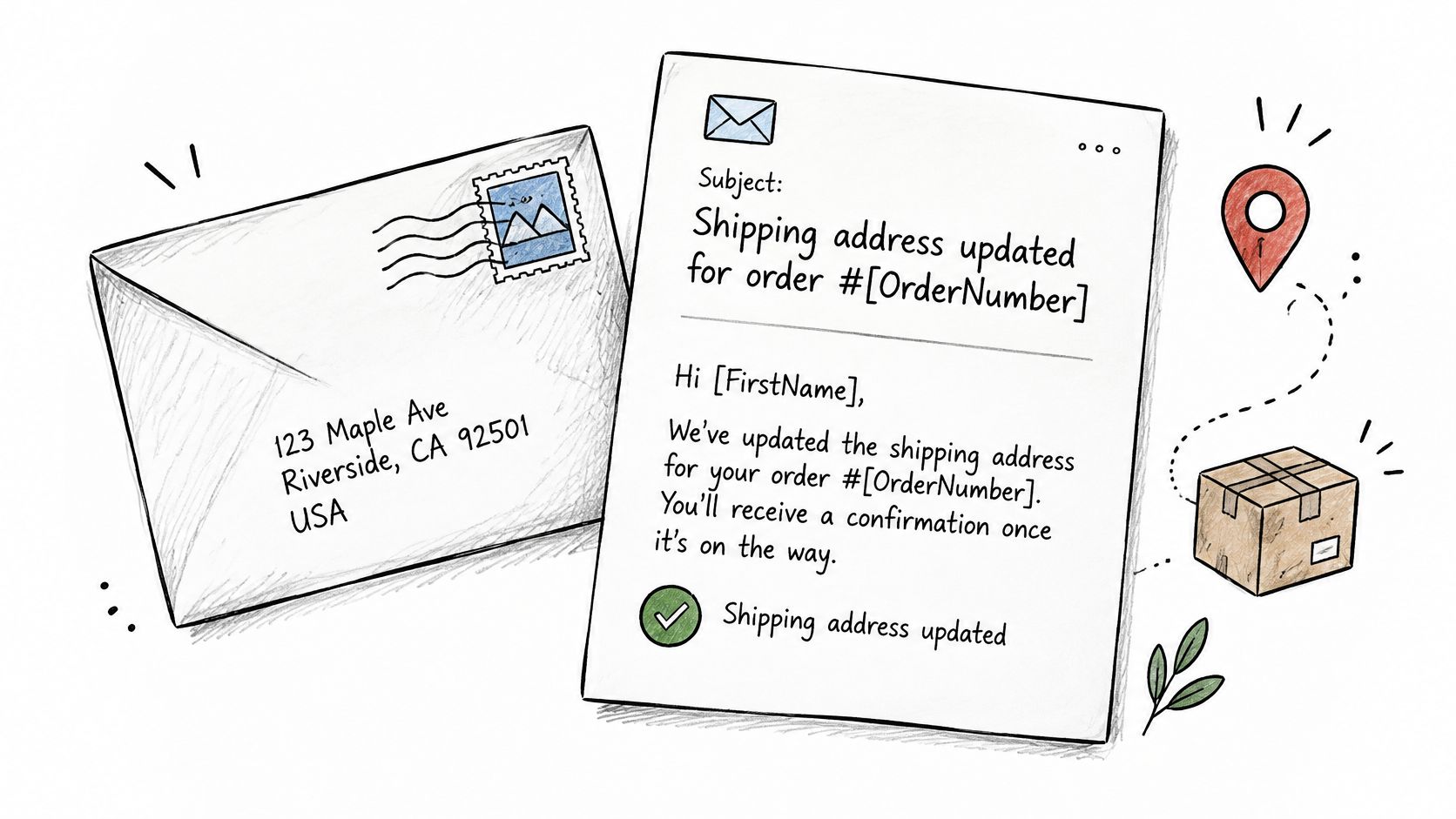
Subject: Shipping address updated for order #[OrderNumber]
Hi [FirstName],
Your shipping address for order #[OrderNumber] has changed as shown below.
Previous address: [OldAddress] New address: [NewAddress] Status: [Unshipped / Packed / Shipped] Delivery date: [NewDate]. Price difference: [AmountOrNone].
We can update this order until [CutoffDate]. After that point, contact us immediately; delivery changes may require carrier approval.
[Review this order] (link directly to the authenticated order status page)
[StoreName] Support, [SupportEmail]
For wholesale or corporate accounts, insert this single line directly under the status block so purchasing teams can reconcile their records without opening another ticket: Company: [CompanyName], PO reference: [PONumber], billing contact unchanged.
Standardizing these replies isn't busywork. According to U.S. Postal Service corporate facts, the agency processed 28.3 million address changes in 2023, while a separate USPS congressional data summary recorded 33.2 million address changes for fiscal year 2022. Those figures reflect national U.S. postal moves rather than ecommerce corrections alone, yet they make the operational reality obvious: customer addresses shift constantly, so ad hoc typing creates avoidable mistakes.
Customer Request Reply Template
When a shopper emails "Hey, I typed the wrong apartment number" without giving you enough details to act, send Template B right away. It collects every detail your team needs in one round trip and asks the buyer what they want if the box has already left the dock.
Template B (Request details and fallback preference)
Subject: Information needed to update shipping address for order #[OrderNumber]
Hi [FirstName],
We received your request to update the shipping address on order #[OrderNumber]. To check whether our warehouse can apply the change before dispatch, reply with the details below:
- Full name on the order: [CustomerName]
- Order number: #[OrderNumber]
- Current shipping address: [CurrentAddress]
- Requested new address: [RequestedAddress]
- Effective date: [EffectiveDate]
- If the order has already shipped, your preference: [Carrier intercept if available / Return and reship / Keep original delivery]
Once we receive this information, we will confirm whether the update is accepted, pending warehouse review, or past our fulfillment cutoff.
[StoreName] Support, [SupportEmail]
Before deploying either layout in Klaviyo, Gorgias, or Shopify Notifications, test your HTML email template with MailAdept's checker to catch broken tables, clipped buttons, or mobile rendering bugs before a live customer sees them.
Three Non-Negotiable Fill-In Rules
A good address change email template still breaks if an agent leaves key variables half-baked. Hold your team to three rules on every send:
- Never leave
[CutoffDate]vague: Write a real timestamp and time zone (such as "Tuesday, May 12 at 2:00 PM ET") rather than "before it ships," because shoppers have no idea when your 3PL pulls batches. - Always show both the old and new address: Listing both blocks side by side lets the customer catch a second typo immediately and gives your team proof of what changed.
- Always name the live status: Stating Unshipped, Packed, or Shipped keeps a customer from assuming a parcel already sitting on a carrier pallet has been rerouted.
Writing the Subject Line, Address Block and Status Line
Treat every shipping-update email as a transactional control and audit message, never a polite courtesy note. When a dispute lands on your desk two weeks later, this email is the written record proving what changed, when the request arrived, which order ID it touched, and what status the warehouse held at that minute. A template that confirms a change your warehouse can no longer make is worse than no template at all, so every field below exists to say what happened, what the cutoff is, and what the customer should do if the box is already packed or shipped.
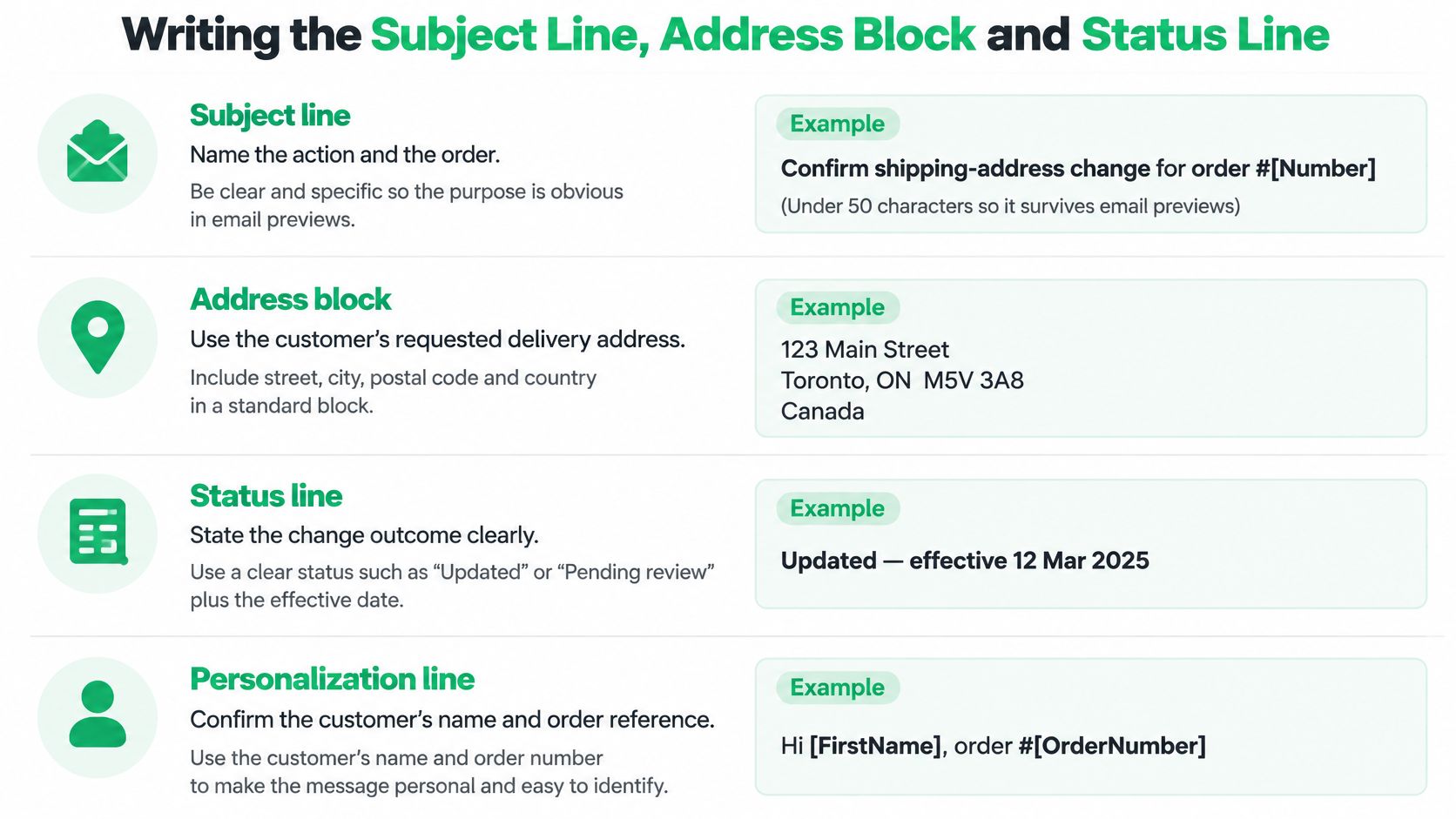
The infographic below breaks down the four message components so support leads and template builders can audit every field in seconds.
A dependable control workflow follows six steps: authenticate the request with an order ID plus a customer-verifiable detail, display the previous and revised addresses in separately labeled fields, declare the operational cutoff, disclose any shipping, tax, or delivery-date impact, include one clear call to action, and log the timestamp, actor, order ID, and resulting status. Formatting decides whether shoppers can act on those details. Email on Acid's 2017 email accessibility analysis uncovered serious or critical defects in the large majority of HTML emails it tested, which is why transactional shipping alerts need plain language, semantic headings, a text fallback, and strong contrast between text and background colors.
Four Field Rules That Prevent Disputes
Every core field carries a specific job. Build each one around a clear rule and concrete wording:
- Subject line: Name the action and the order ID in under roughly 50 characters so mobile previews never cut off the reference number. Use
Confirm shipping-address change for order #[Number], and never use vague phrases like "Click here" or misleading labels like "Invoice" on a shipping-update notice. - Address block: Place the previous and new addresses in separately labeled live-text blocks showing only what the buyer needs to verify (street, city, postal code, and country). Never bake the revised street address inside an image, and omit unrelated billing or account data.
- Status line: State plainly whether the change is pending, accepted, or blocked, and drop the editing cutoff date into the first sentence of the email body. Shoppers skim fast, so hiding a deadline in the footer invites late replies. If the order is already packed or in transit, say so in that same first sentence and point the customer to the intercept or redirect path instead of confirming a reroute the carrier will never make.
- Call-to-action button: Give the reader one descriptive button (such as "Review this order") pointing straight to the authenticated order page. Never ask a shopper to reply with sensitive personal details, and never use a generic confirmation link that isn't tied to a specific order ID.
Practical rule: If an agent has to scroll past three paragraphs of brand copy to spot the order number, old address, new address, and cutoff date, the template has too much fluff. Strip out everything that doesn't confirm or restrict the shipment.
Separating Shipping Updates From Account Email Changes
Keep your address-update workflow strictly separated from contact-email changes. The two requests look identical in a support queue, but they touch different systems: one reroutes a physical parcel against a fulfillment clock, the other rekeys the login identity on a customer account. When a customer asks to switch the inbox tied to their account rather than their delivery destination, route them through a dedicated change of email address notice process so login verification and warehouse fulfillment controls never collide.
Recording every address event with its exact actor (customer self-service or named support agent), timestamp, and fulfillment state takes zero extra effort when your helpdesk macros stay standardized. That clean paper trail settles chargebacks and "I told you before it shipped" claims in minutes instead of hours, and it gives your operations lead something solid to review when a reroute goes wrong.
Adapting the Template for Every Order Status
Most generic customer information update templates treat an address change like a simple profile edit, promising that support will update the order or send alternatives later. That approach falls apart in real ecommerce operations because the exact same customer email requires completely different wording depending on whether the box is unpicked, taped shut, or riding on a UPS truck.
Give your agents a single decision matrix they can scan while a ticket is open, so nobody improvises a promise the warehouse can't keep.
| Order status | Change allowed | Template wording | Approval |
|---|---|---|---|
| Unshipped, within editing window | Yes, automatic | Confirmation variant, new address applied | Self-service |
| Packed, label not yet bought | Hold and review | Pending-review variant with one-business-day promise | Support agent |
| Label printed, not collected | Maybe, carrier-dependent | Intercept offer, no delivery promise | Support agent plus carrier |
| In transit | No | Carrier redirect instructions, no confirmation | Support agent |
| Cross-border or customs-cleared | Manual review only | Review variant, flag possible re-rating | Operations lead |
| B2B order with PO on file | Manual review only | Review variant with PO reference confirmation | Operations lead |
| Address far from billing profile or last-minute request | Manual review only | Hold variant, request verification | Fraud or operations |
Notice how the approval owner shifts the moment fulfillment touches the order. Once a picker packs the box, an agent shouldn't auto-confirm anything without first placing a hold on label generation. Once the label prints, you're negotiating with the carrier, so your reply must offer an intercept or a return-and-reship path without guaranteeing success.
The Single Conditional Sentence That Protects Your Team
Replace vague promises like "We'll make sure your package gets to your new home" with one exact conditional statement across your confirmation and order-received notices:
"We can update this order until [CutoffDate]. After that point, contact us immediately; delivery changes may require carrier approval."
That single line establishes the fulfillment boundary before an error ever happens. It sets realistic expectations around carrier fees, tax recalculations, and label voids, and it pairs directly with a structured process for updating a shipping address after checkout without breaking warehouse syncs.
Why Saying No to Automatic Changes Is a Feature
I'd rather see a template hold an address request for human review than auto-approve a shipment that ends up lost or disputed. The strongest address change email template deliberately refuses automatic updates in four scenarios:
- The parcel is already packed: Changing a street on a sealed box risks mismatched packing slips and missed carrier pickups unless the warehouse pulls it off the line first.
- The destination crosses a border: International edits can trigger customs re-declaration, duty changes, or carrier rejection, which an automated email can't resolve.
- A B2B purchase order is attached: Corporate receiving docks and accounting teams tie deliveries to specific PO records, so an unapproved street swap can delay invoice payment.
- Fraud indicators fire: If the new street sits far from the billing profile, changes states right before dispatch, or arrives minutes before the truck departs, hold the order and verify the buyer before editing a single field.
Refusing an automatic edit isn't poor customer service. Confirming a change your team can't execute is what destroys trust and drains margin.
Measuring the Template Workflow
Sending a clean email is only half the job. Without a closed operational loop, you won't know whether customers confirm their revised details, spot errors in time, or end up opening follow-up tickets anyway.
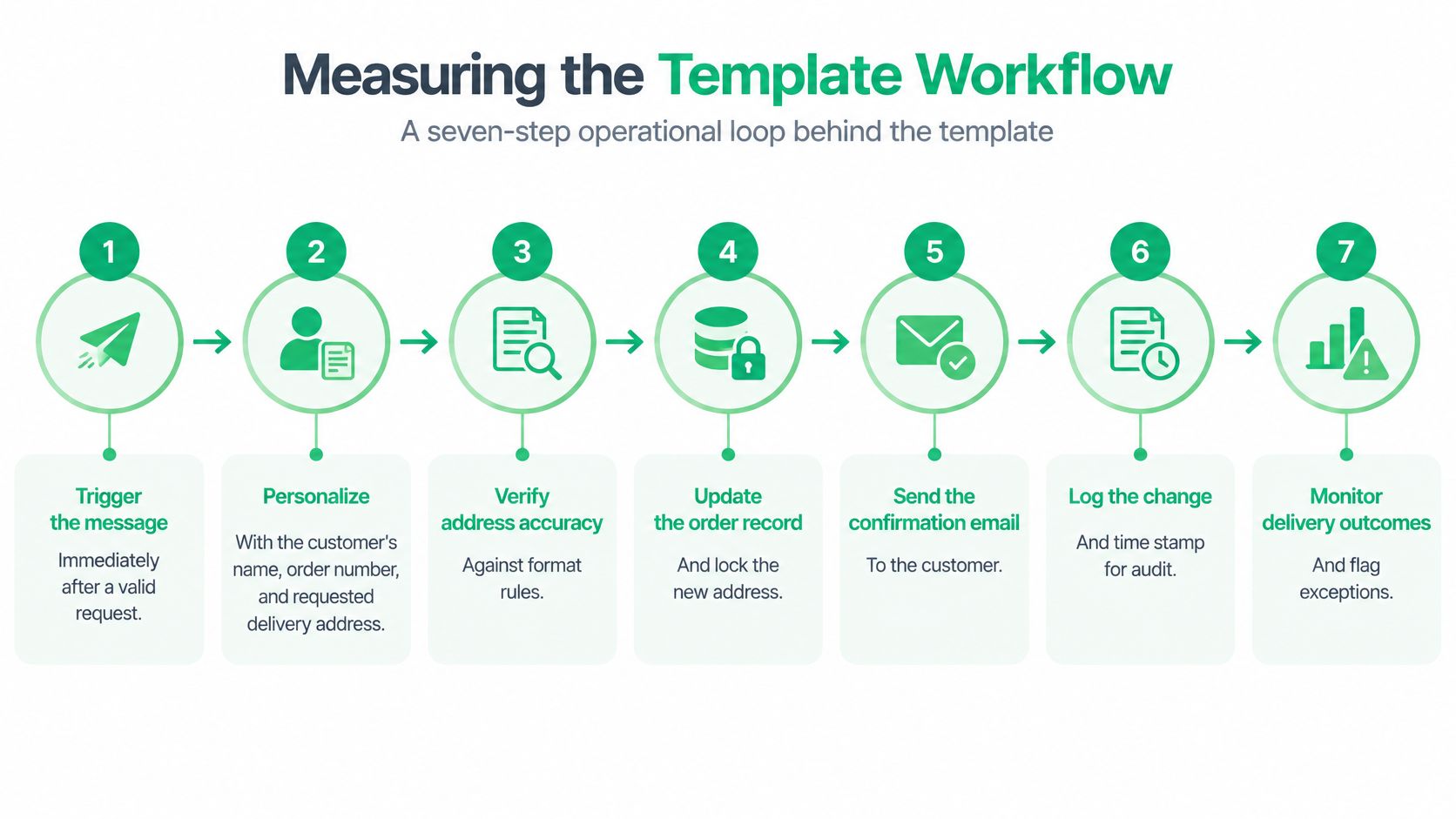
The workflow diagram below maps the seven operational steps connecting the initial customer request to post-send verification and exception logging.
Strong email execution already separates top stores from the pack. According to Netomi's ecommerce customer service benchmark report, only 59% of ecommerce companies offer email support, and 30% of those ignore customer emails entirely. The same benchmark found that 88% of ecommerce responses personalize messages, while 58% use both a customer greeting and an agent sign-off. Explicit status updates, clear personalization, and reliable fallback paths immediately raise your operational floor above that baseline.
Running the Seven-Step Operational Loop
Build your automated and agent-assisted sends around seven sequential actions:
- Trigger immediately: Fire the confirmation or pending-review email the moment a valid request lands, before the customer wonders whether anyone saw it. A confirmation sent two hours late reads as a confirmation that never arrived, and the shopper emails support to ask.
- Personalize with operational context: Populate the shopper's name, order number, and requested delivery country or region.
- Summarize the exact delta: Show precisely what changed rather than summarizing the entire order history. "Line 2 changed from Apt 4B to Apt 4D" prevents a second mistake; a full address block invites the customer to skim past the error.
- Disclose the live decision state: Label the update as pending, accepted, or blocked with zero ambiguity.
- Expose a secure review-or-undo path: Give the customer one authenticated link to inspect the updated details or catch a second mistake before the cutoff closes.
- Route edge cases to humans: Escalate already-shipped orders, restricted items, mismatched billing data, and unsupported destinations directly to a trained agent.
- Segment results by market and device: Break down workflow performance across desktop, mobile, and regional storefronts so broken layouts in one market don't hide behind global averages. A confirmation template that renders cleanly on desktop but truncates the cutoff line on a phone will look healthy in aggregate numbers while failing half your buyers.
Watch this short walkthrough to see how order-change notifications and fulfillment updates connect in practice.
Four Workflow Metrics and Audit Logs That Matter
Cold-outreach reply benchmarks measure marketing engagement rather than order accuracy, so stop judging transactional shipping emails against them. Instead, A/B test subject clarity, CTA wording, and send timing against four operational metrics:
- Confirmation rate: Share of shoppers who open or verify the update without creating a follow-up ticket.
- Correction rate: Share of recipients who catch an error via your review link and fix it before dispatch. A rising correction rate is a win, not a failure: every pre-dispatch fix is a reshipment or intercept you never pay for.
- Escalation rate: Share of requests requiring human support intervention or carrier intercepts.
- Time to resolution: Elapsed minutes from initial request to locked, confirmed shipping details. Track this against your warehouse cutoff, because a resolution that lands after the label prints is operationally identical to no resolution at all.
Every completed record should also confirm the backend state, not just the email send. In the SelfServe editing portal embedded on the customer's order status page, once a customer edit goes through, the order updates in the Shopify admin instantly, inventory adjusts, shipping recalculates, and tags are applied. Your confirmation message should reflect those exact backend updates: inventory, shipping method, payment reconciliation, and order tags. It should also spell out the failure modes, because an incomplete payment or a rule violation can prevent or revert the requested change, and a customer who never hears about the reversal will blame the warehouse when the parcel reaches the old street.
Troubleshooting Emails That Get Ignored or Flagged as Spam
A packed order does not wait for a shopper who never saw your cutoff. If the address-change email lands in spam, reads like a promo, or fails a screen reader, the courier still leaves with the old label. Deliverability and accessibility decide whether that status line is read before the warehouse prints.
Filters and cautious customers bury the same kinds of messages. Pin this symptom-to-fix table in the support wiki so a lead can diagnose a recurring inbox complaint mid-shift.
| Symptom | Likely cause | Fix |
|---|---|---|
| Message never arrives | Lands in spam or promotions folder | Tell customer to check spam and offer a support link |
| Customer thinks it is phishing | Sensitive data shown or unclear sender | Show minimum address detail and link to authenticated order page |
| Delivery date is wrong | Shipped variant promised a date before re-rating | Remove date promises from shipped variant |
| Customer replies after cutoff | Cutoff missing from first sentence | State cutoff in first sentence of body |
| New address disappears | Address only inside an image and images blocked | Move address to live text |
Fixing Accessibility and Phishing Signals Together
Promotional banners, discount strips, and product carousels do not belong in an address confirmation. That mix pushes the message toward Gmail's Promotions tab and trains filters to treat a shipping alert like a blast.
Set the document language so screen readers know which language to use. Add alt text to every graphic that carries meaning, and keep a plain-text fallback with the full address in live text. Images get blocked. A new address that exists only inside a banner disappears with them.
Show only the address detail needed to confirm the change, and send the shopper to an authenticated order page for anything else. Home addresses are personal. A message stuffed with extra account fields looks like phishing even when you sent it.
Put the cutoff in the first sentence. Say what changed, and if the order is already packed or shipped, say that plainly. Name the next step you can still take, such as a carrier intercept or a manual review, instead of confirming an edit the warehouse can no longer make. That line is what stops a late reply from becoming a wrong-label liability.
When the verification link will not open, another copy of the same email is a weak fallback. A consistent customer service problem resolution process gives agents a channel the shopper can reach.
A transactional email that looks like a marketing blast gets filtered like one. Keep your address confirmations stripped down, plain-text friendly, and focused on one operational action.
Choosing Your Template and Next Steps
Your ideal setup comes down to ticket volume. A store with occasional address requests can run well on Template A and Template B saved as macros in Gorgias, Zendesk, or Shopify Inbox. Fill in a real warehouse cutoff time, apply the status matrix above, and route any packed or shipped order straight to manual review. The template stays honest because it only ever confirms what fulfillment can still act on.
Once your team starts answering the same street-typo tickets every afternoon, patching the inbox stops scaling. Every manual back-and-forth burns agent minutes, and each hour a ticket sits in queue raises the odds that the warehouse prints the wrong label. Moving routine unshipped edits to a self-service portal on the order status page cuts those tickets off at the source: the customer fixes the typo while the order is still editable, and no agent touches the thread.
With SelfServe, customers can change item variants, quantities, the shipping address, or cancel fully on their own, and each of those actions is a toggle in settings that you control. Editing rules are evaluated in priority order, and you can reorder, edit, duplicate, or delete them in a visual rule builder with no code required, so the workflow you sketched in the status matrix maps directly onto what shoppers can do. The workload shift is measurable: Naked Cashmere had 91 order changes handled without a single support email, F3 Gear Store processed 102 self-service order edits with 0 support emails required, and each of those changes saved 10 to 15 minutes of support time. SelfServe includes configurable notifications, so you can decide which messages fire when a customer edits their own order. Your manual reply template then becomes the fallback path for packed, shipped, or fraud-flagged edge cases rather than the daily bottleneck.
Three Actions to Finish This Week
Skip the month-long overhaul and lock down the basics in one afternoon:
- Save both templates in your helpdesk: Load Template A and Template B into your saved replies, replace every placeholder with your real cutoff time, time zone, and re-rating outcome, and test each one against a packed order and a shipped order before going live.
- Set a hard warehouse cutoff: Confirm the exact hour your fulfillment team or 3PL batches orders, then check that hour against your carrier pickup times so the cutoff you promise is one the warehouse can honor.
- Assign one approver per order status: Walk through every row in the fulfillment status table with your support and operations leads so every agent knows when to auto-confirm, when to hold, and when to hand the ticket to fraud or operations.
If you run a Shopify store and want to eliminate repetitive shipping-address tickets before they hit your inbox, we build Shopify-native post-purchase tools designed for rule-based self-service order editing, automatic inventory and shipping recalculation, and clean audit tagging. You control the editing windows and order permissions while customers fix their own typos straight from the order status page. Visit ServeApps to see how our apps fit into your fulfillment workflow.

8 Cross Sell Example Tactics for Ecommerce in 2026
Explore 8 cross sell example tactics for ecommerce, with strategy notes, pros, cons, and actionable tips to lift AOV in 2026.
Read more →
Free Gifts with Purchase: How to Plan Them Well
Free gifts with purchase explained: how they work, which gift types convert, and how to set rules that avoid refund disputes and margin loss.
Read more →
How to Update Customer Information in Shopify
Learn how to update customer information in Shopify: contact details, addresses, order changes and the checks that keep records accurate.
Read more →