
You've switched jobs, left an internet provider, or finally chosen a personal email address you can live with. You've updated a couple of accounts, but receipts, support messages, password resets, and subscription notices may still be headed to the old inbox. For a business, the stakes are different: retiring a public email address can strand invoices and customer replies if the transition isn't planned.
A reliable change of email address notice is more than a polite confirmation. For a customer account, it's part of a security process tied to access, receipts, and recovery. For a company changing its public inbox, it's a continuity message that needs to keep mail flowing. The right approach keeps the new address pending until it's verified, sends separate messages to the right inboxes, and has a rollback plan if the new address can't receive mail.
Table of Contents
- Why a Single Email Notice Falls Short
- Copy for Each Inbox Including an Unauthorized Change
- How to Verify an Email Change Before It Goes Live
- Deliverability Checks Before You Hit Send
- Timing Windows from Request to Retirement
- Choose the Go-Live Path and the Rollback Owner
Why a Single Email Notice Falls Short
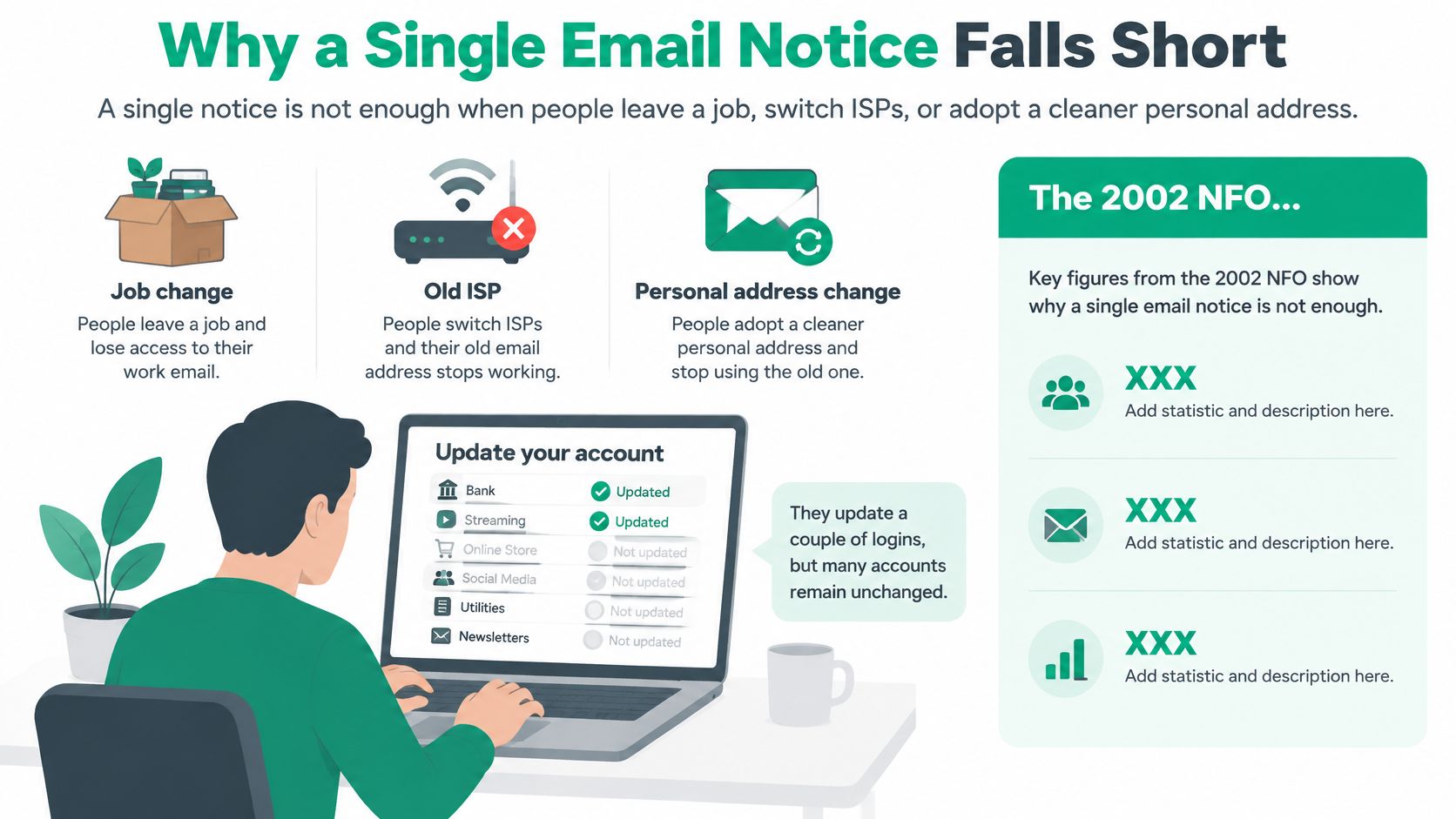
Say you leave a job and update your personal email on a few familiar sites. You may assume the rest of your accounts will catch up, but each organization still has its own record, and many won't know that the old address has stopped working. A company changing its public inbox faces a parallel problem: customers, vendors, and staff may keep writing to the address they already know.
The scale of this gap was visible in a 2002 NFO WorldGroup survey: consumers had registered with more than 12 websites on average, but people who changed an email address notified only about six. Twenty-two percent notified no websites at all, and more than half of participants said they'd lost touch with personal contacts or websites after changing an address, according to Destination CRM's report on the NFO WorldGroup findings.
These situations call for two different kinds of notice:
- Customer account change: Treat the email update as a security event. The service needs to verify control of the new inbox, preserve account access, and tell the old inbox's owner that a change is pending.
- Company inbox move: Treat it as a continuity problem. Tell customers, vendors, and internal teams what address is changing, what mail will move, and how long the old inbox will be monitored.
A good system doesn't depend on a customer remembering every account or on a company announcement being seen by every contact. It uses a pending address, sends the right message to each inbox, and gives the recipient a clear way to act. The failure to avoid is sending a notice only to the newly typed address: if someone else initiated the change, the person who still owns the old inbox may never learn that their login is moving.
Copy for Each Inbox Including an Unauthorized Change
Use a separate message for each purpose and recipient. The confirmation proves access to the new inbox. The alert gives the old inbox's owner a chance to respond. The completion note confirms what happened after verification. A company announcement explains a public inbox transition, not a customer account update.
| Message | Sent to | Subject example | Must include | Never include |
|---|---|---|---|---|
| New-address confirmation | New inbox only | Confirm your email for [Store Name] | Single-use code or link, expiry in minutes, brand, timestamp, type-the-code path | Password, order history, full old address |
| Old-address security alert | Previous inbox, with a separate nonce | A change to your email was requested | Request time, address still pending, how long to stop it, known site or app, reversal identity check | New email address, payment details, order contents |
| Completion notice | New inbox after confirmation; optional short alert to old inbox | Your email address is updated | Effective time, which records moved, where to review the account | A second reset link or any secret |
| Company address announcement | Customers, vendors, internal owners | We are moving to a new email on [date] | Old address, new address, last day old inbox is monitored, which notices switch | Any request to reply with credentials or payment data |
The new inbox gets a proof request
Subject: Confirm your email for [Store Name]
We received a request to use this email address for your [Store Name] account at [time]. Enter this single-use code on the account page: [code]. It expires in [expiry window]. If you can't use the code, you can enter it manually after signing in at [known website].
Keep the message focused on proving control of the new inbox. Include the service name and the request time so the recipient can recognize the event, plus a manual code-entry option for people who prefer not to use a link. Don't include a password, order history, or the full old address.
The old inbox gets the security alert
Subject: A change to your email was requested
We received a request to change the email on your account at [time]. The new address isn't active yet. If you didn't request this change, sign in through [known website or app] within [reversal window] to stop it. We'll verify your identity before reversing the request. Don't reply with passwords or codes. If you can't access either inbox, contact us through [safe support channel].
The alert should state how long the recipient has to stop the change and what identity check is needed. Explain whether the service will sign out active sessions or remove saved payment details when it detects an unauthorized change, and offer a safe support route for someone who controls neither inbox. Keep the new address, payment information, and order contents out of this message. The old inbox may be shared, compromised, or accessible to someone other than the account owner.
An unrecognized change to an account's recovery option may signal compromise, so the message needs to explain how to respond rather than announce that an email was updated. Mailgun's guidance on notices for email changes supports sending separate confirmation and security messages, avoiding personal details in the old-address alert, and directing customers to a trusted recovery path. For practical ways to reduce the risk of exposing sensitive customer information, see ServeApps' guide to customer data protection.
The completion note and company announcement do different jobs
Send the completion notice only after the new inbox is confirmed. State when the change took effect and which records changed, such as login and receipt delivery. If you mention marketing email, make clear that existing preferences still govern it. Don't add another password-reset link or ask the customer to disclose a code.
For a company-wide change, say which address is changing, when the old inbox will stop being monitored, and whether invoices, support requests, or other messages will move. Don't mix a public announcement with an account-security alert: one is a practical routing update, the other is a warning about an action that could affect account access.
How to Verify an Email Change Before It Goes Live
The new address should stay pending until the customer proves they can receive mail there. That separation gives the account owner a chance to stop an unauthorized change and gives the service a safe way to handle a typo or failed delivery.
Require fresh authentication. Before making the address field editable, ask the signed-in customer to complete step-up authentication, preferably MFA. This helps prevent someone who has taken over an unattended session from changing the account's recovery destination.
Save the new address as pending. Keep the existing address as the live contact while verification is in progress. Don't use the unverified address for login, receipts, or password resets.
Send a time-limited, single-use token to the new inbox. The token proves access to the destination. A short expiry limits how long an unused token remains useful; allowing code entry from the service's known website gives customers an alternative to clicking a message link.
Notify the old inbox at the same time. Use a separate nonce for this alert, and don't put account secrets in it. If a new request arrives, invalidate the previous token and rate-limit repeated attempts so several active links can't create confusion.
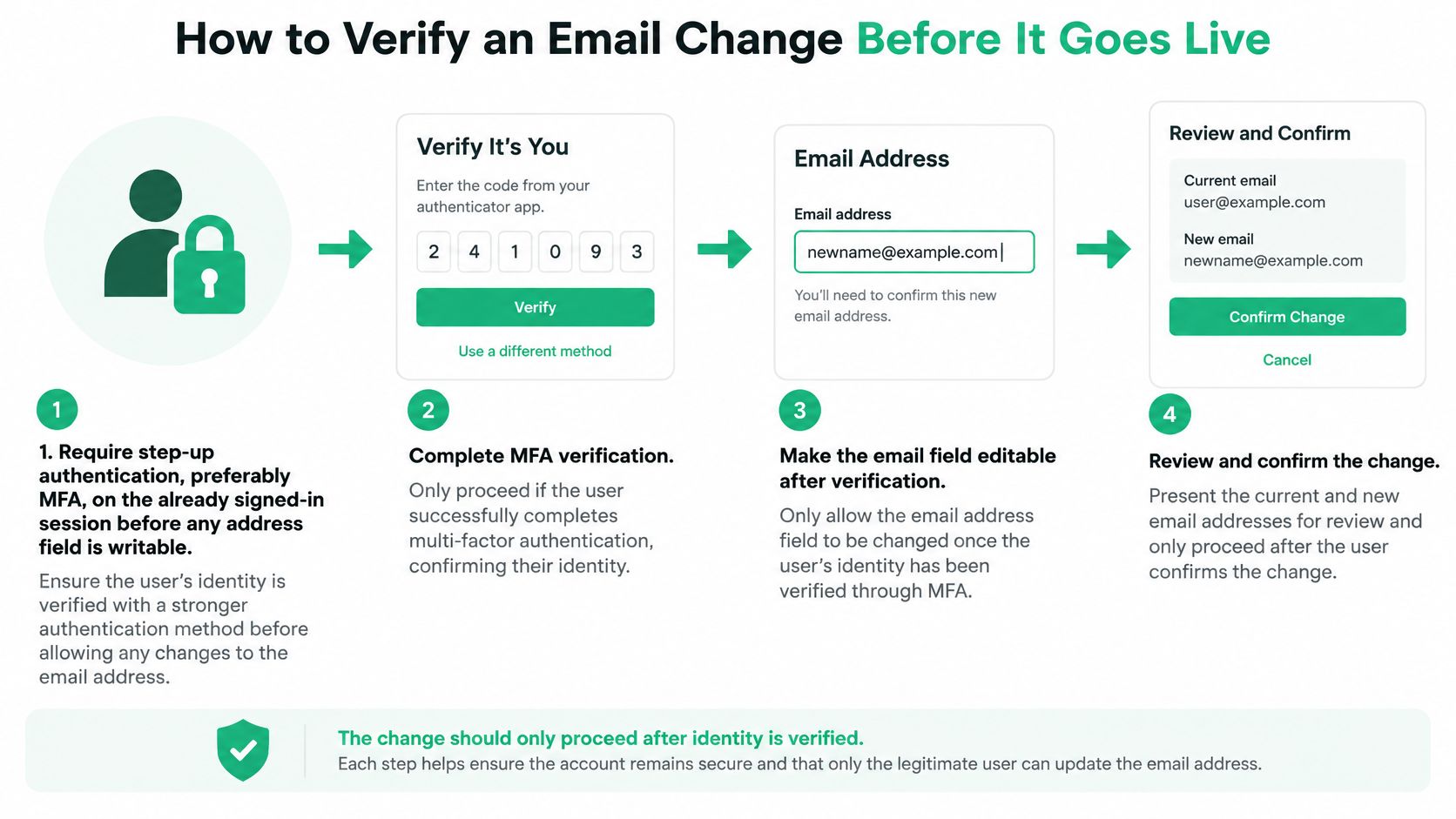
Commit only after confirmation. Once the new inbox confirms, update the address and create one canonical audit event. Record the actor, authentication strength, IP or device context, timestamps, delivery status, and whether confirmation succeeded. This provides a coherent account of the change if support or security staff need to investigate it.
Synchronize dependent systems together. Update the identity provider, CRM, billing records, support desk, subscription settings, reply-to fields, and marketing permissions as part of the change. Don't switch the sender address before reply routing works, or replies may disappear into a mailbox no one monitors.
Send a completion notice. Tell the customer the change is effective and which records moved. Retain the old address as a recovery or alert destination for a defined period, and tell the customer how long that protection lasts.
Roll back if delivery fails. If the new address bounces or the token expires unused, do not replace the working contact without notice. Clear or hold the pending value and offer a non-email route, such as confirmation in the signed-in account or support identity checks.
Keep more than one notification route. NIST guidance recommends maintaining at least two notification addresses and sending security-event notifications to stored non-postal notification addresses. A workflow that alerts only the new inbox can let an attacker move the login while the legitimate owner remains unaware. The NIST Digital Identity Guidelines also support tying notifications to the specific security action and recording its outcome.
Before launch, write down the token expiry, the person responsible for rollback, and every system in the address inventory. For teams that need to catch formatting problems before they reach the verification flow, an email address validation tool can be one useful check, but it can't replace inbox confirmation.
Deliverability Checks Before You Hit Send
A single account-change email is transactional, not a bulk campaign, but it still relies on a sender domain that inbox providers can authenticate and trust. Configure SPF, DKIM, and DMARC alignment, use a stable From name customers recognize, and include plain text alongside HTML. Monitor suppressions and bounces: a message that never arrives must not be treated as successful verification.
Mailgun's 2025 deliverability research reported that 53.8% of surveyed senders used DMARC in 2024, up from 42.6% in 2023. The practical lesson for a transactional notice is to test sending and monitoring as part of the workflow, not just polish the copy. An email tester can help you inspect a message's authentication and presentation before customers depend on it.
If the new address is mistyped or undeliverable
Don't activate an address just because the customer submitted it. If the verification message hard-bounces, or the customer never uses the token, keep the old address as the live contact and clear or hold the pending value. Provide another recovery route, such as an authenticated confirmation in the account while the customer is signed in, or support staff verifying identity through an established process.
That hold state prevents a typo from cutting off receipts and password recovery. It also gives support a clear status to explain: the request is pending, the old address remains active, and the customer needs to verify or restart the change. A bounce is not proof that the customer intended to abandon the existing address.
- Confirm the sender: Authenticate the sending domain and check that SPF, DKIM, and DMARC align.
- Make it recognizable: Use a stable From name and include a plain-text version of the message.
- Protect the workflow: State the expiry and queue the old-inbox alert with a different nonce.
- Keep secrets out: Don't put passwords, order details, or payment information in either message.
- Own the failure path: Assign someone to monitor bounces and document who can roll back the request.
A customer changing an account address is managing a security event. A company changing its public contact address is managing continuity and consent for messages such as invoices, legal notices, subscriptions, and data-processing communications. Those processes share sender-authentication checks, but the public announcement also needs clear routing instructions and a monitored transition.
Timing Windows from Request to Retirement
The customer workflow should move quickly through verification without making the address live too soon. A company inbox move takes longer because staff need to identify every place the old address appears, test mail flow, and give people time to update their records.
| Stage | When | Who | Success check |
|---|---|---|---|
| Step-up authentication | At the request | Signed-in customer | MFA or equivalent passed; new address still pending |
| Token to the new inbox | Within minutes | New address only | Single-use token used before expiry; older tokens killed |
| Alert to the old inbox | Same window as the pending change | Previous address | Different nonce; new address absent from the body |
| Hold if undeliverable | Until verification or documented rollback | Account system | Old address remains the live contact |
| Company parallel period | Days to a few weeks with forwarding | Monitored old mailbox | Test mail aligns SPF, DKIM, and DMARC; replies hit the new box |
| Commit and audit | Only after the new inbox confirms | Identity and downstream systems | One audit event; CRM, billing, and support updated together |
| Retire old login use | After the recovery window you published | Named owner | Bounces and missed replies are clean |
For a customer account, start step-up authentication when the request is made. Send the new-inbox token and old-inbox alert in the same window, then commit after the customer confirms. Tell the customer in the notice how long the token remains valid and how long the old address can be used to stop the request. Those are different clocks: token expiry protects the verification step, while the published recovery window gives the old address's owner a chance to respond.
A company moving its public inbox needs a parallel period measured in days or weeks, not an immediate switch. Inventory the identity provider, CRM, billing system, support desk, subscription records, marketing permissions, calendar routing, reply-to fields, and third-party portals. Keep the old mailbox monitored or forwarding while the team verifies the new address and checks test messages, bounce handling, replies, unsubscribe paths, and automated notifications.
The MediaPost report on email-address switching describes why a partial migration can strand contacts: people in the cited survey had registered with more than 12 websites on average but notified only about six when changing addresses. Notify high-value customers, partners, and internal owners first, then monitor delivery failures and missed replies daily.
Don't treat open rate as proof that the move worked. Track verified delivery, replies reaching the new mailbox, hard bounces, unresolved references to the old address, and incidents detected through old-inbox monitoring. Name the rollback owner and retirement criteria before cutover. Common failure points include switching the sender before reply routing is ready, losing conversation context, forgetting transactional systems, and closing the old inbox on announcement day.
Choose the Go-Live Path and the Rollback Owner
Start by identifying which address is changing. A company inbox move needs an inventory of identity, CRM, billing, support, subscriptions, reply-to settings, and third-party portals. Keep the old mailbox monitored or forwarding during the parallel period, test the new route, and contact high-value customers, partners, and internal owners before making a public announcement. Name the person who can retire the old inbox, and make that decision depend on clean bounces and missed replies.
A customer account change needs two messages and a pending value. Send the token to the new inbox and the security alert to the old inbox in the same request window. Keep the new address inactive until the customer uses the single-use code, publish the reversal window in the alert, and create one audit event only after confirmation. Clear or hold the pending value if delivery fails.
For either route, a bounce is a reason to hold, not a successful update. Write down the expiry length, rollback owner, and systems included in the migration before launch. Clear ownership makes it possible for support and operations to act consistently if a customer can't verify or a company message still reaches the retired inbox.
For Shopify merchants managing customer updates alongside post-purchase operations, ServeApps' customer profile management guide offers related guidance on keeping customer information organized.
ServeApps builds Shopify-native tools for post-purchase operations, including SelfServe for customer order edits and contact updates under merchant-defined rules. Visit ServeApps to explore how its tools can support a smoother customer self-service experience.

Shopify Store Credits: Issuing, Redeeming and Accounting
Learn what Shopify store credits are, how they differ from gift cards and refunds, and how to issue, redeem and account for them.
Read more →
Can You Have Multiple Stores on Shopify? Plans and Limits
Can you have multiple stores on Shopify? Yes, through organizations or Plus expansion stores. Compare plan limits, eligibility and setup tips.
Read more →
Product Customizer App Shopify: Choosing the Right Tool
Compare native and third-party product customizer app shopify options on speed, theme support, variant mapping and SKUs before you install one.
Read more →