

A customer has returned an item, your support team wants to offer store credit, and you're trying to work out what happens next. Where will the customer see the balance? Can they spend it in your physical store? And does keeping the money mean you can count it as revenue?
Shopify store credits are both a customer payment balance and a financial obligation. A reliable process needs more than an issue-credit button. You need the right customer record, a predictable redemption experience, and reports that explain what you still owe.
Table of Contents
- Shopify Store Credit Compared With Gift Cards and Refunds
- When Store Credit Beats a Cash Refund
- How to Issue Store Credit to a Customer
- How Customers Redeem Store Credit Online
- Manual, Refund and App Options for Store Credit
- Accounting for Store Credit as a Liability
- Store Credit Pitfalls at the POS and in Mixed Carts
- Set Your Store Credit Policy and Audit It Monthly
Shopify Store Credit Compared With Gift Cards and Refunds
Store credit is a balance held in a customer's Shopify account and spent as a payment method at checkout. You can issue it directly or create it through a refund, keeping the value available for a future purchase instead of returning every eligible amount to the original payment method.
Where does the customer use it? Shopify's store credit documentation describes redemption through authenticated customer accounts or Shop Pay, plus Shopify POS and the Shop channel. Draft orders and orders being edited are an unreliable case, so train staff not to promise credit will apply there.
Store credit, gift cards and cash refunds at a glance
| Feature | Store credit | Gift card | Cash refund |
|---|---|---|---|
| Ownership | Tied to one customer or company location | Spendable by whoever holds it | Returned to the original payment method |
| Expiry | Set per issuance, or none | Store-wide default setting | Not applicable |
| Where it can be spent | Signed-in checkout, Shop Pay, POS and Shop channel | Eligible purchases under the store's gift-card acceptance rules | Money returns to the card or account it came from |
| Draft and edited orders | Not reliably supported | Accepted as payment under the store's gift-card rules, including staff-collected payments | Not applicable |
| Accounting effect | Outstanding liability until spent or validly expired | Track unredeemed value separately from store credit | No store-credit balance remains after refund |
The practical difference is who controls access to the value. Store credit belongs to a specific account. A gift card is closer to cash in an envelope: it can be handed to someone else, and whoever presents it can spend it. A cash refund hands control back to the customer entirely, because the money leaves your books and no purchase from you is needed to use it.
For a return involving only part of an order, first establish the eligible amount. This guide to what a partial refund means helps separate the refund calculation from the decision about how to deliver it.
For business purchasing, issue credit to the company location. Shopify shares location-level credit among that location's authorized buyers, so any of them can spend the same balance.
Both issued credit and unredeemed gift cards are money you owe customers. Keep them in separate accounts so your liability reporting shows exactly what each instrument still owes.
Practical rule: Choose the instrument by who should control the value: credit when one customer should carry a balance, a gift card when the value may change hands, a refund when the money should leave your books entirely.
When Store Credit Beats a Cash Refund
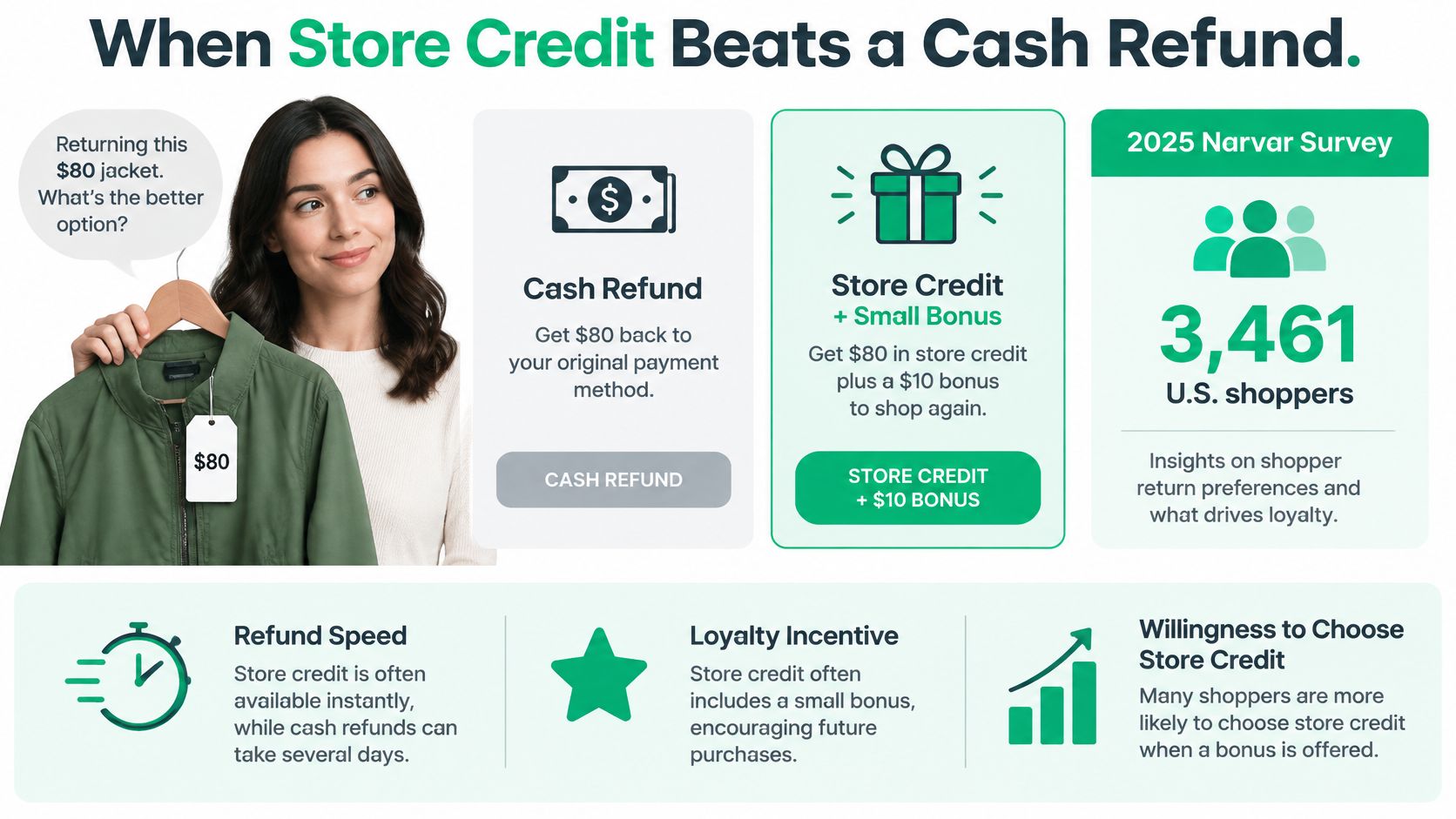
Say a customer returns a jacket because it fits badly. They still like your products, so you offer a choice between getting their money back and receiving store credit with a small bonus.
In a 2025 survey of 3,461 U.S. shoppers, 54% said they would choose store credit over a cash refund when offered a small bonus, according to Narvar, as summarized by Terms and Conditions Template. That supports offering a choice, not assuming every customer prefers credit.
The comparison below illustrates the decision.
Three outcomes to consider
- A replacement purchase is likely. In a hypothetical offer, an $80 return could become $88 of credit with a 10% bonus. The customer gets extra purchasing value, while you accept the cost of the bonus in exchange for another opportunity to serve them.
- You're repairing a service problem. A hypothetical $15 goodwill credit after a late delivery can acknowledge inconvenience without reversing the original payment. It shouldn't replace a refund the customer is entitled to receive.
- The customer never returns. You've retained cash, but you haven't secured another sale. The outstanding credit still needs financial tracking until it's redeemed or otherwise validly resolved.
Store credit belongs within a broader ecommerce customer retention strategy, not a policy designed to make refunds difficult.
Before offering it, ask: Will this customer plausibly buy again? Does the problem call for money back? Is the bonus clearly explained? If those answers are uncertain, a larger incentive won't fix the underlying mismatch.
How to Issue Store Credit to a Customer
Start with the customer's identity and the reason for the credit, not just the amount. A correctly calculated balance attached to the wrong profile still creates a support problem.
Use this workflow to keep issuance consistent.
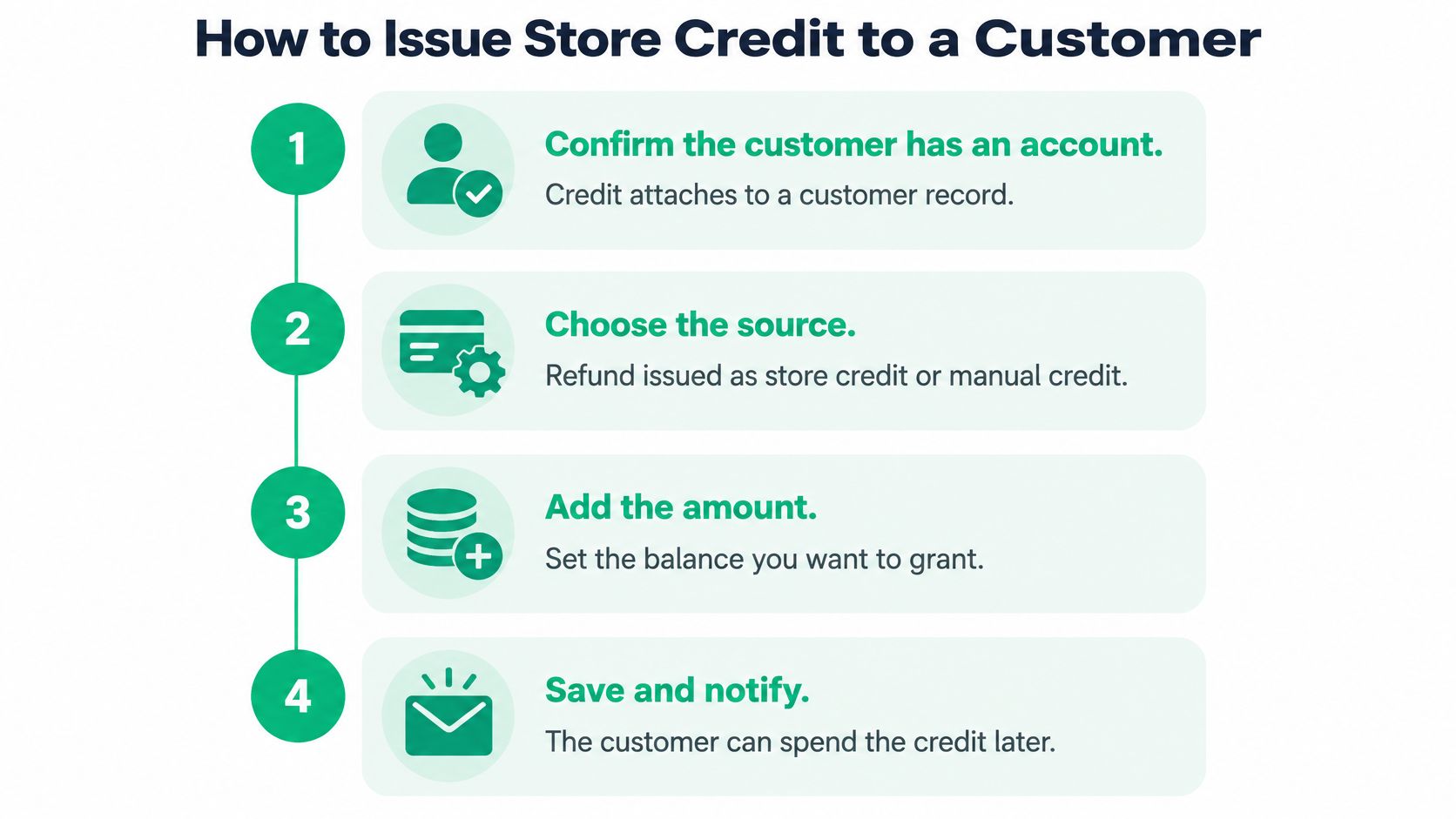
Follow a controlled issuance process
Confirm the customer record. Find the customer in Shopify admin and verify their email against the order or support conversation. A customer record can exist after a guest purchase, but the buyer will need an authenticated redemption experience later.
Choose the source of the credit. For a return, use the refund workflow and select store credit where available, either alone or alongside a refund to the original payment method. For goodwill or service recovery, issue credit directly from the customer record.
Enter the amount and currency. For a partial return, calculate the refund from the eligible items rather than copying the entire order total. Check discounts, taxes, and any other refundable components before confirming the amount.
Make an explicit expiry decision. Set a permitted expiration date or leave the issuance open. Don't assume another credit's deadline automatically applies to this one.
Document the reason. Record whether the issuance is refund credit, promotional credit, or service recovery. If the issuance interface doesn't provide the note field you need, keep the explanation in a linked customer note or support record.
Verify the saved movement. Reopen the customer record and confirm the balance changed in the intended currency. Match the issuance to its transaction entry so you can distinguish a completed action from an unsaved attempt.
Notify the customer. Explain why the credit was issued, where they can view it, how they can redeem it, and any applicable deadline. Include enough context that another support agent can understand the promise without reading the whole conversation.
A successful issuance has two checks: the correct customer can access the balance, and your team can explain the transaction.
Before retrying an issuance after an interruption, inspect the record. Otherwise, an agent may create a second credit while trying to confirm the first.
For team training, keep a short approval checklist beside the workflow: customer identity, credit reason, eligible amount, currency, and expiry decision. This gives staff a consistent stopping point before they commit value.
How Customers Redeem Store Credit Online
Customers must authenticate through customer accounts or Shop Pay to access store credit online. Entering an email during guest checkout isn't the same as signing in to the account that owns the balance.
Shopify's store-credit account documentation describes each balance as a non-transferable, customer-owned monetary account denominated in a specific currency. That means support should check both identity and currency before treating a missing payment option as a checkout fault.
Give customers a clear sequence
- Sign in first. Use the store's customer-account sign-in experience or an authenticated Shop Pay session associated with the credit recipient.
- Add eligible items and proceed to payment. Make sure the purchase uses a supported checkout workflow.
- Select store credit when it appears. The balance is a payment option, not something to paste into a discount-code field.
- Review the amount applied. If the balance doesn't cover the purchase, pay the remainder with another method where checkout permits it.
A useful support message is simple: “Sign in using the email associated with your credit, then proceed to checkout and look for store credit under payment options.” Avoid promising that any email address the customer uses will locate the same balance.
Check configuration before troubleshooting the customer
For a missing balance, confirm the customer record and relevant currency account, then inspect whether redemption is enabled. Don't promise that credit can fund a draft-order payment or an additional payment on an edited order.
For developers, balance visibility also depends on configuration and access. Shopify's Customer API doesn't return store-credit accounts when the shop has disabled redemption, so an empty response doesn't necessarily mean no credit exists.
Reading balances requires the customer_read_store_credit_accounts access scope. Apps using the Customer Account API must also satisfy Shopify's protected-customer-data requirements, so treat a balance display as customer financial information rather than a public storefront field.
Manual, Refund and App Options for Store Credit
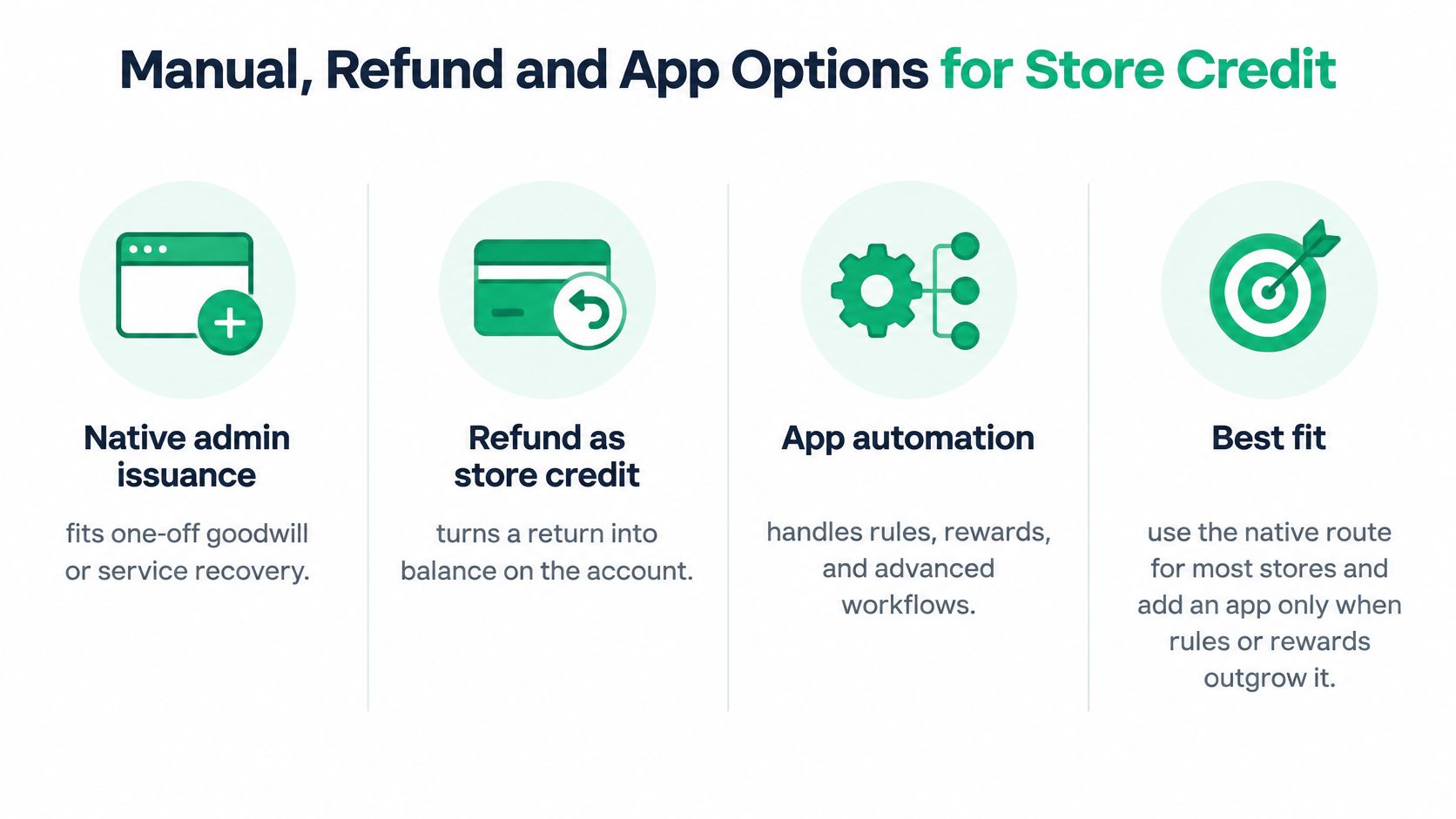
Use Shopify's native route first. Add an app when recurring rewards, eligibility rules, or operational volume justify another system, not because store credit sounds like a loyalty feature.
This visual separates direct issuance, refunds, and automation.
Store credit setup routes compared
| Option | Expiry control | Reporting | Best use |
|---|---|---|---|
| Native admin issuance | Per-issuance date or none | Store credit transactions and outstanding balance reports | One-off goodwill or service recovery |
| Refund to store credit | Per-issuance date or none | Recorded against the customer balance | Returns the customer will reuse |
| Loyalty or referral app | Set through the app's supported rules | Verify native transaction records and app reward history | Ongoing rewards and referrals |
| Custom build on the Customer API | Set by your code through supported issuance operations | Set by your code, reconciled to native records | Complex rules across many customers |
Manual issuance requires little setup but puts the decision in a staff member's hands each time. Refund issuance keeps the action close to the return, making it easier to connect the customer's balance with the reason it exists.
Apps need a different evaluation. Confirm whether the app issues native Shopify store credit, its own points, or discount codes. Those aren't interchangeable, and a customer-facing label such as rewards doesn't explain the underlying payment behavior.
Choose an owner for issuance
For custom development, separate balance reading from balance creation. Customer Account API access for displaying balances isn't, by itself, a complete issuance system; developers must identify the supported operations and permissions for changing balances.
Evaluate effort against your monthly workload rather than choosing an arbitrary transaction threshold. Ask who approves exceptions, monitors failed actions, and prevents a refund workflow and reward automation from both issuing value for the same event.
Use the video as an additional walkthrough while assessing your workflow.
Choose one primary issuance route for each credit type. Keep the other routes for documented exceptions.
Accounting for Store Credit as a Liability
Unused store credit represents an obligation to customers, not automatically earned revenue. Keeping cash in your bank account doesn't remove the promise to provide purchasing value later.
Shopify's store credit guidance identifies dedicated transaction and outstanding-balance reports, supports per-issuance expiry decisions, and lists store credit as a payment provider in payment reports. Its transaction records provide an audit trail for issuance, redemption, and expiration.
The ledger view helps distinguish retained cash from an outstanding obligation.
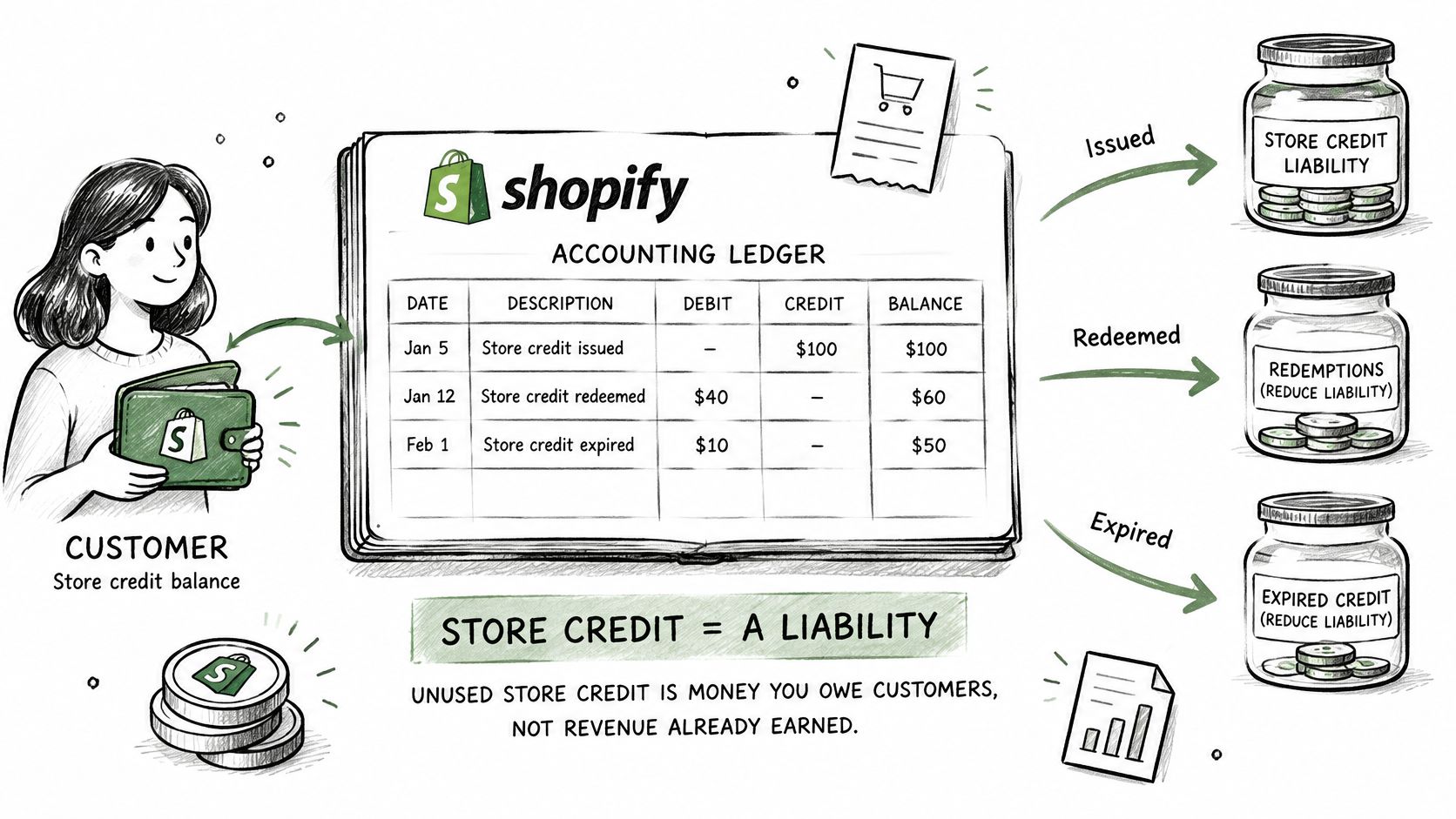
Reconcile movements to the closing balance
Consider a hypothetical monthly reconciliation:
| Movement | Example amount |
|---|---|
| Opening outstanding balance | $10,000 |
| Credit issued | +$3,000 |
| Credit redeemed | −$2,200 |
| Credit validly expired | −$300 |
| Closing outstanding balance | $10,500 |
The calculation explains how the opening obligation becomes the closing obligation. In this example, the closing outstanding credit is the amount finance needs to reconcile to the relevant liability account, subject to the business's accounting policy.
Don't treat every difference as an expense or write-off. Investigate timing, missing transactions, currency grouping, and incorrect issuance before adjusting the ledger.
Shopify store credit reports and what each answers
| Report | What it shows | How to use it |
|---|---|---|
| Store credit transactions | Every issuance, redemption and expiry movement | Audit each balance change back to its source |
| Outstanding store credit balance | Unused credit still owed to customers | Measure the liability to carry on the balance sheet |
| Payment reports | Store credit listed as a payment provider | Reconcile it alongside other tender types |
Separate the reasons behind the balance
Segment refund credit, promotional credit, and service-recovery credit in your working records. Their redemption patterns and accounting treatment may differ, even when customers spend them through the same payment option.
For multiple markets, reconcile currency balances separately before translating them into your reporting currency. Keep the transaction export, reconciliation, and explanations for adjustments together.
If your team needs help establishing ledger treatment or reviewing expired balances, Hire Accountants from HireAccountants is a resource for finding accounting support. Give the accountant the issuance categories and transaction history, not just a total from the customer dashboard.
Store Credit Pitfalls at the POS and in Mixed Carts
A customer wants to use some credit and save the rest, but the cashier can't enter a custom partial amount. Shopify POS applies the maximum possible balance, so the conversation must happen before the sale is tendered.
Shopify's POS redemption guide also confirms that gift-card products block store-credit redemption and that redemption isn't available offline. These are checkout constraints, not permissions a cashier can override.
Store credit situations that fail at the POS and in mixed carts
| Situation | What happens | Fix |
|---|---|---|
| Customer wants to keep part of the balance | Staff can't apply a custom partial amount; the maximum possible balance is applied | Explain the amount before tendering; use another payment method if necessary |
| Cart includes a gift-card product | Store credit can't be applied to the sale | Remove the gift-card item or use another payment method |
| POS terminal is offline | Redemption is unavailable | Wait for connectivity or take another tender |
| Guest checkout online | Balance can't be accessed | Ask the customer to sign in through customer accounts or Shop Pay |
| Staff can't see the balance | Customer may not be linked to the correct store profile | Link and verify the profile before proceeding |
Give cashiers a repeatable procedure
- Identify the buyer. Link the correct customer profile before building the cart.
- Inspect the items. Check for gift-card products before offering credit as tender.
- Check connectivity. Confirm the terminal is online.
- Explain the applied amount. Get agreement before completing payment.
- Confirm what remains. Communicate the remaining balance and record the support context if needed.
Don't promise a custom partial redemption at POS. Explain the actual amount Shopify will apply.
Give refund-credit recipients a short written explanation of where their balance works. The return conversation is the best time to prevent a later checkout surprise.
Set Your Store Credit Policy and Audit It Monthly
Separate promotional credit from refund credit before issuing more balances. A campaign incentive and money owed after a return shouldn't automatically share an expiration rule.
Shopify's store credit overview tells merchants to check local law before setting expiration dates. Use no expiry as a conservative starting point for refund credit until you've confirmed the applicable rules, rather than assuming a promotional deadline is lawful.
Put the policy into practice
- Define each category. Write a short policy covering refund, promotional, and service-recovery credit, including permitted expiry rules and approval responsibility.
- Align customer promises. Update your Shopify return policy so customers understand when credit is optional and what they're accepting.
- Review exposure monthly. Reconcile outstanding balances, estimate likely redemption using your own history, and retain the closing obligation in your financial review.
- Audit expirations. Match expired amounts to their issuance reason and approved policy.
- Train support and POS together. Give both teams the same instructions for maximum POS tender, gift-card carts, and offline terminals.
Our SelfServe app lets customers edit Shopify orders after checkout from their order status page. Document order-edit settlement separately from store-credit issuance so staff don't confuse the two workflows.
This week, publish an expiry rule for each credit category and schedule the monthly finance review. If you need help with our apps, reach us through the chat bubble in any ServeApps app opened in your Shopify admin.
ServeApps offers Shopify-native apps for self-service order changes, configurable cart drawers, and popup upsells. Visit ServeApps to explore the tools and decide how they fit alongside your store-credit policy and post-purchase workflow.

Can You Have Multiple Stores on Shopify? Plans and Limits
Can you have multiple stores on Shopify? Yes, through organizations or Plus expansion stores. Compare plan limits, eligibility and setup tips.
Read more →
Product Customizer App Shopify: Choosing the Right Tool
Compare native and third-party product customizer app shopify options on speed, theme support, variant mapping and SKUs before you install one.
Read more →
What Is a Partial Refund? How It Works on Shopify
Find out what is a partial refund, how Shopify calculates it, when to issue one, and how it affects inventory, taxes and payouts.
Read more →