
Only 62% of consumers said their issue was resolved the first time they contacted customer service, according to a 2024 XM Institute study of 23,730 consumers across 23 countries and regions. Turn that around and roughly 38% needed another contact, gave up, or never felt the problem was fully fixed.
Most support teams are good at answering. Fewer can prove the answer landed. That difference decides whether a customer buys again or leaves, and it shows up most clearly in post-purchase work: an address that has to be saved before the parcel ships, a size that has to change before fulfillment, a cancellation that has to be stopped before the label prints.
Table of Contents
- What Counts as a Resolved Customer Problem
- The Six-Step Resolution Process
- Communicating So Customers Do Not Repeat Themselves
- Which Problems Self-Service Can Fix and Which Need a Person
- Escalating Without Losing Context
- Worked Example of One Order Change
- Following Up and Measuring Whether the Problem Stayed Solved
- Confirm Your Resolution Workflow This Week
What Counts as a Resolved Customer Problem
A customer asks to swap a medium for a large before the warehouse picks the order. The agent replies, sets the ticket to Closed, and moves on. The next morning the order page still shows a medium. That ticket was closed. The problem was not resolved.
Ticket queues usually treat a status change as the finish line. Customers treat the finish line as the thing they asked for, visible on the order. The gap between those two moments is what brings the same person back.
Separate three states. They get blurred on a busy queue, and only one of them holds up the next morning.
| State | What it means on an order | Where the fix usually slips |
|---|---|---|
| Closed | The conversation ended and the ticket left the queue | The agent answered, but the order record never changed |
| Resolved | The requested outcome happened: variant swapped, address saved, refund issued | A later step, such as a payment difference or a fulfillment hold, is still open |
| Verified | The order record was checked and nothing is left pending | Nobody looked, so a stale line item survives until the customer writes again |
Closed is a label on your side. Resolved is an action on the order. Verified is the check that the action stuck.
The working rule: a problem is resolved when the customer can see the fix in the order and has no reason to write back.
A parcel scan works the same way. "Out for delivery" is not the box on the doorstep, and a photo of the doorstep is what settles the argument. Ticket status is the scan. The order record is the photo.
A blended first-contact rate is a weak scoreboard for this work. A size swap and a billing fault are not the same job, and centers differ widely in what they count as done. Compare stores that handle the same kinds of order edits, not a cross-industry average with no shared definition of finished.
A channel can collect the request and still leave the order untouched. Reporting on Gartner's customer service research found that only 22% of customers resolved an issue completely within a company's own channels in early 2025. The chat window does not swap the variant, save the address, or issue the refund.
Check the order, not the ticket. If the new size is on the unfulfilled line, the address matches what the customer typed, and any price difference has been collected or refunded, the fix held. If any of those is still pending, the problem is open, whatever the status field says.
The Six-Step Resolution Process
A resolution process earns its keep when the same request produces the same outcome at 9 a.m. on a Tuesday and at 11 p.m. on a Sunday. Six steps do that, and each one exists to block a specific failure.
Write the rules down instead of holding them in one person's head. A customer service standard operating procedure that names who can approve what, and in which order state, is what stops an agent improvising a goodwill gesture that inventory then has to absorb.
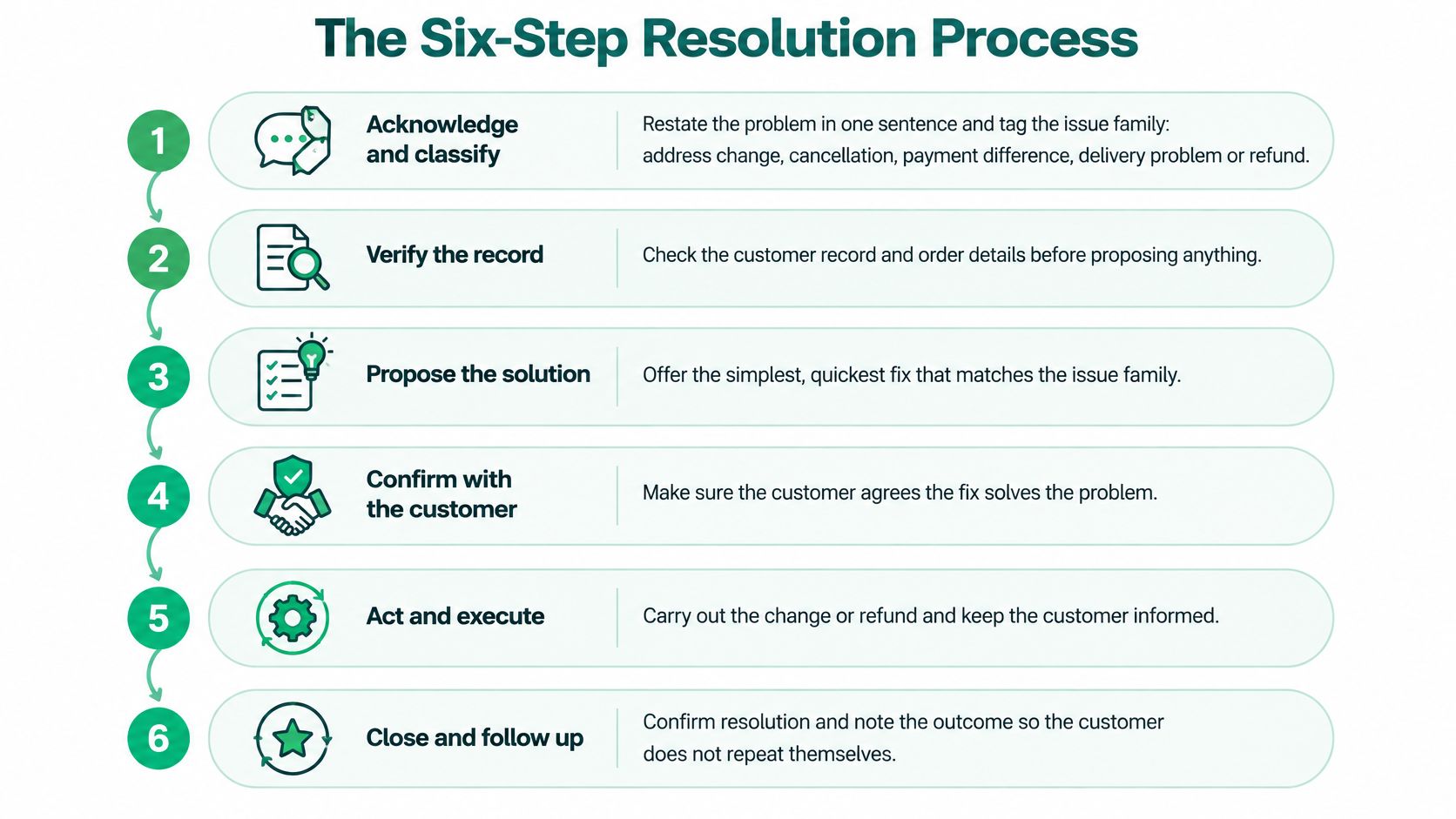
- Acknowledge and classify. Restate the request in one sentence and tag the issue family: address change, cancellation, payment difference, delivery problem, refund. The tag decides which eligibility rules apply. A vague tag like "order problem" costs more later than it saves now.
- Verify the record. Pull the original order before touching anything: fulfillment status, payment status, existing tags, earlier edits. Most reopened cases begin with a change made against a stale view, where someone edited an order that had already left the warehouse.
- Check eligibility. Confirm the request sits inside the policy window and within stock and carrier limits, then pick the path: self-serve, agent-handled, or approval-only. Skip this and a kindness turns into an inventory problem.
- Act once, with the full change. Do the whole thing in one pass: swap the variant, adjust inventory on both items, recalculate shipping, collect or refund the difference. Two half-changes produce two confirmation emails and one confused customer.
- Confirm the result. Re-read the order state and check it matches what you promised, then send one message with the outcome, any amount charged, and the next date for anything still pending. This is the step teams cut when queues build, and it's the one that prevents the follow-up.
- Schedule the follow-up. Set a check window and watch for recontacts on the same order. For shipping and payment issues, three to seven days is usually enough to catch a failure before the customer has to chase it.
What a Finished Fix Looks Like
The customer opens their order status page and sees the new size, the new address, or the cancelled line. The confirmation names the order, the change and the amount, if there was one. Nothing sits in a pending state without a date attached to it. Then the case closes and nobody writes back.
That's the test to apply to your own process this week: take five recent "resolved" tickets and ask whether a customer could have seen the fix without emailing again.
Communicating So Customers Do Not Repeat Themselves
Most customers who write back aren't asking a new question. They're asking the same one again because the first answer never told them what happened. Harvard Business Review's analysis of more than 75,000 customer interactions found customers mainly value a simple, quick solution, and that effort spread across channels is associated with weaker loyalty. The same work introduced Customer Effort Score as a diagnostic that can predict loyalty better than satisfaction scores.

Effort compounds. A customer who repeats the order number, then re-explains the issue to a second agent, then chases a confirmation is doing procedural, cognitive and emotional work at once, and each layer makes the next one harder to tolerate.
Every reply needs to do four things: name the order and the issue in the first line, state what was checked, state what was done or what happens next, and give one next step with a time. Use four sentences, with no preamble.
Wrong: "Hi there! Thanks for reaching out. Could you please provide your order number so we can look into this for you?"
Right: "Order 1042 is still unfulfilled, so I've changed the size from S to M and charged the $6 difference to the card on file. You'll get a shipping confirmation by Thursday."
The second reply proves someone looked. It also means the customer has nothing left to ask, which is the point.
On frustration, name the effect rather than the feeling. "The delay means the order misses the birthday, and that's a real problem" lands; a scripted apology does not. When a customer moves from chat to email, the new agent must see the full history, including what the first agent already tried, or the customer starts over.
This short walkthrough shows the difference between a reply that closes a loop and one that opens a new thread.
Before sending any reply, check four things: the order number is present, the current order state is described accurately, the outcome or next action is stated, and there is exactly one next step with a date.
Which Problems Self-Service Can Fix and Which Need a Person
Not every request should be automated, and not every request needs a human. The sorting question is simple: can the change be completed and verified in the order system without judgement? If yes, a customer can do it. If the answer depends on policy, risk or a carrier's behaviour, a person owns it.
| Issue | Self-service fit | Needs a person when | Rule to set |
|---|---|---|---|
| Size or variant swap before fulfillment | Yes | Stock for the new variant is low or zero | Check stock before the option is shown |
| Address change before fulfillment | Yes | Address is flagged as high risk or the carrier cannot deliver there | Run an address risk check before saving |
| Adding an item to an unpaid order | Yes | Payment fails or times out | Revert to the original order if unpaid after 15 minutes |
| Cancellation before fulfillment | Yes, within the edit window | Order is in a gray zone or the customer is in a blocked segment | Block cancellations for set customer tags or route to approval |
| Payment difference after an edit | Yes | Automatic collection fails | Collect the difference or issue a partial refund automatically |
| Delivery delay or lost parcel | No, start with a carrier check | Always, after the carrier check | Route to an agent with tracking attached |
| Refund dispute or policy exception | No | Always | Agent reviews policy and order history |
Two safety rules keep that table honest. The first is that the system should only show actions valid for the order's current state and should validate constraints before the customer submits rather than after. A greyed-out option teaches the customer the rule; a submitted request that fails teaches them to email support.
The second rule is reversibility. Payment-dependent changes must be able to undo themselves. In SelfServe, if a customer edits an order but doesn't complete payment within 15 minutes, the order reverts to its original state automatically. When a total changes, the difference is collected or a partial refund is issued without staff involvement. That removes the worst outcome, which is an order edited on one side and a payment left unresolved on the other.
Segment rules matter as much as the mechanics. Cancellations can be blocked for named customer groups using tags such as wholesale or black-friday-customers, so high-volume accounts go to a person who can weigh the margin.
Deflection is not resolution. A customer who is stopped from contacting support but doesn't know whether the change went through has been handled, not helped.
Where self-service sits in a wider stack is worth settling before you buy anything; this guide to customer self-service tools covers the surrounding decisions. The same sorting logic applies when a team adds AI live chat for service businesses, because a chat layer can only finish an issue it can verify in the order system. Keep delivery loss, refund disputes and anything emotionally charged with a person from the first message.
Escalating Without Losing Context
Cutting contact volume can lower resolution. If automation absorbs a request it can't finish, the customer doesn't disappear, they escalate with less patience and a worse story. A 2025 survey of consumers in the United States, United Kingdom and Canada found 72% were open to AI-powered interactions only when escalation to a human was available, and 74% preferred phone support for complex or urgent matters, according to Five9's research on balancing AI and human connection. The same research reported that 55% of consumers had to escalate an AI-handled issue to a person.
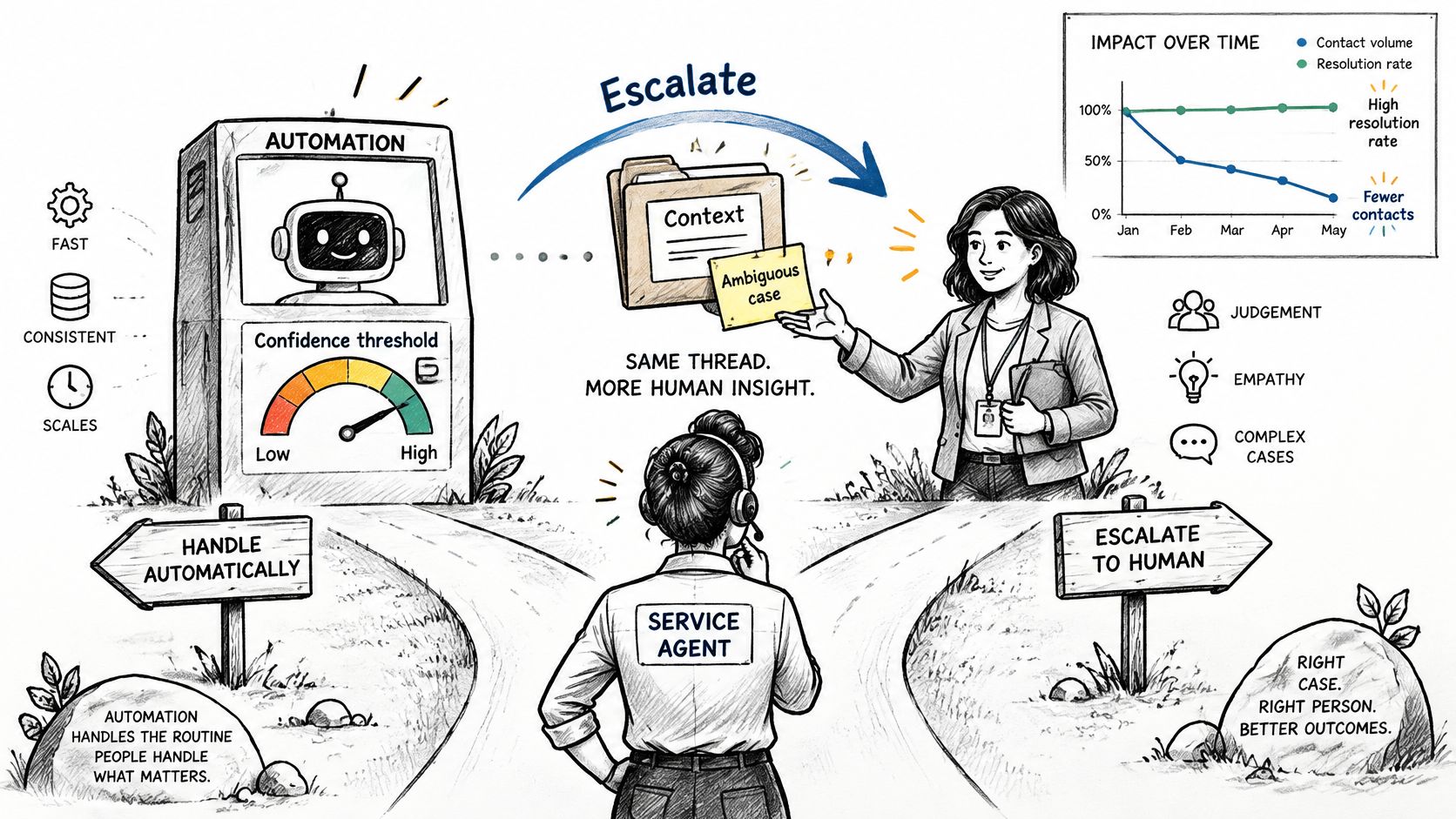
So set the stop points explicitly rather than leaving them to judgement under pressure.
- Outside policy or deadline: escalate immediately, with the order history attached.
- Payment mismatch after two retries: stop retrying and hand off, because a third attempt usually creates a duplicate charge.
- Urgent or emotionally charged language: a person replies next, even if the answer is "not yet".
- Fraud signal on the address or payment: the order freezes and a human decides.
- Any self-service flow that fails twice: the customer is moved to an agent rather than asked to try again.
What travels with the case matters more than the trigger. The handoff package carries the original order state, the exact change requested, what the customer already tried, the payment and inventory position, and the full conversation history. Without it, escalation just restarts the clock.
Cross-channel loss is the usual reason context vanishes. Reporting on Deloitte Digital's 2023 contact-center survey found that only 7% of multichannel contact centers could move customers between channels while preserving the relevant data, history and context. Adding channels is easy; carrying the story across them isn't.
Gray-area cancellations deserve their own path. Those requests can route to an approval queue where the team approves or denies with one click, and the customer receives a status update stating the reason. Give every escalated case one named owner and a response target, offer a fallback for customers who need another language, and review escalated cases separately so each handoff package can be checked after the case closes.
Worked Example of One Order Change
Here's the whole process on a single order, with the clock running.
09:14. A customer writes: "I ordered a small, can I get a medium instead?" The case is tagged as a size change before fulfillment, because nothing has shipped.
09:15. The agent pulls order 1042 and finds three facts that decide everything: status is unfulfilled, the card on file is still chargeable, and size M has stock.
09:16. Eligibility checks pass. The edit window is open and the variant exists, so the request doesn't need approval. Because this is a routine swap, the option is also visible in self-service, which means the next customer with the same question never writes in.
09:18. The change happens in one pass. The variant moves from S to M, inventory is adjusted on both sizes, shipping recalculates, and the price difference is collected on the card on file. No second ticket, no manual invoice.
09:20. The order state is re-read and matched against what was promised, then one message goes out: order 1042, size M, the amount charged, and the delivery window.
Days 1 to 3. The case stays open for recontacts on order 1042. If the card had declined, the edit would have reverted to size S after 15 minutes and routed to an agent with the payment failure attached, which is a very different outcome from a silent partial edit.
A healthy finish needs nothing further. The customer sees size M on the order status page, the charge matches the message, and there is no reason to email. That's the standard to hold every issue family to, not just this one.
Following Up and Measuring Whether the Problem Stayed Solved
First-contact resolution only means something once eligibility is set. Calculate it as eligible issues resolved on the first interaction divided by all eligible issues, with a stated recontact window and a resolution test rather than an agent's disposition code. SQM Group's guide to the FCR metric makes the point that the number is only usable for benchmarking or performance management after that definition work is done.
Eligibility is where teams cheat without meaning to. An order change submitted before fulfillment is an eligible case. A post-fulfillment cancellation or a payment failure follows different rules and shouldn't share the same denominator, because mixing them makes the rate move for reasons nobody can act on.
Report two numbers, not one: gross FCR across every contact, and eligible-case FCR on the defined subset. Then segment both by channel, issue family, journey and queue.
| Metric | How to calculate | What a low value points to |
|---|---|---|
| First-contact resolution (eligible cases) | Eligible issues resolved on first interaction divided by all eligible issues | Unclear permissions or missing order data |
| Repeat-contact rate | Contacts on the same issue within a set window divided by resolved issues | Fix not confirmed to the customer |
| Reopen rate | Reopened cases divided by closed cases | Payment or inventory mismatch after closing |
| Transfer rate | Transfers between teams or channels divided by all contacts | Missing context in the handoff |
| Customer Effort Score | Average effort rating from a short survey after resolution | Too many steps or repeated information |
| Resolved without channel switching | Cases finished in the first channel divided by all cases | Channel gaps or lost history |
For every change, record six things: the original state, the permitted change, the payment delta, the inventory effect, the shipping impact and the final confirmation. That record is what lets you reverse an incomplete payment-dependent edit instead of discovering it three weeks later in a chargeback.
Segmentation turns those metrics into causes. Low FCR on address changes usually points at permission logic or a status page customers can't find. Low FCR on payment adjustments points at reconciliation or timeout defects, not agent skill.
Review every reopened case before counting it as resolved. If it came back inside the window, it was never fixed.
The wider set of numbers that sit around resolution, including satisfaction and effort measures, is covered in this guide to customer satisfaction metrics.
Confirm Your Resolution Workflow This Week
A workflow is confirmed only when the same issue stays closed. This week, run five actions in order, and start from the tickets you already have rather than a new tool.
- Tag 30 days of tickets by issue family, using the same categories as the self-service table: address, variant, cancellation, payment, delivery, refund.
- Pick the two highest-volume families and mark which of the six steps is missing for each. The gap is usually confirmation or follow-up, not classification.
- Write a verification checklist and a handoff package template for those two families, covering original state, requested change, payment position and conversation history.
- Record a baseline for eligible-case first-contact resolution, repeat-contact rate and reopen rate before you change a single rule.
- Test one rule on one family, such as address changes before fulfillment, and compare against the baseline after two weeks.
Testing is cheap to start. SelfServe is free for up to 25 orders a month, which is enough to see whether a rule produces verified fixes or just quieter customers.
Hold that result before you widen it. If repeat-contact rates stay stable across two consecutive review windows, add the next family. If they do not, the problem sits in the workflow, and more issue types will spread it. A verified fix means the customer got the change, the order matches that change, and nobody had to reopen the case to patch payment or shipping.
ServeApps builds the order-editing layer that makes verified fixes possible on Shopify: SelfServe lets customers change a variant, swap an address or cancel an order inside rules you set, with automatic payment reconciliation and reversion when a payment doesn't complete. It's the difference between a customer writing in and a customer fixing it themselves inside the rules you set. Start with the free tier and see how many of your next 25 order-change tickets never arrive at ServeApps.

Free Gifts with Purchase: How to Plan Them Well
Free gifts with purchase explained: how they work, which gift types convert, and how to set rules that avoid refund disputes and margin loss.
Read more →
How to Update Customer Information in Shopify
Learn how to update customer information in Shopify: contact details, addresses, order changes and the checks that keep records accurate.
Read more →
Rules of Editing: When Customers Can Change an Order
Rules of Editing for orders explained: eligibility windows, permitted changes, payment safeguards and when to hand off to support.
Read more →