
It's twenty minutes after checkout, and a customer emails to say they ordered the medium but need the large. Your warehouse starts picking at the top of the hour. Between those two facts sits every decision that matters about post-purchase changes: who's allowed to touch the order, what happens to the money already authorized, and whether the pick list has already left your building.
Most stores treat this as a convenience toggle. It isn't. Rules of editing are a money and inventory policy, and the three parts that decide outcomes (the lock point, the payment step, and the handoff trigger) all fire on the same order, sometimes within the same minute. Write them separately and they'll contradict each other in front of a customer. Write them together and the awkward requests resolve themselves before anyone on your team opens a ticket.
Table of Contents
- Edit Windows and Lock Points at a Glance
- Which Changes Customers Can Make After Purchase
- Order Conditions That Block or Reopen an Edit
- How Payment Adjustments Stay Safe
- Edge Cases and When to Hand Off
- Set Your Editing Rules Before Customers Edit
Edit Windows and Lock Points at a Glance
| Rule type | Example setting | When edits lock | Best used for |
|---|---|---|---|
| Time since purchase | 60 minutes or 3 days | When the window closes | Low-risk corrections |
| Fulfillment lock | Default behaviour | When fulfillment starts | Protecting orders already being picked |
| Fixed window with fulfillment lock | 1 hour after purchase | Whichever comes first | A safe default for most stores |
| Third-party logistics pickup | Order handed to a 3PL | Immediately on pickup | Orders outside the merchant's warehouse |
| Product type | Standard items for 24 hours | Window end, or at purchase for blocked types | Custom-made and final-sale items |
| Order tag | selfserve_canedit added or removed | When the tag is removed | Manual control of a single order |
Why the earliest lock wins
The default most stores run is a fixed window plus the fulfillment lock, and the two aren't alternatives. Our order edits lock by default when fulfillment starts, and you can also set a fixed window such as one hour after purchase, with whichever comes first taking effect. A one-hour window on an order that ships in forty minutes closes at minute forty. Customers never see a countdown that outlives the pick.
That behaviour is what keeps the promise honest. The editing controls a customer sees on the order status page should reflect the order's real state, not a timer that keeps running after a picker has scanned the barcode. If your warehouse is fast, your effective window is short, and no setting changes that.
Third-party logistics tightens it further. Our edits apply before orders are exported to fulfillment, and once a 3PL picks up an order we treat it as locked. That's deliberate: you can't recall a carton from someone else's conveyor, and an edit that succeeds on screen but fails in the building produces a mis-ship plus a refund plus an apology.
Practical rule: set your window from your slowest realistic pick time, not from how generous you want to look.
Product rules and single-order control
Two rule types work differently from a clock. A product-type rule can lock at the moment of purchase rather than at the end of a window, which is what you want for made-to-order goods that enter production immediately or final-sale lines you've already priced to clear. The customer sees no edit affordance at all, so there's nothing to argue with.
An order tag gives you a manual override on one order. Adding or removing the tag selfserve_canedit opens or closes editing on that specific order, which is how you handle a VIP exception or freeze a suspicious purchase without rewriting your global policy.
Run this check today: pull one recent order, write down its purchase time, its fulfillment start time and its tags, then confirm which rule would have locked it first. If the answer surprises you, your policy isn't what you think it is.
Which Changes Customers Can Make After Purchase
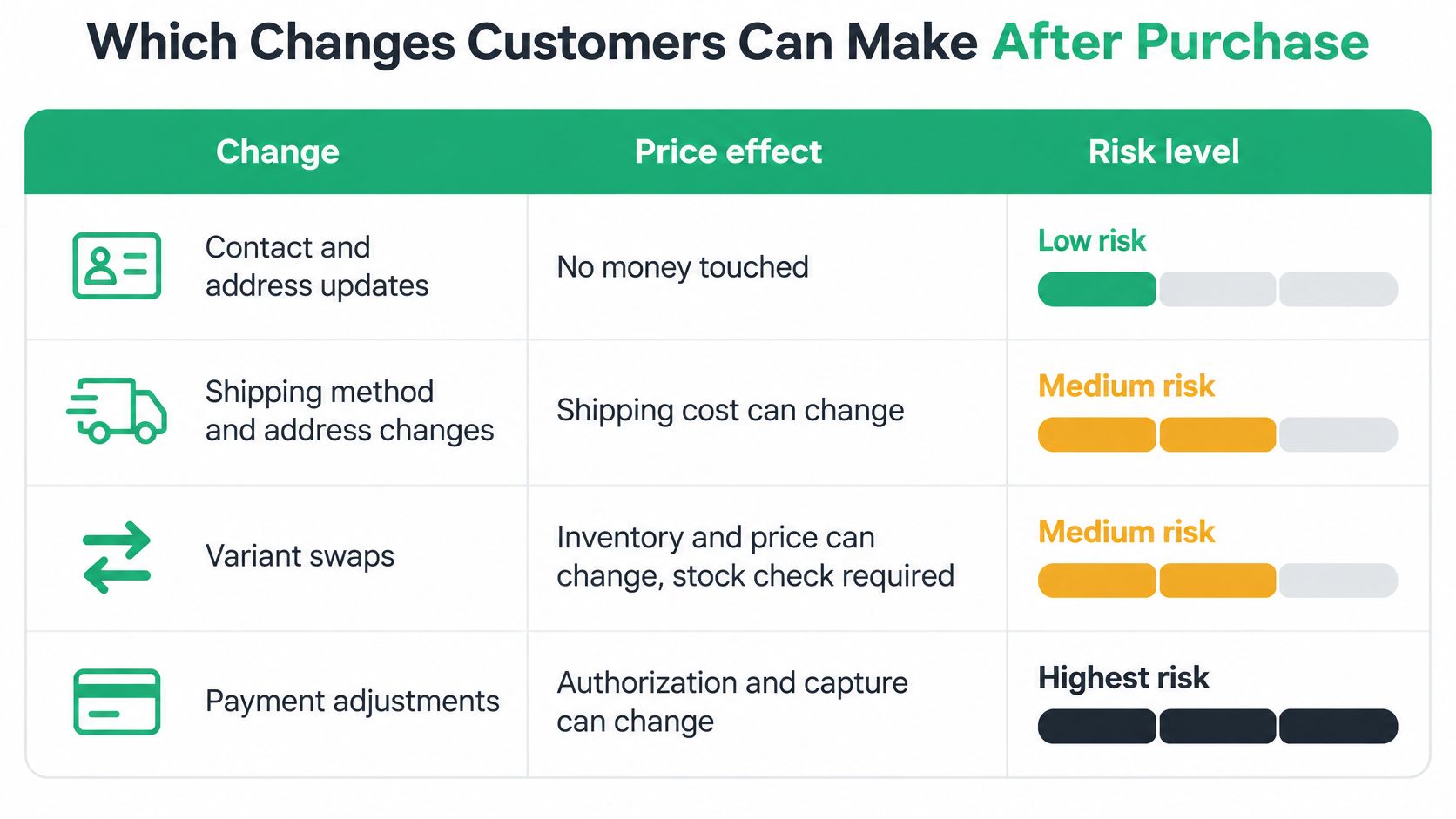
| Change | Price effect | Condition | Risk level |
|---|---|---|---|
| Update contact details | None | Inside the edit window | Low |
| Change shipping address | Shipping cost may change | Before fulfillment starts | Medium |
| Change shipping method | Difference collected or refunded | Before fulfillment starts | Medium |
| Reduce quantity or remove item | Partial refund issued | Before the lock | Low |
| Swap variant | Difference collected or refunded | Stock available for the new variant | Medium |
| Add new item | Charged at the new order total | Only if the merchant allows additions | High |
| Cancel order | Refund follows your store's refund policy | Cancellation rules and eligible order types | High |
Four families, four different mechanisms
Group the changes by what they touch rather than by how they look in the portal. Contact and address corrections move no money when the destination stays in the same shipping zone and tax jurisdiction. Shipping method and address changes recalculate shipping and can recalculate tax, so the total moves even though the items don't. Quantity reductions and removals only ever move money one direction. Variant swaps and additions change both stock demand and the amount you're entitled to collect.
The price mechanism is simple once you separate the directions. When the new total is higher, we collect the difference automatically; when it's lower, we issue a partial refund. Either way the order total, taxes and reports stay correct, because the adjustment runs through the order rather than around it as a manual credit note.
That last point is where hand-edited orders go wrong. An agent who refunds a flat amount from the payment screen leaves the line items, the tax lines and the revenue report describing an order that no longer exists.
Additions are a separate decision
Letting customers add products to a paid order is the highest-exposure change on the list, and it's a merchant choice, not a default. You can allow additions or restrict customers to modifying items already in the order. Additions create fresh stock demand and a fresh collection attempt on a card you only authorized for the original amount, so turn them on when your payment reconciliation is proven, not on day one.
After a customer edits, the order updates in the Shopify admin instantly, inventory adjusts, shipping recalculates and tags are applied. The portal itself sits inside your theme on the customer's order status page, so there's no separate login and no second destination to explain.
Cancellation belongs to its own rule set. It has a separate time limit and its own list of eligible order types, and the money outcome follows your refund policy rather than the item-change logic. Confirm that policy in writing before you enable self-serve cancellations, because "cancel" means "full refund now" to most customers and "restocking fee" to some stores.
Start with the changes that can't create a collection attempt. Turn on additions and cancellations only after the first set has run cleanly for a full shipping cycle.
Order Conditions That Block or Reopen an Edit
A final-sale candle sits in an order placed yesterday, and your window is three days. The clock is wide open. The customer sees no edit button on that line, because the product rule blocks it and a blocking rule beats an open window. Rules are evaluated in priority order, so the outcome is decided by which rule wins, not by which rule is most permissive.
That precedence is the part most policies leave undefined. Write it down before launch, in plain language, for every pair of rules that could disagree.
Conditions that decide the outcome
- Tags that open: the presence of
selfserve_caneditgrants editing on one order, and removing it closes editing again. - Tags that flag: a customer action can apply a tag back to the order, such as
customer_item_added, which your warehouse can use to trigger a revised pick list. - Segment and order-type blocks: Shopify tags let you block editing entirely for wholesale accounts, subscription renewals or any order type you don't want touched.
- Item editing limits: these control what a customer may add, so an upsell path can't be used to slip a restricted product into an existing order.
- Cancellation rules: a separate time limit and a separate eligible-order list, evaluated on their own terms.
Notice that tags run in both directions. They're an input to the window engine and an output of customer behaviour, which is what makes them useful for warehouse signalling rather than just access control.
A test list you can run this afternoon
For each rule, write three things: the condition, the outcome, and the rule that wins when two rules disagree. Then check the outcome on a real order of that type, including the address case, where a correction inside the same zone behaves very differently from a cross-border move that changes duties and carrier. Our guide to updating a shipping address after purchase covers the customer-facing side of that flow, and it's worth reading against your own zone setup.
A rule set written once runs on its own, which is the point and also the risk. Nobody re-reads it until a customer screenshots a contradiction, so the testing has to happen before the link goes live, on real order types rather than on a clean test order you created yourself.
How Payment Adjustments Stay Safe
An order edit is several updates at once. Changing a line item, a quantity, an address or a shipping method can alter inventory, fulfillment state, tax, shipping cost and the amount authorized or captured by the payment provider. Shopify's transaction resource documentation notes that an order may carry multiple authorization transactions after an edit or a post-purchase upsell, and recommends monitoring order-edit events through the OrderEdit webhook.
The sequence, and why each step exists
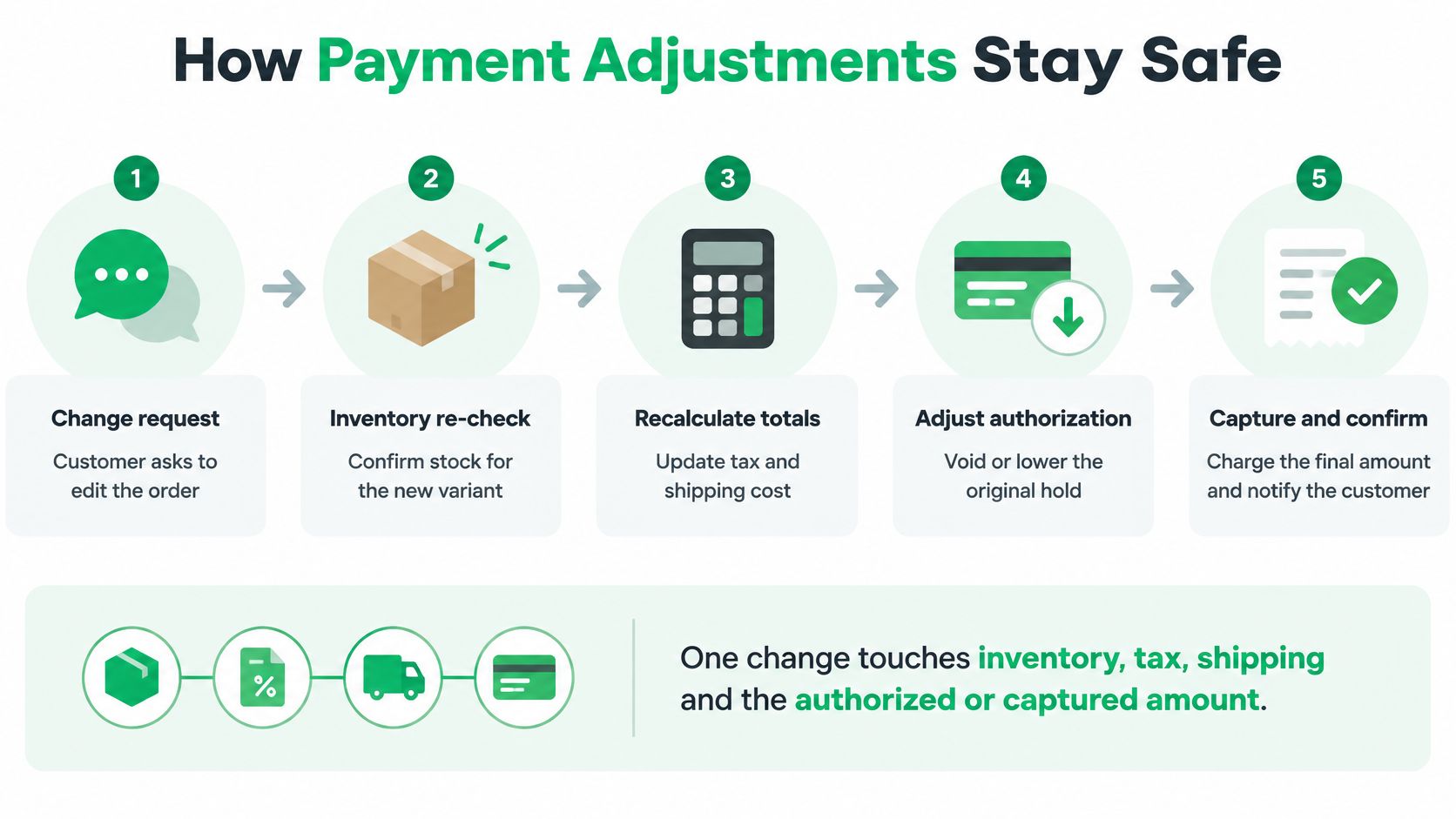
- Check eligibility against the current order state. Read the live order rather than the page the customer loaded, because fulfillment may have started while they were deciding.
- Calculate the new total and the difference. Tax and shipping are part of the delta, so a variant swap at the same price can still owe money.
- Request the authorization or collection for the difference, or issue the partial refund. Attach a unique idempotency key here, because a retry without one can charge the customer twice for the same upgrade.
- Re-check eligibility immediately before commit. An order can become ineligible between page load and submission, and this second read is the only thing standing between a stale page and a mis-ship.
- Commit the order change, then update inventory, shipping and tags. Downstream effects follow the commit, so your stock ledger never describes an order that failed its final check.
- Revert if payment is incomplete after the short safety window. SelfServe reverts the change automatically when collection doesn't complete, so the order returns to a state your warehouse can trust.
The commit step is also where the lock point matters. Edits apply before orders are exported to fulfillment, and once a 3PL picks an order up it counts as locked, so a payment problem discovered after that boundary gets unwound by hand instead of by the safety window.
Four operations, not one
| Operation | What it does | When an edit uses it |
|---|---|---|
| Authorization | Reserves funds on the card without moving money | Holds the new amount when an edit raises the total |
| Capture | Collects the authorized amount once the order change is confirmed | Settles the difference after the change commits |
| Refund | Returns money already captured | Issues the partial refund when an edit lowers the total |
| Void | Cancels an authorization that was never captured | Releases the hold when a later step fails before capture |
The four operations aren't interchangeable. If you capture at checkout, a downgrade is a refund and an upgrade is a fresh collection; if you authorize first and capture at fulfillment, you may be adjusting a hold instead. In SelfServe, price differences are handled automatically: upgrades are charged and downgrades refunded through Shopify Payments, and the order total, taxes and reports stay correct. Understanding what a partial refund actually reverses helps you explain the outcome to a customer who sees two lines on their statement.
Keep one audit record per edit: the original order snapshot, the requested change, the actor, the rule version and the resulting transaction identifiers. When a provider response is slow or a webhook arrives late, that record is the difference between a two-minute diagnosis and an hour of guessing.
Edge Cases and When to Hand Off
Classify edits by reversibility and downstream impact before you write a single exception. Contact details are reversible and touch nothing else, so automate them. Variant swaps consume and release stock, so they need a live availability check. Adding discounted items or changing shipping methods is financially complex, needing precedence rules and payment checks rather than a timer. The stakes are real: Deloitte's customer service excellence trends report finds that 50% of customer-service contacts concern order or delivery problems, which is exactly the volume a well-built policy absorbs.

The cases a time window can't settle
Say a customer bought a three-piece bundle with a discount code and wants to swap one piece two days later. The rule has to answer three questions in order: does the bundle discount still hold with the new component, is the replacement item eligible for editing at all, and who absorbs any duty difference on an international shipment. A window says yes. A policy has to say yes to what.
The same reasoning covers split shipments (which parcel is still yours to change), subscriptions (does the edit hit this delivery or the template), gift cards, fraud holds, partially fulfilled orders, and any edit that shifts tax or shipping liability. More permissive isn't automatically better. The target is the highest rate of successful self-resolution while fulfillment, fraud, tax and margin controls stay intact.
Confidence and consequence, not a blanket timer
Automation should stop where consequence rises, not where a clock runs out. Verint's 2025 State of Customer Experience report found that 52% of customers prioritize resolving issues without human interaction, while 48% still value access to a human agent when necessary, so the safety net isn't optional. Automatically approve clearly authenticated, low-risk edits. Route high-value orders, fraud signals, address changes after fulfillment and regulated goods to confirmation or agent review.
When you escalate, pass the context: the requested change, the rule that blocked it, the payment state, the inventory state and the alternatives you can offer. An agent who receives "customer wants to edit" starts from zero; an agent who receives the blocking rule and the payment state finishes in one reply.
Payment failure needs a defined outcome per class, and the reversal has to match the operation. AWS's guidance on the Saga pattern describes failure triggering compensating transactions that reverse previously committed business effects, and the compensation must be semantic: a completed charge is reversed with a refund, a stock reservation is reversed by releasing inventory. A low-risk edit that fails isn't applied. A variant swap that fails payment releases the new variant's reservation and keeps the original line. An addition that fails collection leaves the order untouched and tells the customer plainly that nothing changed and nothing was charged.
Set Your Editing Rules Before Customers Edit
Make four decisions before the editing link goes live: the window and its lock point, which changes are allowed, which conditions block an edit, and which triggers hand off to a person. Leave any one of them implicit and the other three will produce outcomes you didn't choose.
I'd start with a fixed window of one hour plus the fulfillment lock, and contact and address changes only. That combination is narrow enough to be safe on a fast pick line and useful enough to remove the most common correction requests. Widen it once you've watched a full cycle of real orders go through.
Build the rules in a visual rule builder with no code required, where you can reorder, edit, duplicate and delete them, and where priority order decides conflicts. Windows can combine time of day, order tags, product types and customer segments into rules written in natural language, so the policy reads like the sentence you'd say to a customer. A workable second step is allowing edits on standard items for 24 hours while blocking editing entirely for custom-made or final-sale items, with individual orders opened or closed by tag.
If you're weighing where automation pays off across the rest of your service operation, SwiftJet's piece on how to improve output in service businesses is a useful companion read on labour efficiency rather than headcount.
Test on five or six real orders of each type before you enable anything for all customers, including one final-sale item and one order already picked. Then confirm the checklist:
- Window set: duration chosen against your slowest realistic pick time.
- Lock confirmed: fulfillment start and 3PL handoff both close editing.
- Changes approved: each change type explicitly on or off.
- Blocks tested: conflicting rules resolved in writing, priority order verified.
- Handoff triggers named: high value, fraud signals, post-fulfillment address changes and regulated goods routed to a human with full context.
We build Shopify-native post-purchase tools, and SelfServe puts rule-based order editing, cancellations, address and contact updates, and automatic payment reconciliation on the order status page your customers already use. Set your window, your allowed changes and your handoff triggers once, and the routine size swaps and address fixes stop landing in your inbox. Take a look at ServeApps and configure your first rule set against the checklist above before your next shipping run.

How to Update Customer Information in Shopify
Learn how to update customer information in Shopify: contact details, addresses, order changes and the checks that keep records accurate.
Read more →
Updating Address on Shopify Orders: How to Do It Safely
A practical guide to updating address on Shopify orders: what you can change, when edits lock, and how to avoid misdelivery and fraud.
Read more →
Best Bundle App for Shopify: 10 Tools Compared for 2026
Compare the best bundle app for Shopify by features, pricing, and integrations. Find which tool fits fixed kits, mix-and-match bundles, or upsells.
Read more →