
Your store still takes orders, but a familiar checkout message has disappeared. Marketing can't confirm whether a purchase tag still fires, and support wants to know where customers are supposed to request an address correction. The developer who installed the original scripts isn't available.
That's the kind of problem Shopify Checkout Extensibility requires you to solve. It isn't just a new place to put old code. It's a decision about which business processes belong before payment, which belong after purchase, and which need a different design altogether.
Table of Contents
- Why Shopify Built a New Checkout Framework
- The Four Building Blocks of Checkout Extensibility
- Checkout Extensibility vs Legacy checkout.liquid
- Plan Tiers, Bundle Limits, and Rate Limits Explained
- What You Cannot Reproduce After Migration
- Server-Side Validation With Shopify Functions
- Analytics, Attribution, and Experimentation After the Migration
- Where ServeApps-Style Workflows Belong
Why Shopify Built a New Checkout Framework
Consider a hypothetical Plus store whose developer added a checkout notice and a tracking script years ago. Both worked sufficiently that nobody documented them. After the checkout transition, the notice is missing and the marketing team can't verify the script's events.
The immediate instinct is to restore the old code. But the underlying problem isn't necessarily a broken snippet. Shopify changed the supported customization architecture.
From page editing to supported components
Shopify introduced Checkout Extensibility in developer preview on June 22, 2022, during Editions Summer ’22. Legacy checkout.liquid customization of the Information, Shipping, and Payment pages stopped working on August 13, 2024, and stores that hadn't migrated were moved to an unmodified Shopify Checkout. The staged transition continued with the sunset of checkout.liquid and additional scripts on Thank you and Order status pages on August 28, 2025, as summarized in this Checkout Extensibility migration timeline.
The operational shift is easier to understand as a sequence than as a code change.
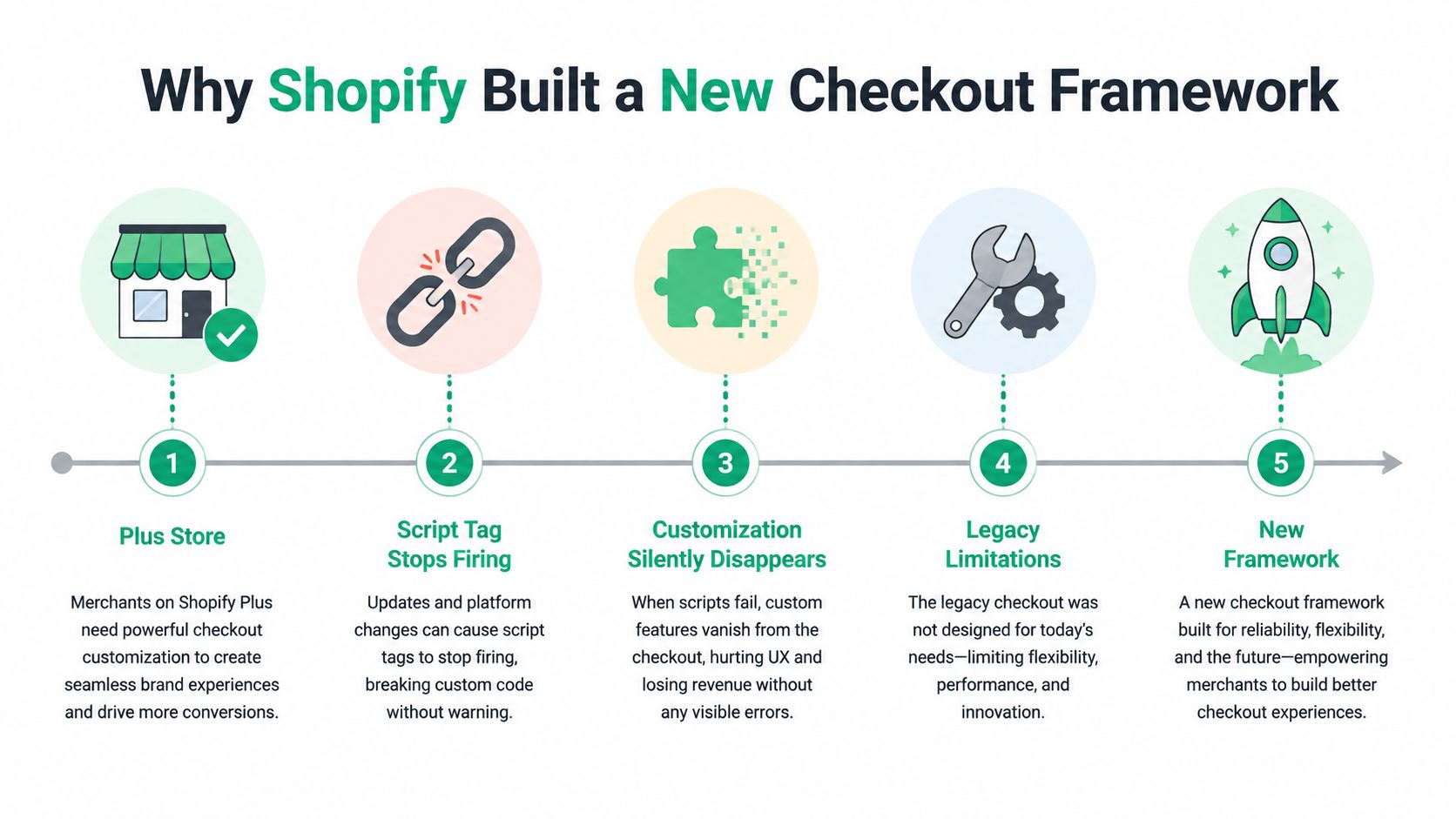
Under the old approach, developers could change checkout markup directly. Under the supported model, they assemble approved components with defined responsibilities. Think of replacing a building's improvised wiring with a managed electrical system: you gain clearer boundaries, but you can't reconnect every old wire wherever you please.
Practical rule: Treat migration as a review of business requirements, not a search-and-replace exercise for Liquid.
For a merchant, the important question isn't whether an extension reproduces the old screen exactly. It's whether customers can still complete the task the customization supported. A missing delivery instruction, eligibility check, or service link deserves a named owner and a replacement plan, even when checkout itself continues processing payments.
The Four Building Blocks of Checkout Extensibility
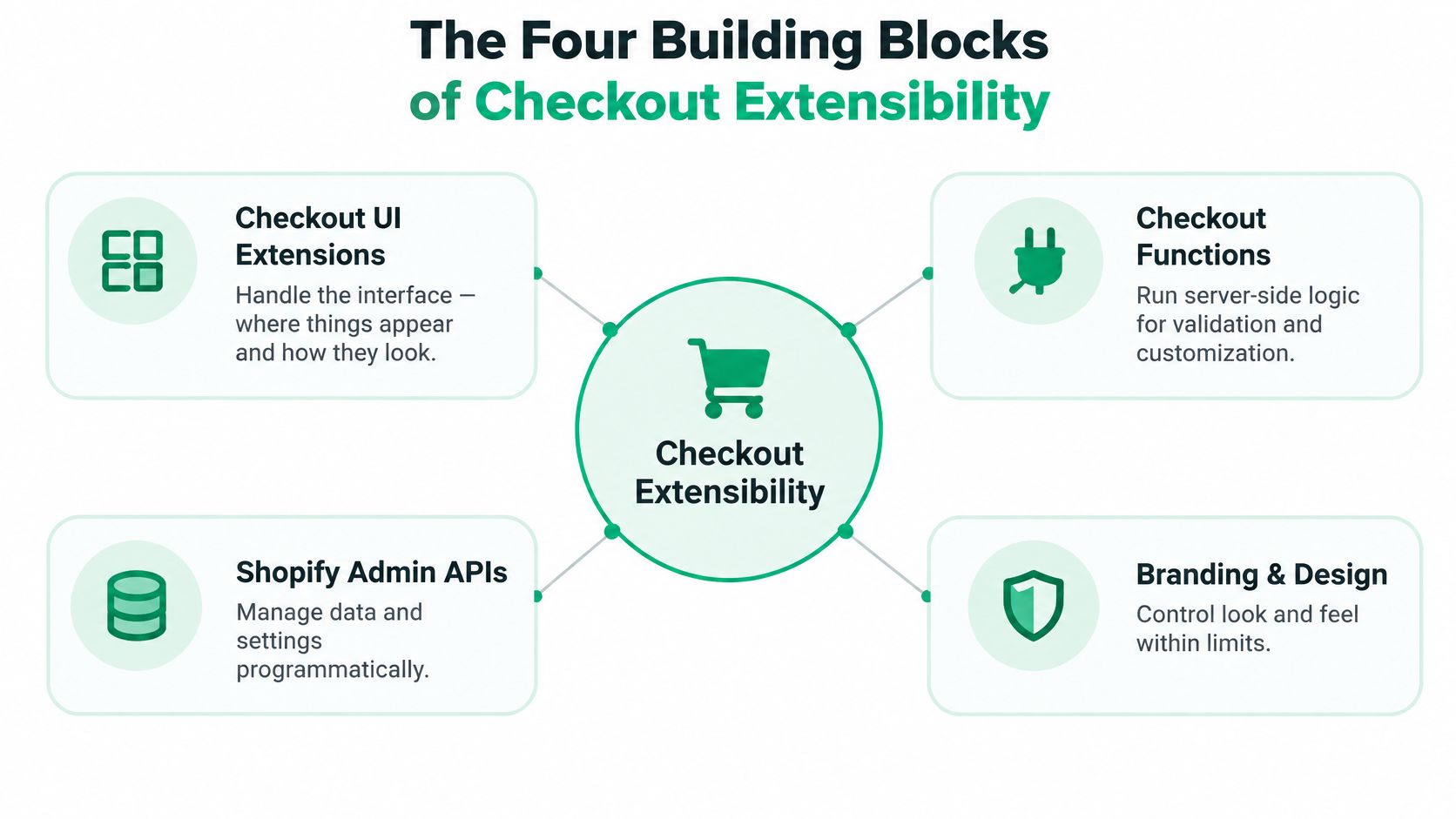
Think of checkout as a building. Checkout UI extensions are its furniture and usable spaces. Shopify Functions are the electrical and plumbing systems. The Branding API supplies the paint and finishes, while web pixels act like event sensors.
The diagram provides a broader integration view, including the Admin APIs used around these components.
Give each component a distinct responsibility
- Checkout UI extensions present supported interface elements and handle shopper interactions. A message or offer belongs here when an appropriate extension target exists.
- Shopify Functions execute server-side business logic, including supported discount and validation rules. They determine what should be allowed, rather than how a notice looks.
- The Branding API controls supported visual styling. It isn't permission to replace the checkout's structure.
- Web pixels handle event-based measurement. Their role is observing supported events, not changing the buyer's interface.
These are sandboxed, API-defined mechanisms rather than unrestricted page-editing tools. That separation reduces dependence on fragile DOM selectors, but implementations must stay within supported targets and capabilities, as explained in this technical overview of the Checkout Extensibility architecture.
Separate the display from the decision
Suppose you want to show an offer only when the cart meets your merchandising conditions. The interface can explain the offer and accept an interaction. Authoritative eligibility rules shouldn't depend solely on whether the shopper can see that interface.
A useful design exercise is to write separate requirements for presentation, business decisions, stored data, and measurement. For broader context on separating responsibilities across commerce systems, Wonderment Apps' composable commerce architecture explained is a relevant companion resource.
The embedded video offers another way to approach the platform shift.
The key engineering habit is simple: don't make a display component responsible for enforcing a business policy. Design the shopper's interaction and the underlying rule as related, but separate, concerns.
Checkout Extensibility vs Legacy checkout.liquid
The difference isn't old code versus new code. It's direct page control versus controlled integration.
A developer maintaining checkout.liquid could think in terms of HTML placement and scripts attached to page elements. A developer building an extension must first ask whether Shopify exposes the required target and capability.
Legacy checkout.liquid vs Shopify Checkout Extensibility
| Dimension | Legacy checkout.liquid | Checkout Extensibility |
|---|---|---|
| Architecture | Liquid templates and page-level scripts | Defined extensions, APIs, and server-side Functions |
| Interface scope | Direct modification of checkout markup | Supported components at approved targets |
| Styling | Custom styling tied to page structure | Supported branding controls |
| Business logic | Often intertwined with interface code | Separated into appropriate server-side mechanisms |
| Tracking | Browser-injected scripts | Event-based pixel integrations |
| Upgrade approach | Maintain assumptions about page structure | Build against supported platform contracts |
| Merchant reach | Associated with legacy Plus checkout customization | Availability depends on the surface and plan |
| Migration outcome | Preserve the existing implementation | Preserve the requirement where supported, otherwise redesign |
The trade-off matters when someone asks for an exact visual replica. An extension isn't a blank sheet of HTML, and an approved placement may not match the old placement precisely.
The intended benefits include upgrade safety, Shop Pay compatibility, and lower maintenance. Those benefits don't imply unrestricted customization or automatic feature parity. Your acceptance criteria should distinguish a business-critical behavior from a historical layout preference.
Keep the requirement precise: “Customers must understand the delivery restriction” is more useful than “Put the old red box back.”
Compare outcomes rather than screenshots
For each customization, record the task, the customer affected, the business owner, and the consequence of failure. Then evaluate the replacement against that record.
A message can look different and still achieve its purpose. Conversely, a checkout can look almost identical while an important operational rule has disappeared. Screenshots help review presentation, but they can't prove that eligibility, exception handling, or measurement still works.
That's why a migration sign-off should involve operations, support, and marketing alongside engineering.
Plan Tiers, Bundle Limits, and Rate Limits Explained
Before choosing an app or commissioning development, establish where it must run. A feature's location can determine whether your current plan supports the proposed experience.
Read the constraints as design inputs
Shopify's Checkout UI extensions documentation specifies these boundaries: UI extensions in the Information, Shipping, and Payment steps require Shopify Plus; Thank you and Order status extensions are available on all plans except Shopify Starter; Checkout UI extensions have a 64 KB compiled bundle limit; full-page customer-account extensions have a 128 KB limit; and an extension that reaches checkout-change rate limits can't make further changes during that buyer session.
These aren't interchangeable restrictions. Plan eligibility determines your audience, bundle size constrains implementation, and rate limiting affects interaction design.

For merchants weighing an upgrade, this explanation of what Shopify Plus includes provides useful commercial context. Decide whether the requirement directly needs an in-checkout placement before treating a plan upgrade as unavoidable.
Build for a bounded environment
- Keep the client focused. Review dependencies and avoid importing broad libraries for a narrow interface task.
- Make changes idempotent. Repeating an action should produce the intended state, not keep adding quantities or reapplying changes.
- Avoid update loops. Check whether the desired state already exists before requesting another mutation.
- Provide a clear failure state. If an action can't complete, tell the shopper what happened instead of leaving an active-looking control.
For developers, a sensible review includes the compiled artifact, not just the source code. For product teams, it includes behavior when a requested update fails.
The best response to these boundaries isn't to hide more complexity inside the extension. It's to reduce the extension's responsibility and place supporting work in the appropriate backend or commerce surface.
What You Cannot Reproduce After Migration
A technically successful migration can still remove a business capability. That's the uncomfortable distinction between a supported implementation and a useful replacement.
Checkout Extensibility doesn't provide a one-to-one equivalent for bespoke checkout steps, non-standard address forms, or custom payment flows. This checkout migration field report highlights why teams must evaluate functional gaps rather than assume every customization can be ported.
Classify the requirement before estimating development
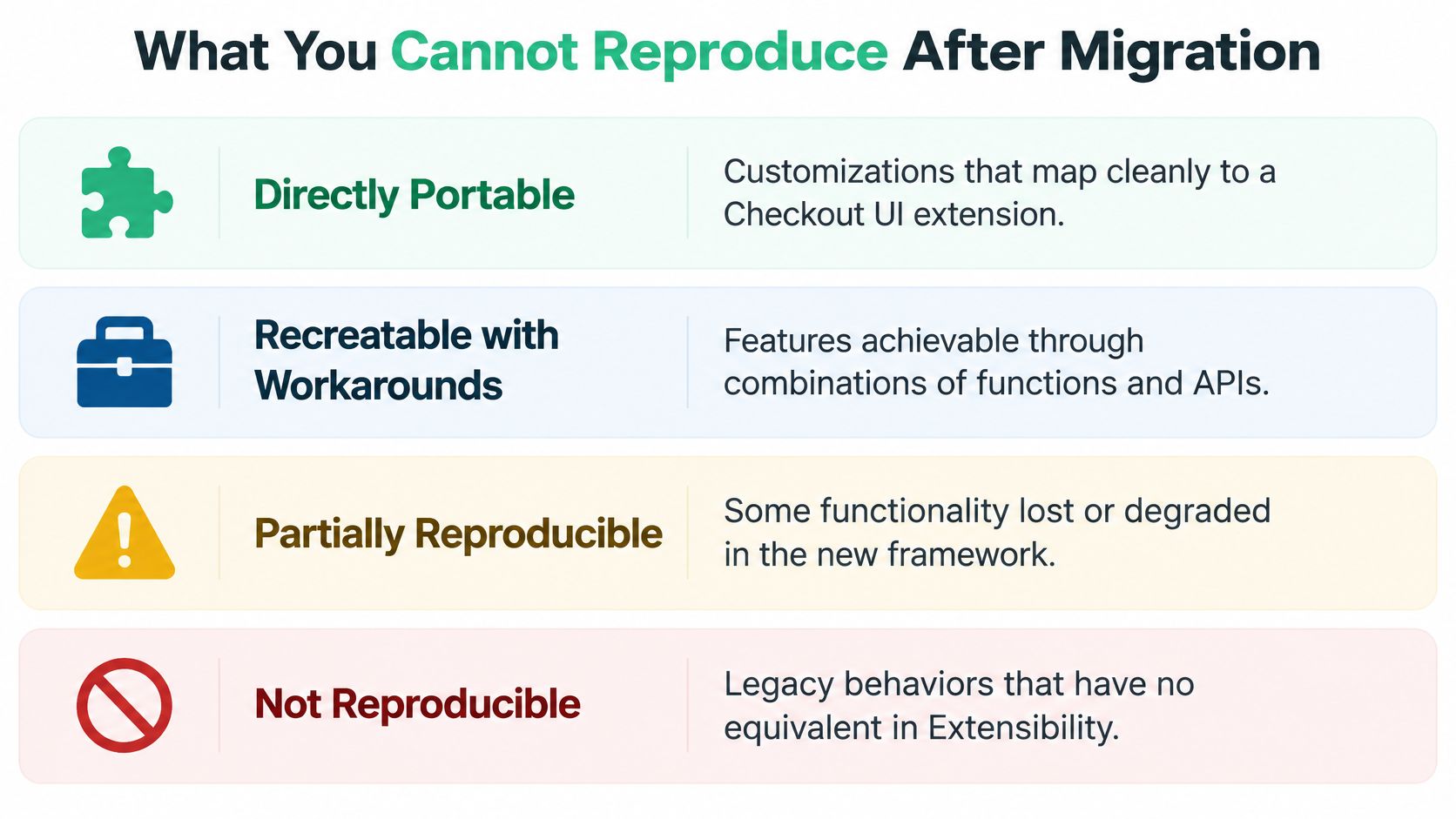
| Classification | Illustrative requirement | Recommended decision |
|---|---|---|
| Directly portable | An informational checkout banner | Verify an appropriate UI extension target |
| Replaceable | A tiered discount or enforceable cart rule | Evaluate the relevant Shopify Function capability |
| Redesign required | A complex delivery scheduling journey | Consider collecting choices before checkout |
| No equivalent inside checkout | A bespoke payment journey or replacement address form | Simplify the process or relocate it |
A banner already on the cart page doesn't need to become a Checkout UI extension. Its business purpose may be perfectly well served on the cart. Moving everything toward payment isn't automatically an improvement.
Use the categories as an audit aid, not a promise of compatibility.
Find the operational exceptions
Ask support staff what the old customization allowed them to resolve. A delivery selector might have captured warehouse instructions that never appeared in the original development specification. A custom field might have supported an internal approval process.
For a delivery scheduler, consider a redesigned flow that collects the requested slot before checkout and verifies the resulting restriction during purchase. That is a design proposal, not a guarantee that every scheduling requirement is supported.
A missing technical equivalent doesn't eliminate the business need. It means someone must own the redesigned process.
If a workflow can't remain inside checkout, document its new location, the data it needs, and the fallback when it fails. Obtain approval from the operational owner before calling the migration complete. Otherwise, engineering may close the project while support inherits an unresolved problem.
Server-Side Validation With Shopify Functions
A shopper-facing warning and an enforceable rule aren't the same thing. If a purchase must be blocked, the decision needs an authoritative enforcement point rather than a message that merely asks the customer to comply.
Shopify's Cart and Checkout Validation Function API provides that server-side enforcement. Its documented use cases include age or identity checks, B2B minimums and maximums, quantity multiples, flash-sale quantity limits, shipping restrictions, and purchase-order requirements.
Design the rule and its explanation together
Shopify permits a maximum of 25 active validation functions per store, and validation errors can surface through checkout and the Storefront API's Cart object, according to the Cart and Checkout Validation Function API documentation.
Don't interpret the API as an identity-verification service by itself. You still need a trustworthy basis for the rule's decision. The Function is the enforcement point for the relevant condition.
A sound implementation should specify:
- Authoritative inputs. Identify the cart and eligibility data the rule can trust.
- Deterministic decisions. The same relevant inputs should produce the same result.
- Actionable messages. Explain what the customer must change, not merely that validation failed.
- Failure handling. Decide what happens when required information is absent or invalid.
Recheck the cart after changes
Suppose a shopper accepts a bundle offer that changes quantities. The initial cart may have been valid, but the updated cart must still satisfy purchasing rules before payment.
That matters for cart rewards, subscriptions, and checkout-adjacent upsells. Don't assume the rule remains satisfied because the shopper entered checkout successfully. Equally, don't confuse pre-payment cart validation with post-purchase order editing, which needs its own authorization and settlement controls.
Shopify Functions run on Shopify's infrastructure, avoiding dependence on customer-controlled browser JavaScript for enforcement. Organize related validations into a manageable rule set rather than creating a separate Function for every merchant preference.
Test the failure paths as carefully as the successful purchase. A correctly blocked order with an incomprehensible error is still a poor customer experience.
Analytics, Attribution, and Experimentation After the Migration
A checkout can look correct while your measurement has changed. That's why visual approval isn't enough to close a migration project.
For Plus Thank you and Order status pages, the script-tag sunset shared the post-purchase milestone described earlier. For non-Plus stores, script tags on those pages are scheduled to sunset on August 26, 2026, according to Shopify's checkout.liquid migration documentation. Tracking that depends on legacy injected JavaScript needs a supported replacement, such as Web Pixels API or native Customer Events integrations.
Prove event equivalence
Create an event register that records the business meaning of each event, its destination, expected fields, and consent requirements. Don't stop at checking whether a pixel is enabled.
- Compare event volumes. Investigate differences between the old and replacement implementation without assuming every discrepancy is a defect.
- Deduplicate signals. Check whether browser and server integrations report the same purchase more than once.
- Test buying paths. Include Shop Pay and other accelerated checkout paths in the test plan.
- Document consent behavior. Verify expectations for each relevant market.
- Reconcile revenue. Compare analytics purchases against Shopify orders and explain differences.
For reporting context, use this guide to tracking and understanding Shopify analytics. For planning subsequent optimization work, Wojo Media's 2026 ecommerce conversion playbook is a separate resource to consider once measurement is dependable.
Measurement checkpoint: Don't interpret a reporting change as a conversion improvement or decline until you've checked event definitions and delivery.
Privacy requirements, browser restrictions, and regional consent flows deserve explicit test cases. Keep experimentation records clear about the implementation change so the team doesn't compare unlike measurement periods as though nothing changed.
Where ServeApps-Style Workflows Belong
Start with the customer's task, not the app's preferred placement. Someone correcting an address after payment has a different need from someone considering an accessory before purchase.
A useful routing model separates purchase completion, merchandising, and post-purchase service. Each needs explicit data contracts: what information the interface receives, what operation it requests, and which system authorizes the result.
Route each workflow to its natural surface
| Customer task | Proposed home | What to verify |
|---|---|---|
| Understand an offer during payment | Supported checkout extension | Plan eligibility, placement, and applicable rules |
| Discover related products | Product page, cart drawer, or add-to-cart popup | Theme integration and offer eligibility |
| Correct an eligible order | Order status page | Editing permissions and fulfillment state |
| Update an address or shipping method | Post-purchase self-service interface | Merchant policy and operational feasibility |
| Cancel an eligible order | Controlled post-purchase workflow | Cancellation rules and settlement handling |
SelfServe is an option for rule-controlled order editing, address and contact updates, shipping changes, and cancellations. CartServe provides configurable cart drawers, while UpServe supports add-to-cart upsell popups and Plus checkout upsells. These are different workflows, not interchangeable checkout customizations.
For a post-purchase implementation, this guide to the Shopify order status page provides relevant context. Keep the interface separate from permission checks, payment reconciliation, inventory updates, and fulfillment decisions.
Cart drawers and add-to-cart popups belong on storefront theme surfaces. Design those integrations to load where needed rather than using checkout as a general-purpose merchandising canvas.
Turn the audit into an implementation plan
- Inventory the legacy behavior. Include scripts, visual changes, rules, service links, and undocumented staff workarounds.
- Classify each requirement. Mark it portable, replaceable, redesign-required, or unavailable inside checkout.
- Assign its destination. Choose checkout, the order status page, the cart, or an earlier step.
- Define acceptance evidence. Record the expected customer result, enforcement behavior, and analytics event.
- Confirm commercial fit. Check plan requirements and implementation ownership before approving development.
Operational questions merchants ask
What if a legacy customization has no checkout equivalent?
Preserve the business requirement where possible, not necessarily its old placement. Choose a supported alternative and have the process owner approve the changed journey.
How can we prove tracking measures the same thing?
Use the event register and reconciliation process described above. A successful test purchase alone doesn't prove attribution or consent behavior.
Why can post-purchase apps reach more merchants?
Their eligible surfaces have broader plan availability than the core checkout steps. Confirm the exact page and capability instead of relying on an app's general checkout label.
How do we stay within implementation ceilings?
Inspect compiled dependencies, keep the interface narrowly scoped, and consolidate related validation rules. Include those checks in release reviews rather than leaving them until deployment.
ServeApps offers Shopify-native tools for controlled self-service order changes, configurable cart drawers, and contextual upsell popups. Visit ServeApps with your customization inventory to assess which workflows belong after purchase, on the storefront, or in an eligible checkout extension.

Best Up Sell App Picks for Shopify in 2026
Compare 10 Shopify up sell app options for 2026, with features, pricing, placements, and honest limitations to help you choose the right fit.
Read more →
Best Checkout Page: 7 Examples That Convert in 2026
Discover 7 best checkout page tools and examples for Shopify with pros, cons, and conversion tips to boost AOV without rebuilding checkout.
Read more →
Shopify Checkout Customization: Options Compared
Compare Shopify checkout customization options: Checkout Extensibility, checkout.liquid, and apps. Learn plan limits and which approach fits your store.
Read more →