
Most merchants treat post-purchase changes as an FAQ problem. They rewrite the policy, add a clearer button, and ask support agents to respond faster. That approach misses the operational risk. The difficult question isn't how to word an editing policy, it's who can change what, from which source, during which fulfillment state.
A useful set of rules for editing turns customer convenience into controlled access. The shopper gets a fast path for safe changes, the warehouse receives one authoritative order record, and exceptions move to a human instead of disappearing into an inbox. That requires governance, not better copy alone.
Rethinking Post-Purchase Editing Rules
The popular advice is simple: keep answers concise and fully answer the customer's question. That guidance is sound for an FAQ, but it doesn't tell a merchant how to govern a live order. Government guidance on FAQ content emphasizes real user needs and clear answers, yet a clear answer still leaves operational decisions unresolved.
A customer might ask, “Can I change my address?” The useful answer depends on several facts:
- Order state: Has the order been released to the warehouse?
- Field risk: Is the request changing a phone number, a delivery destination, or a line item?
- Source authority: Should the storefront, warehouse system, 3PL, or support agent control the final value?
- Exception path: What happens when the requested change falls outside the approved rules?
A static FAQ can describe the policy. It can't enforce it.
Operational rule: Treat every editable field as a permission, not a piece of text.
This distinction matters because post-purchase changes can affect inventory reservations, tax treatment, shipping labels, fraud review, warehouse queues, and customer notifications. A harmless correction to a contact detail may need no review. A product swap can alter stock, fulfillment routing, and the commercial value of the order.
Replace content advice with decision rules
The strongest workflow starts with a field-level decision matrix. For each possible change, define whether the customer can make it directly, whether the system must validate it, whether an employee must approve it, or whether the request must be blocked.
Technical editing guidance takes a similar systems view. Editors are advised to match changes to the document's purpose, audience, format, and use case, while reviewing completeness, organization, navigation, visual design, style, illustrations, and accessibility before changing text. Technical editing guidance supports the same principle for commerce operations: change the right layer for the actual use case.
For Shopify merchants, the practical shift is from “How do we answer this request?” to “What is the safest executable rule?” That rule should specify the permitted field, the time window, the validation requirement, the fulfillment condition, and the owner of the final decision.
Self-serve editing can remove handling time for money-neutral requests before fulfillment progresses, but only when the workflow controls the outcome. The customer changes the order. The business controls the boundaries.
Designing Time Windows and Field Permissions
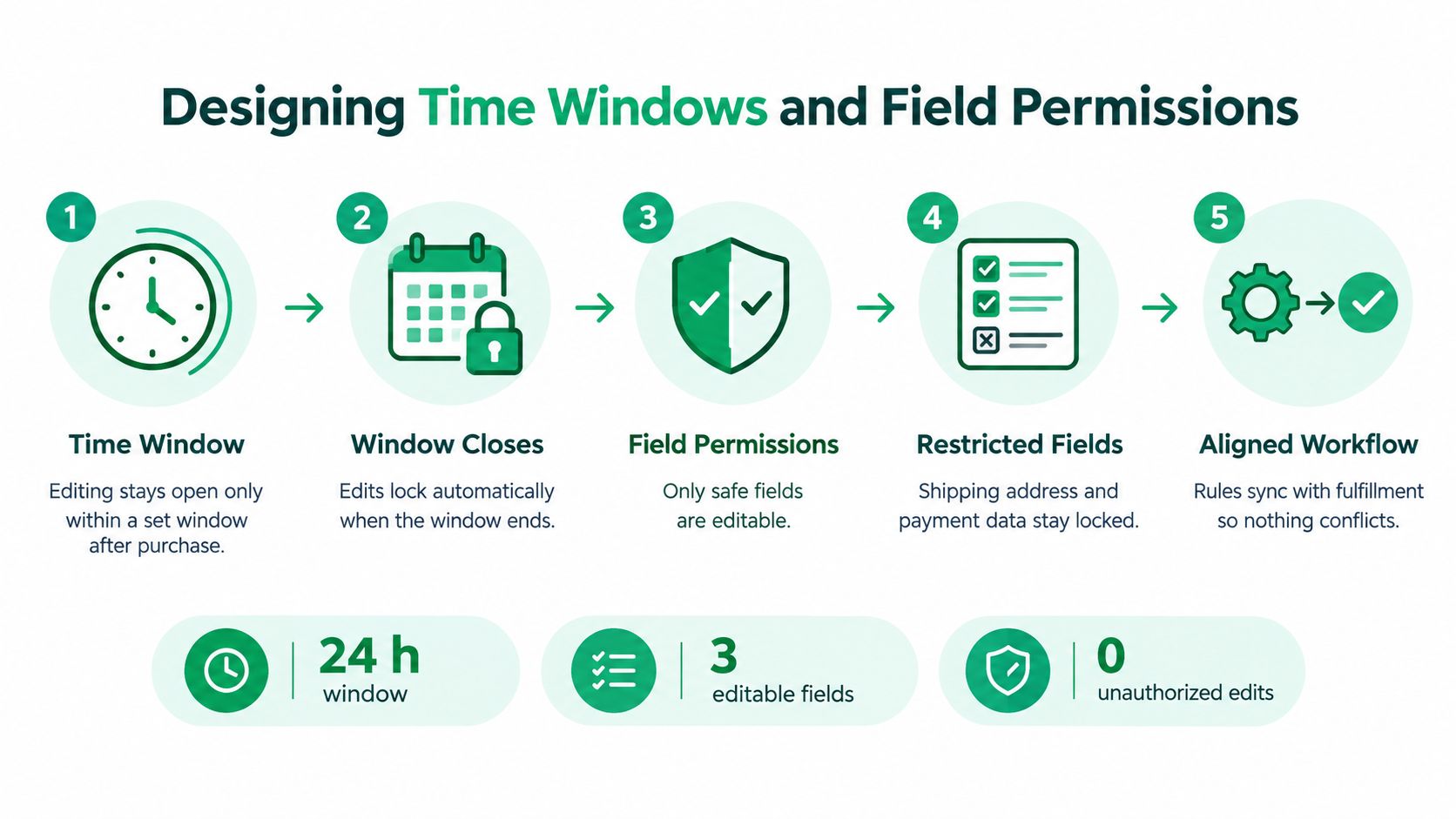
Blanket editing access is a warehouse problem disguised as a customer experience feature. If shoppers can modify every order field until shipment, fulfillment teams may pick against an old version, print a label for the wrong address, or receive a line-item change after inventory has moved.
Start with the warehouse clock, not an arbitrary customer promise. Identify the events that make a change unsafe, such as order release, pick confirmation, packing, label creation, carrier handoff, or a 3PL export. Then close or narrow editing access as the order crosses those states.
Set the window around fulfillment reality
A workable policy might keep low-risk changes available while the order remains unprocessed, then lock them automatically when the warehouse claims the order. The exact window should follow your operation, order type, cutoff logic, and fulfillment partner. A made-to-order product, a subscription shipment, and a stocked parcel shouldn't inherit identical rules.
Use separate conditions for:
- Order tags: Route expedited, wholesale, subscription, or fraud-reviewed orders differently.
- Product types: Lock personalized, limited-stock, or regulated items earlier.
- Customer segments: Apply distinct controls to loyalty, trade, or account customers where your risk policy requires it.
- Fulfillment state: Close direct edits when the order reaches a warehouse event that makes the old record operationally active.
The point isn't to give every shopper the longest possible editing period. It's to offer a predictable opportunity that ends before the change can conflict with physical work.
Give every field a risk class
Field permissions should be explicit. Contact details are usually lower risk than payment data. A shipping address may be editable only after real-time validation and only before a label exists. Core line items may require inventory checks or a manual queue.
A practical permission model looks like this:
| Field or action | Typical control |
|---|---|
| Email or phone correction | Direct edit, format validation, audit trail |
| Shipping address | Address validation, deliverability check, fulfillment-state check |
| Payment method | Lock or route to a controlled payment flow |
| Quantity change | Inventory validation and order-state check |
| Product swap | Approval queue, inventory review, automated tag |
| Cancellation | Direct only within the approved window, otherwise manual review |
Document the final rules in a style sheet or operational rulebook. Editing guidance recommends defining the editing level and using a style guide or style sheet before work begins, because surface corrections, visual changes, and structural edits carry different risks. The guidance on editing levels/08:_Technical_Editing/8.04:_Levels_of_edit) applies directly here: deep changes create ripple effects, so your system should handle structural order changes before shallow updates such as contact corrections.
For a practical explanation of access models, review this guide to permission-based access control. Your interface should show only the actions the current order can safely perform, not every action the platform technically supports.
Implementing Validation and Compliance Guardrails
Never let a customer submit sensitive or operationally important data without validation. A permissive form transfers error detection to the warehouse, the carrier, or support. By then, the package has already become expensive to fix.
Address changes deserve the strongest entry controls because a single typo can produce an undeliverable shipment. Use address autocomplete to reduce manual typing, then send the selected address through a real-time verification service such as Google Maps before accepting the change. The system should return a normalized address, flag missing apartment or unit information, and reject values that fail the delivery rules you use.
Validate before writing to the order
The editing flow should validate in sequence:
- Confirm identity and order scope. Show only orders the authenticated shopper is allowed to edit.
- Check order state. Reconfirm that the order remains inside its permitted editing condition at submission time.
- Validate the field. Apply format, length, allowed-value, and business-rule checks.
- Verify external dependencies. For a destination, confirm that the address service recognizes and can process the location.
- Write one authoritative update. Save the accepted value to the system that fulfillment treats as the source of truth.
- Record the event. Keep the old value, new value, actor, timestamp, reason, and resulting order state in the audit trail.
The second state check is essential. A customer can open an edit form while an employee or integration advances the order. The system must evaluate permission again when the customer submits, not rely on the page state from when it loaded.
Keep language flexible and rules fixed
International merchants need multilingual interfaces, but they can't allow translations to alter operational meaning. The widget should adapt labels, instructions, validation messages, and confirmation text to the shopper's language while preserving the same underlying permissions and fulfillment logic.
Avoid translating rules informally inside support macros. Maintain approved terminology for concepts such as “edit,” “cancel,” “approval required,” “address validation,” and “changes locked.” Test languages that use different address conventions, name order, postal formats, and character sets. A customer should understand what they can change, but the system should still enforce the same field controls unless a market-specific process requires a different rule.
Accessibility belongs in the validation layer too. Error messages should identify the field, explain what failed, and state how the customer can correct it. Don't clear the form after an error. Don't make the shopper guess whether the system saved the new address.
A valid workflow also needs clear ownership. If an external 3PL or ERP overwrites the storefront value, the customer experience must state which system controls the result. Source control is part of compliance because an accepted change that never reaches fulfillment is functionally a failed promise.
Managing Approvals and Driving Incremental Revenue
Automation should handle safe changes. It shouldn't pretend that every change is safe.
Create a manual cancellation or approval queue for requests that can affect inventory, payment, fraud exposure, shipping cost, or fulfillment timing. The queue should include the order identifier, requested action, original value, proposed value, customer reason, validation result, and deadline. An employee should be able to approve, reject, or request clarification without reconstructing the case from scattered support messages.
Route exceptions with deliberate friction
Use approval when a request:
- Changes a core line item: The reviewer checks inventory, price, promotion eligibility, and fulfillment routing.
- Alters a high-value order: The reviewer confirms the request's legitimacy and commercial impact.
- Touches a restricted payment condition: The system prevents uncontrolled payment changes and directs the customer to the approved process.
- Arrives after a fulfillment milestone: The reviewer coordinates with the warehouse or 3PL instead of updating the storefront.
- Conflicts with a product rule: The request needs a human decision because an automated condition can't safely resolve it.
This isn't a failure of self-service. It's a sign that the workflow distinguishes convenience from risk. A blocked action with a specific explanation is better than a successful edit that creates a warehouse exception.
Use the post-purchase moment carefully
The same controlled surface can support incremental revenue. Add curated products or collections to the Thank You and Order Status pages, but restrict what can be added to an existing order. The offer should respect inventory, shipping compatibility, fulfillment location, promotion rules, and the order's current state.
Product restrictions matter more than the promotional message. If a customer adds an item that requires a separate shipment, special handling, or a different warehouse, the upsell can create more operational work than value. Keep the offer inside the boundaries your fulfillment process can absorb.
Automated order tagging gives downstream teams a visible signal. A tag can identify an order with an approved addition, a pending review, or a special fulfillment instruction. It shouldn't replace a system of record, but it can make the operational state easy to recognize across Shopify, support tools, and warehouse workflows.
Use a platform such as approval workflow software for order changes when your team needs explicit routing rather than a generic support inbox. The commercial principle is straightforward: offer more only where the order can safely absorb more.
Real-World Scenarios for Self-Serve Editing
A customer enters the wrong apartment number shortly after placing an order. In a governed flow, the customer opens the order-status page, selects the address action, and sees the current destination in an autocomplete field. The system checks the revised address, confirms that the apartment information is complete, verifies that the order still qualifies for direct editing, and writes the accepted value to the fulfillment source.
The customer receives a confirmation. The warehouse sees the current address rather than a support note buried in a conversation. The support team doesn't need to copy data between systems or ask whether the label has already been printed.
The broken version looks familiar. The customer emails support, receives an automated reply, and sends the apartment number in plain text. An agent updates one system but not the 3PL export, or the label prints while the request sits in the queue. The customer believes the change succeeded because the agent acknowledged it. The warehouse still works from the old record.
Product swaps need a different path
Consider a customer who wants to replace a color or size. That request isn't equivalent to correcting a phone number. The store needs to check available inventory, price differences, discounts, warehouse routing, and whether the original item has already entered a pick wave.
A governed workflow can show a swap action only while the order qualifies. It can restrict eligible products, apply an inventory check, and place the request into an approval queue when the change affects stock or price. Once approved, the system updates the order and adds an operational tag that downstream staff can see.
The ungoverned version lets the customer replace any line item. The warehouse receives an order that no longer matches the reserved stock. A support agent then contacts the customer, an operations manager investigates the discrepancy, and the fulfillment team pauses work. The customer experiences delay even though the original request was reasonable.
Let the order state decide
These scenarios share a rule: the interface doesn't decide based on customer intent alone. It evaluates the order's current state, the requested field, the validation result, and the system responsible for fulfillment.
That makes the customer journey clearer. Safe requests complete quickly. Risky requests explain why review is required. Impossible requests show a specific alternative, such as cancellation, return, or a new order. A good editing experience doesn't promise universal control. It makes the boundary understandable.
Building Your Post-Purchase Governance Framework
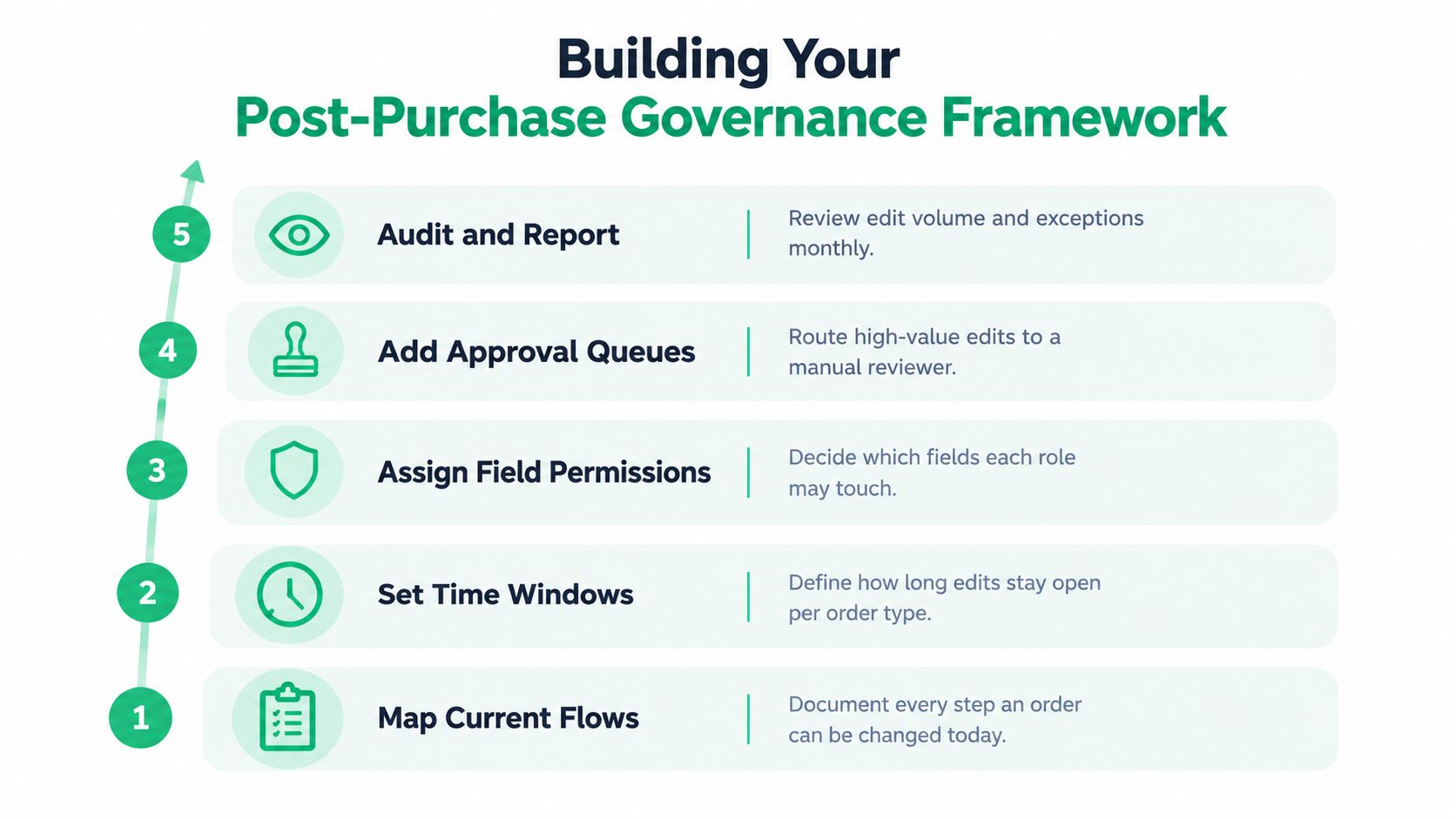
Treat your editing system like an operational control plane. Start by documenting what happens today, including customer requests, support macros, Shopify changes, warehouse exports, 3PL actions, and manual overrides. Don't document only the intended process. Capture the unofficial workarounds, because those are where ownership and source-control failures usually hide.
Use a decision framework, not a loose policy
For each edit type, answer these questions:
- What can change? Name the exact field, action, or product condition.
- Until when? Tie the editing window to a fulfillment event, not just a customer-facing promise.
- Who can approve it? Assign an owner for exceptions and define the response path.
- What validates it? Specify address, inventory, format, payment, fraud, or eligibility checks.
- Which system wins? Identify the authoritative source and the integration that must receive the update.
- How is it reported? Record accepted changes, rejected requests, approval time, and recurring exceptions.
Use the framework in this order because each decision constrains the next. A field can't be considered editable until you know who owns it. A time window isn't useful until it reflects the point where fulfillment becomes committed. An approval queue isn't useful unless the reviewer receives enough context to decide quickly.
Audit the gaps that create work
Review your rules for contradictions. If the storefront allows an address change after the 3PL has imported the order, the system has two competing promises. If support can override a locked field without recording the reason, the audit trail is incomplete. If an upsell adds products without checking fulfillment compatibility, revenue activity can interfere with warehouse execution.
The professional publishing world offers a useful reminder that standards remain active and maintained. The third edition of the IPEd standards for editing practice was published in 2024, while university style guides continue to formalize presentation requirements such as margins, spacing, page numbers, and source ordering. The University of Wisconsin Oshkosh history style guide and the University of Cambridge History Faculty guide show how consistency depends on explicit rules rather than individual preference.
Commerce operations need the same discipline. Review the framework regularly, remove rules that no longer match fulfillment reality, and give every exception a named owner. For implementation guidance, use this resource on order change management.
The right rules for editing don't maximize the number of changes customers can make. They maximize safe control, clear ownership, and reliable execution. Start with your most common post-purchase requests, map them to fulfillment states, lock high-risk fields, validate every accepted value, and route exceptions to a queue that someone actually owns.
SelfServe gives Shopify merchants configurable editing windows, field permissions, multilingual customer flows, address validation, product restrictions, approval queues, order tagging, and post-purchase upsell modules. Review your current change requests against those controls, then visit SelfServe to see how you can move safe edits out of support while keeping fulfillment in control.

Order Confirmation Screen: What to Include and Templates
Learn what to include on an order confirmation screen, in what order, with tracking, cross-sell and support templates you can copy for your Shopify store.
Read more →
Best Up Sell App Picks for Shopify in 2026
Compare 10 Shopify up sell app options for 2026, with features, pricing, placements, and honest limitations to help you choose the right fit.
Read more →
Best Checkout Page: 7 Examples That Convert in 2026
Discover 7 best checkout page tools and examples for Shopify with pros, cons, and conversion tips to boost AOV without rebuilding checkout.
Read more →